
How Legion Security Meets CISA's Secure by Design Objectives
See how Legion Security meets CISA's Secure by Design Pledge with MFA by default, no default passwords, full audit logs, and SOC 2, ISO 27001, and HIPAA-certified security.


Security teams don't get to choose their threat model. They inherit it: alert volumes outpacing headcount, attackers moving at machine speed, and a stack of tools that all assume a human is sitting in the middle of every decision. Legion Security was built to change that operating model. It should go without saying that the platform doing the changing has to be secure to its core.
CISA's Secure by Design Pledge exists to push the whole industry toward that standard: security as a default, not an upsell. Legion Security has signed the pledge, and this page lays out how we deliver on each of its seven goals today, where we go beyond them, and where we're still pushing.
One note before diving in. Legion Security is independently certified against SOC 2 Type 2, ISO/IEC 27001:2022, and HIPAA, and against ISO/IEC 42001:2023 for responsible AI management, because AI reasoning sits at the center of everything the platform does and we believe that deserves its own standard of scrutiny. Everything below is backed by audited evidence, not just a blog post. Every report, policy, and pentest result is available on request through our Trust Center.
Authentication
The pledge commitment: Demonstrate actions taken to measurably increase the use of multi-factor authentication across the manufacturer's products
Every Legion Security customer gets enterprise-grade identity protection from day one, not as an add-on. The platform integrates with any SAML 2.0 or OIDC-compliant identity provider, including Okta, Microsoft Entra ID, and Google Workspace, so your existing MFA and conditional access policies extend automatically to every login. No extra licensing tier, no SSO tax, no “contact sales” for basic protection.
For teams still mid-rollout on SSO, direct logins to Legion Security require MFA. There is no opt-out, not for admins, not for anyone.
And because Legion Security operates natively in the browser rather than through a sprawl of API integrations, there are no long-lived API keys quietly wiring it into the rest of your stack. Your analysts sign in once, through the identity layer they already trust, and the platform meets them there. Sessions are scoped and expire like any other corporate login, which is exactly how it should be.
Default Passwords
The pledge commitment: Demonstrate measurable progress towards reducing default passwords across the manufacturer's products.
Default and shared passwords are how breaches happen quietly. Legion Security doesn't have any, and we never will. Every customer environment is provisioned with unique, securely generated credentials from the moment it's stood up, and service-to-service connections run on scoped, short-lived access that expires on its own rather than a static key someone forgot to rotate. There's no fallback password lurking in a setup guide for an attacker to find.
Reducing Entire Classes of Vulnerabilities
The pledge commitment: Demonstrate actions taken towards enabling a significant measurable reduction in the prevalence of one or more vulnerability classes across the manufacturer's products.
Most security automation platforms expand your attack surface before they ever deliver value: months of custom connectors and API plumbing, each one a new door into your environment. Legion Security was built to eliminate that door entirely. The platform works through the browser your analysts already use, so there's no integration sprawl and no expanded blast radius when something goes wrong elsewhere in your stack.
For an AI-native platform, though, the honest conversation starts with a different vulnerability class: prompt injection. Legion Security's agents reason over evidence pulled from your tools, and some of that evidence, phishing emails and attacker-controlled artifacts among it, is adversarial. So we treat all of it as untrusted input. Evidence is validated and normalized before it ever reaches a model, agents operate with tightly scoped permissions rather than broad tenant access, and actions that change your environment pass through explicit approval gates. Malicious content can try to talk to our agents. It doesn't get to instruct them.
When we do find a weakness, whether through the independent penetration tests we commission, a researcher's report, or our own review, we don't stop at the fix. Significant findings get a root cause analysis and a set of preventative changes aimed at the pattern, not just the instance. Security isn't a checkpoint at the end of our development cycle; it's a constraint we design around from the start.
Security Patches
The pledge commitment: Demonstrate actions taken to measurably increase the installation of security patches by customers.
Legion Security runs as SaaS, full stop. There's no patch cycle for your team to manage, no fleet of installations slowly drifting out of date, no tenant running last year's fixes because nobody got around to the upgrade. We ship continuously through automated pipelines, so when we close a gap, every customer is protected at the same moment. The single biggest reason security patches don't get applied, the burden falling on the customer, simply doesn't exist in our model.
Vulnerability Disclosure Policy
The pledge commitment: Publish a vulnerability disclosure policy that authorizes testing in good faith, commits to not pursuing legal action against good-faith researchers, and provides a clear channel to report vulnerabilities.
As a SaaS-only platform, Legion Security maintains a vulnerability management policy that defines severity classifications, SLAs, and response processes for issues in the platform that may impact customers. We commit to those timelines contractually in our customer agreements, and our security operations are audited, internally and by third parties, to confirm we actually hold to them.
Researchers have a clear channel to responsibly disclose vulnerabilities to us, with explicit safe harbor: we will not pursue legal action against anyone making a good-faith effort to find and report an issue. Researchers working with us are partners, not liabilities, and we treat them that way.
Customers can follow all of it through our Trust Center, which provides self-service access to policies, procedures, security notifications, and third-party assessment reports such as penetration tests. Our Shared Responsibility Model, covered under Evidence of Intrusions below, defines which vulnerability management obligations sit with us and which stay with you. And when we patch a vulnerability that matters to you, you'll see it documented as a regular part of our release notes.
CVEs
The pledge commitment: Demonstrate transparency in vulnerability reporting, including accurate CVE records for the manufacturer's products.
Legion Security's SaaS-only architecture means we don't ship versioned software the way traditional on-prem vendors do, which changes how public vulnerability reporting typically plays out. What doesn't change is our commitment to transparency. We're formalizing a procedure that defines exactly how our security team evaluates and reports vulnerabilities, including issuing CVE records where appropriate, so customers always know what to expect from us. Not just when something goes wrong, but how we'll communicate it.
Evidence of Intrusions
The pledge commitment: Demonstrate a measurable increase in the ability for customers to gather evidence of cybersecurity intrusions affecting the manufacturer's products.
You shouldn't have to pay extra to see what's happening in your own tenant. Every Legion Security customer gets detailed, security-relevant audit logs at no additional cost, exportable to your own data lake for as long as you need to keep them. If something happens, you're never locked out of the evidence.
And here's the part we think matters most for a platform like ours: those logs don't stop at human logins and admin changes. Every action an agent takes during an investigation is recorded, along with the evidence it examined and the reasoning behind what it did. When an AI is doing SOC work, “who did what and why” has to include the AI. With Legion Security, it does.
We also publish a Shared Responsibility Model that spells out which parts of logging, monitoring, and incident response we own and which stay with you, so there's no ambiguity on the day it counts.
Software Supply Chain Security
The pledge commitment: The software manufacturer should maintain and share provenance data of third-party dependencies and have processes to govern its use of, and contributions to, open-source software components.
The pledge stops at seven goals. Your security questionnaires don't, and the topic that comes up most is supply chain. Third-party and open-source components in Legion Security are scanned automatically in source control and CI before anything reaches production, new vendors and dependencies go through a risk review before we adopt them, and a software bill of materials is available to customers through the Trust Center. If it runs inside Legion Security, we can tell you what it is and where it came from.
Looking Ahead
Legion Security's whole premise is that the best security systems don't freeze in place; they keep learning your environment and getting sharper with every investigation. We hold our own security program to the same standard. As the platform grows and the threat landscape shifts, this won't be a static page. We'll keep it current, and we'll keep raising our own bar right alongside it.
Questions about anything above? Dig into the documentation in our Trust Center, or reach out to your Legion Security team directly.
TL;DR: An AI SOC is a Security Operations Center (SOC) that uses AI agents to do some (or most, or all) of the security work that human analysts would otherwise do manually, including alert triage, investigation, threat hunting, and response. Legion works across phishing, malware, identity, cloud and network alerts, at the level of autonomy your team sets.
Though the term “AI SOC’ is used loosely in the cybersecurity industry right now, here at Legion we see an AI SOC as a SOC where agents learn the workflows your analysts already run, show them back to you, help improve them, and then execute them at a level of autonomy your team sets.
>>Short on time and want to see what an AI SOC looks like in practice? Watch a 3-minute demo of Legion in action.
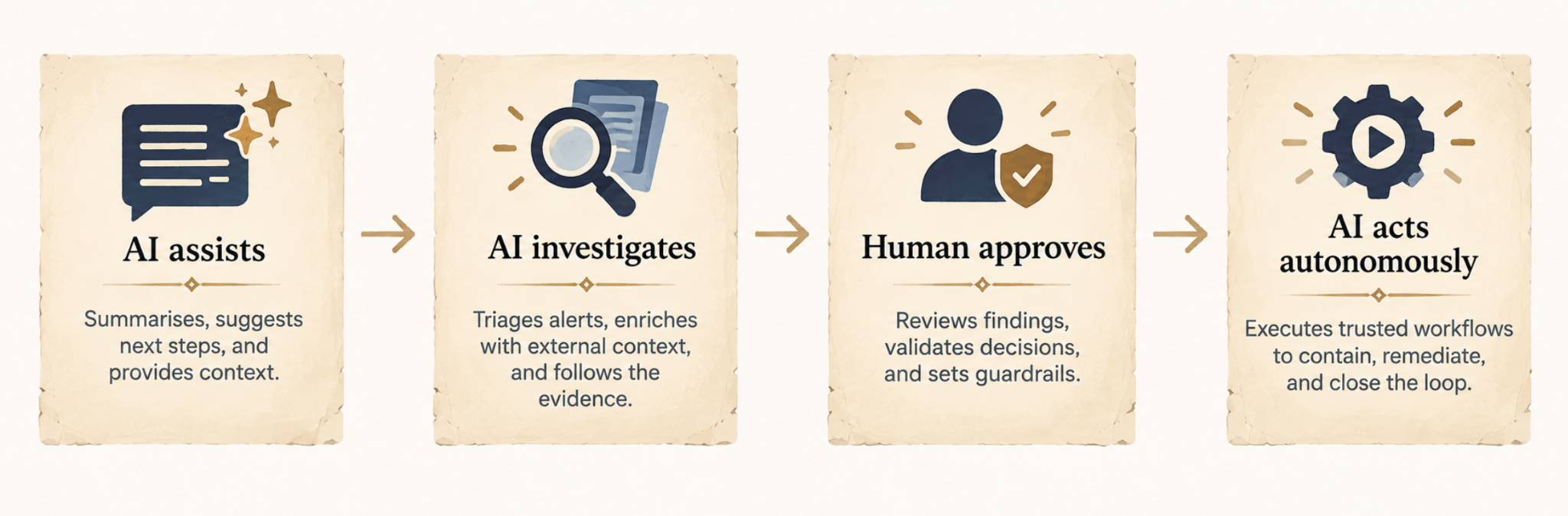
Agents are designed to work across the security tools and data the SOC already has.
For example, if an alert related to identity misuse fires, the agent looks at the account, checks authentication activity, pulls endpoint and network evidence, queries threat intelligence, correlates it, and decides whether the activity looks malicious or not, rather than requiring a human to investigate each alert like this one-by-one, agents are designed to scale, handling many of the noisy, voluminous alert types.
How Does an AI SOC Work?
There isn’t one standard way an AI SOC works, as the AI workflow used will depend on the task, the platform, and how much autonomy the AI has been given.
To help make the idea more concrete, we use Legion, an AI SOC tool, as an example:
1. Something triggers an investigation
An investigation starts when something happens that needs looking into. That might be a phishing, malware, identity, network, or cloud alert, or a custom detection you’ve configured Legion to investigate.
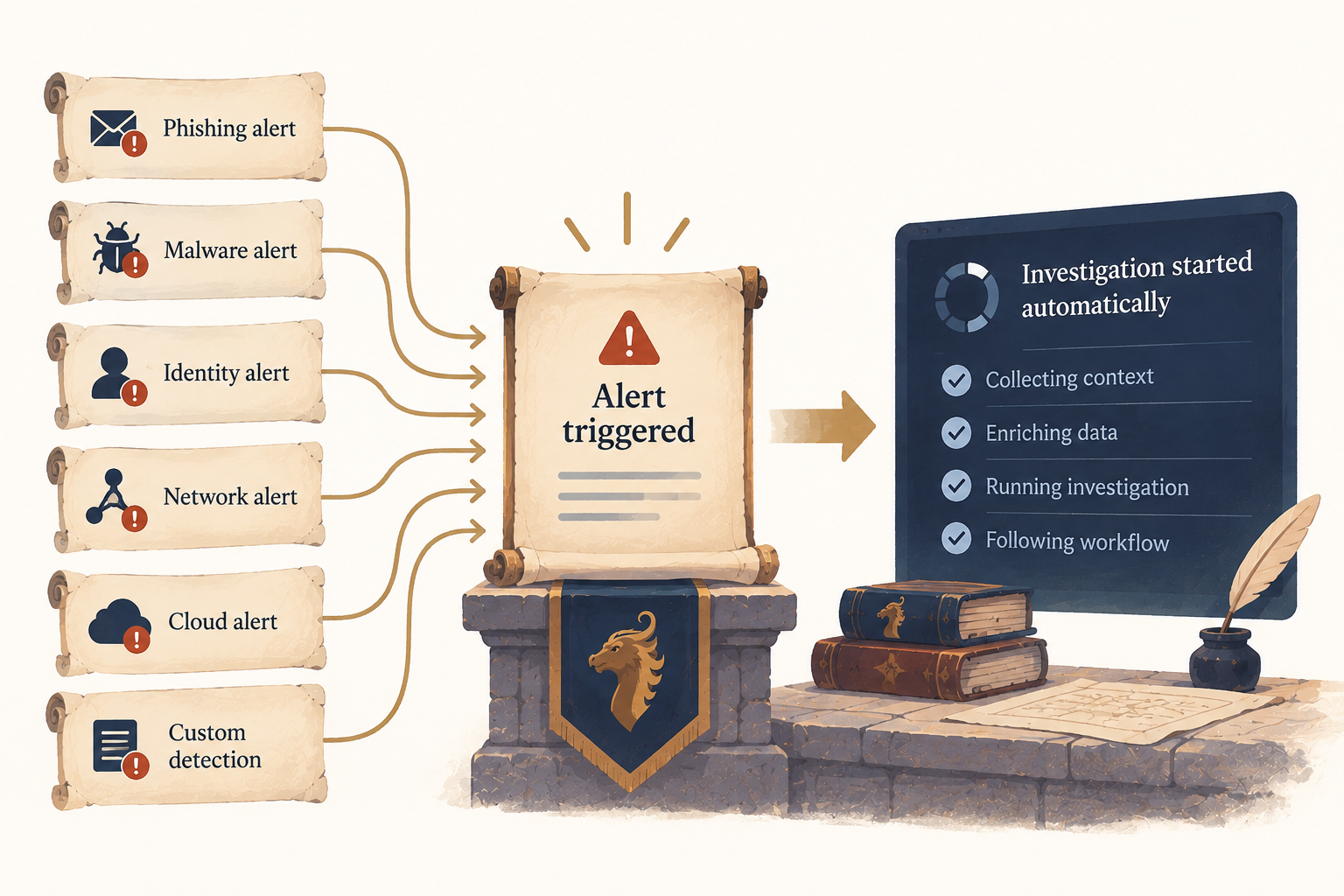
From there, an AI SOC tool like Legion can start the relevant investigation automatically, without waiting for an analyst to assign it.
2. An AI SOC platform like Legion gathers the necessary context
An alert rarely contains everything that’s needed to determine what happened, particularly in the moment it’s being triaged and investigated by a human.
For example, an identity investigation might require authentication data, information about the user and their permissions, and previous access patterns. A cloud investigation might need API activity, resource information, permission changes, and information about the identity responsible.
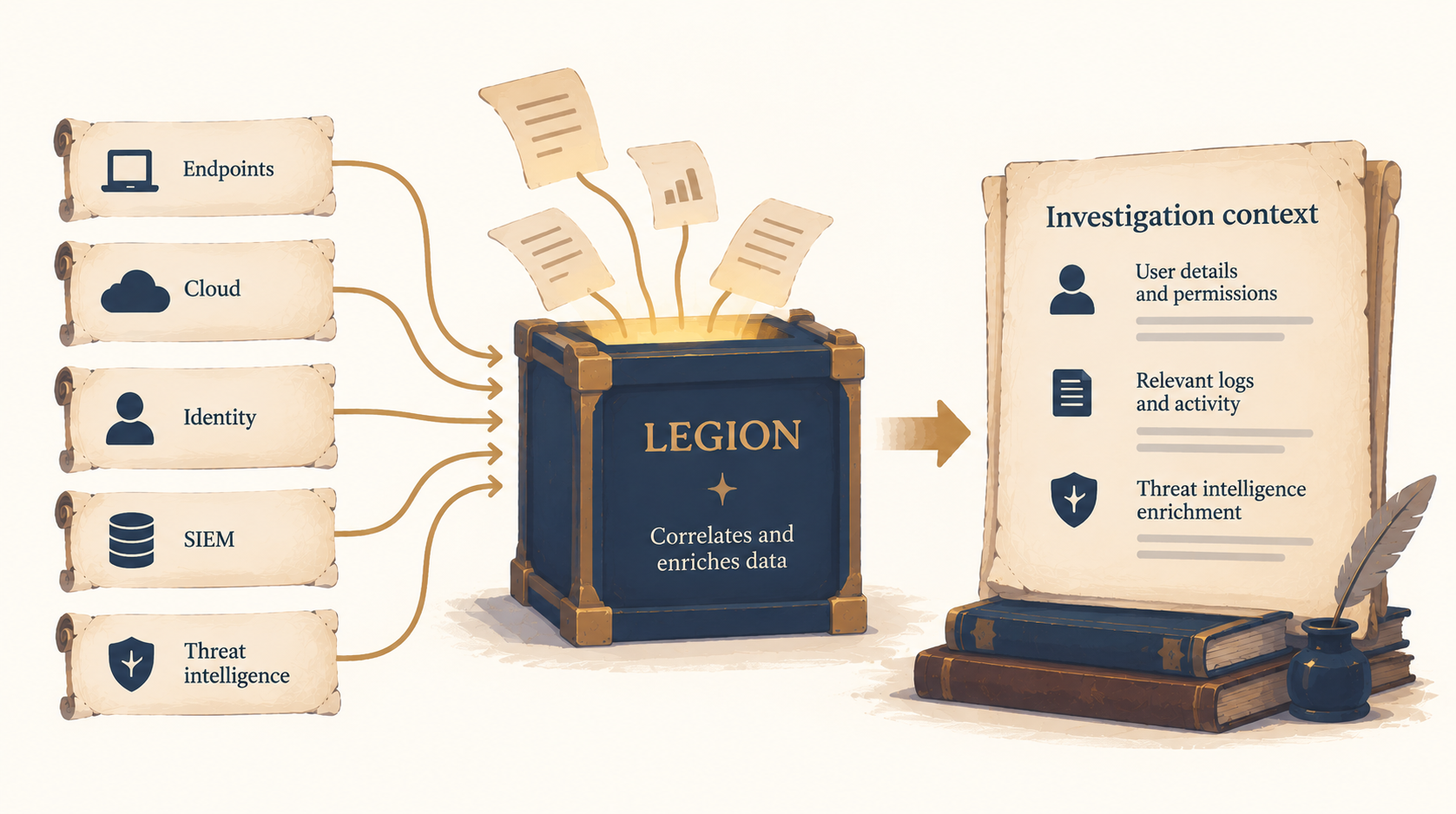
Legion’s alert investigations correlate evidence across security tools and enrich it with threat intelligence, bringing the information required for the investigation into the workflow.
3. Legion investigates what the evidence means
Next, Legion determines what the information means in context.
Take an unusual login. On its own, it doesn’t tell you whether an account has been compromised.
Legion’s identity workflows can investigate anomalous sign-ins, impossible travel, MFA bypass attempts, account takeover indicators, and RBAC drift. They correlate authentication signals with user behavior and assess patterns to determine whether activity is legitimate or represents compromise.
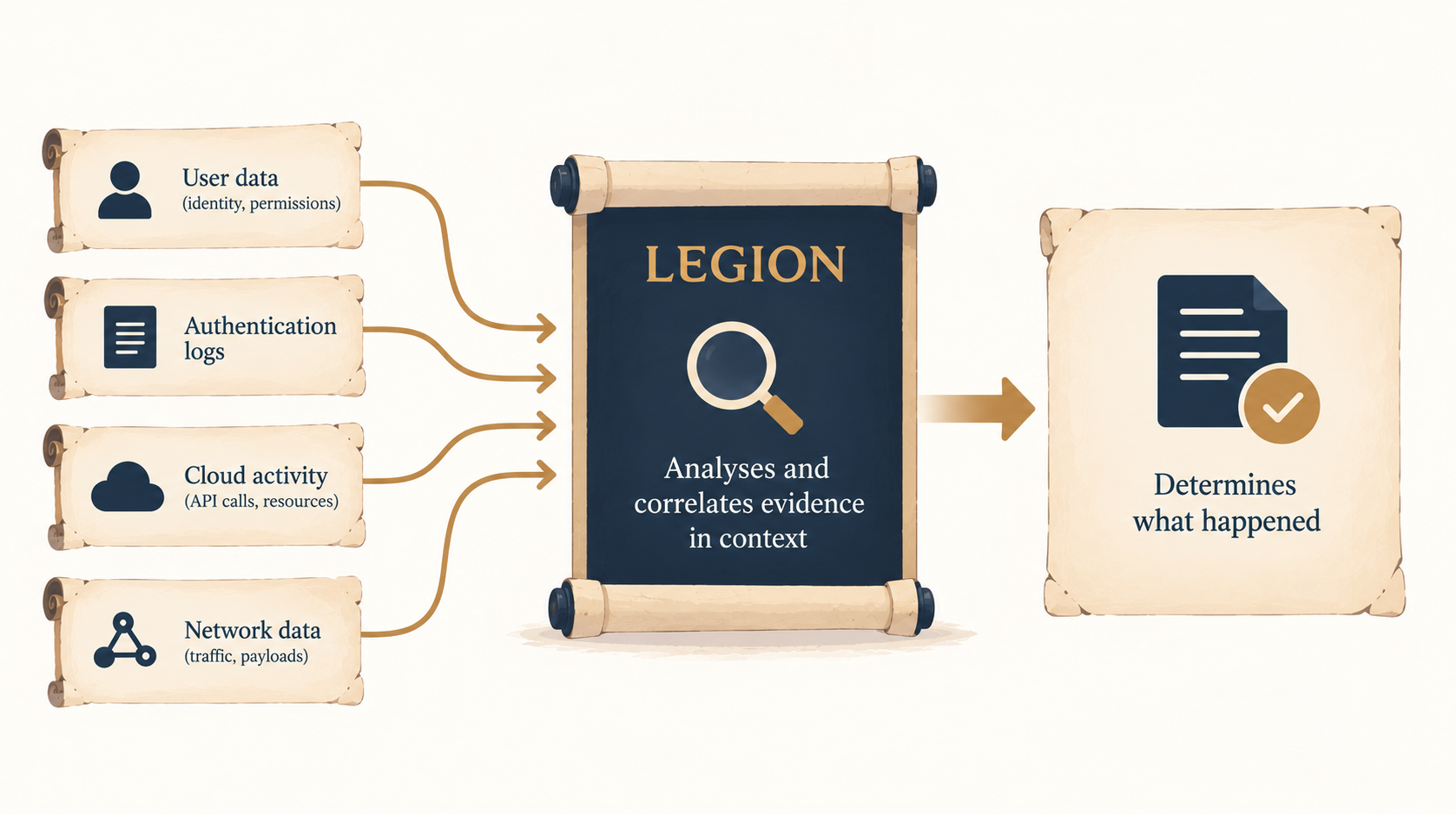
The same principle applies to other workflows. In cloud security investigations, Legion can trace unusual API calls to their source, review the context around resource creation, and assess permission changes for legitimacy.
For network security alerts, Legion can analyze attack patterns and payloads, identify their source, assess whether an attack succeeded, and evaluate its impact.
4. More than just triage, agentic SOC solutions should move into response
Once the investigation establishes what happened, the workflow can continue into containment or remediation where necessary.
Legion’s agentic or deterministic workflows can take an alert or custom detection from evidence correlation and threat intelligence enrichment through validation, containment, and remediation.
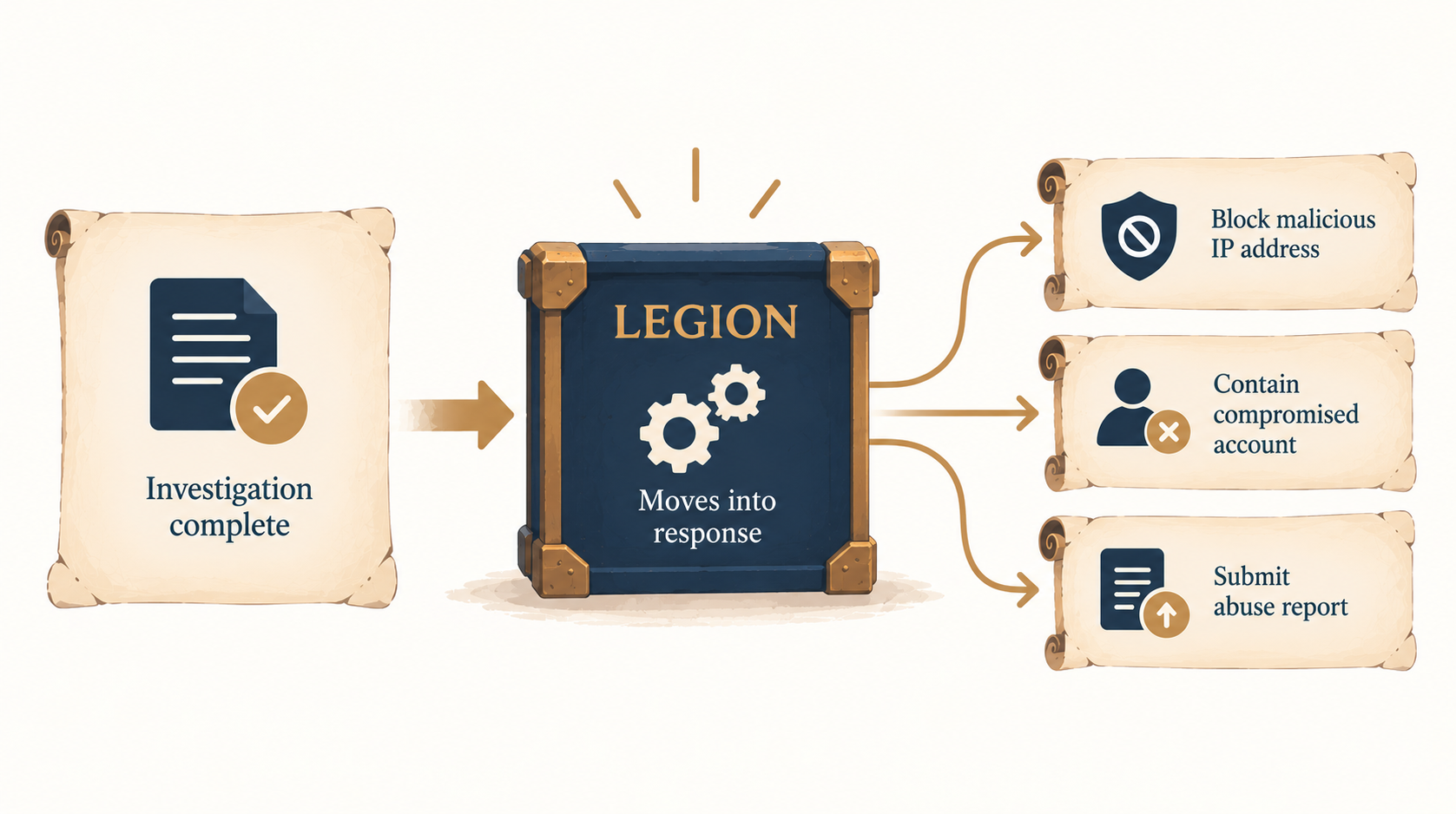
Depending on the incident, response actions might include blocking a malicious IP address or submitting an abuse report.
Alert investigation is a useful example because it’s high-volume, time-critical work, making it a common start for organizations implementing an AI SOC.
However, an AI SOC isn’t limited to investigating alerts only. AI-driven workflows can also support other security operations tasks, including detection rule tuning and threat hunting.
How those workflows operate depends on the work being done, i.e., a threat hunt will follow a different process from an alert investigation, while rule tuning has a different objective again.
AI SOC Use Cases
Alert investigation
Legion triages and investigates alerts across phishing, malware, identity, network, and cloud. It correlates evidence across your tools and enriches each investigation with threat intelligence, so analysts get a complete picture instead of piecing it together by hand. The result is far less manual investigation work for your team.
Custom detection investigation
Most teams have detections built for their own environment, and those alerts rarely come with a ready-made playbook. Legion investigates custom detections and carries each one through the full workflow, from enrichment and validation to containment and remediation. That means faster investigation and response, even for alerts no vendor anticipated.
Threat hunting
Legion runs your team's hunting hypotheses and queries across the environment, looking for threats that existing detections may have missed. Hunts that once competed with the alert queue for analysts' time can now run regularly, leading to broader threat discovery.
Detection tuning and engineering
Legion analyzes alert patterns to spot where detections are generating unnecessary noise, then helps refine detection logic to cut false positives without sacrificing coverage. Over time, your team deals with less alert noise and more of the signals that matter.
AI SOC vs SOAR
AI SOC and SOAR do have some overlap, but the main difference between the two is that with SOAR, humans generally define the investigation logic beforehand.
For example: Alert -> Query EDR -> Check IP reputation -> If malicious, check affected hosts -> If X, do Y -> Escalate to analyst.
The SOAR then executes that predefined playbook. SOAR is particularly good at repeatable processes where the conditions and appropriate actions can be encoded ahead of time.
With an agentic AI SOC, the investigation can be more adaptive.
For example: Alert -> Examine available evidence -> Decide what information is needed next -> Query the appropriate tool -> Interpret the result -> Decide what to investigate next -> Reach a conclusion.
You don’t need to specify every investigative branch beforehand because the agent is able to select its next steps based on what it has learned so far, within whatever tools, permissions, and guardrails you’ve given it.
Why Deploy AI SOC?
The most surprising reason to modernize your SOC with an AI SOC is that it actually makes your human analysts enjoy their jobs more. 75% of analysts say AI tools are already improving their job satisfaction by reducing alert fatigue and automating repetitive triage.
Most analysts still spend their days on the same handful of jobs, such as pulling evidence out of one tool, enriching an alert in another, correlating what they find, documenting findings, and coordinating a response.
Traditional automation helped with some of this workload, but AI makes it possible to automate more of the investigation itself.
Whereas in the past, every alert became another task for an analyst to work through manually, AI can now gather and correlate the necessary context, work through the investigation, and either handle the response or hand the case over to a human with the groundwork done.
97% of companies that use automated security control validation and measure their cyber effectiveness reported a positive impact.
Challenges of an AI SOC
AI can automate SOC work, but organizations still need to decide what it can do independently, what requires human approval, and where to set boundaries.
Workflow quality
Before you automate a workflow, it’s a good idea to make sure it’s actually a good one. If an investigation has unnecessary steps, outdated processes, or poor decision-making, automating it just means that those problems happen faster and at scale.
>> Legion starts by learning how your analysts already investigate and showing those workflows back to your team. That gives you a chance to review and improve the process before Legion starts taking on more of the work itself.
Access to security tools
An AI investigation can only use information it can access. If analysts normally need the SIEM, EDR, identity platform, cloud environment, and threat intelligence systems, AI needs appropriate access to those systems as well.
AI SOC platforms that connect to your existing security tools through APIs work well with supported (traditional) tools, but it usually takes some setup and leaves out anything there isn’t a connector for (like homegrown applications, legacy systems, et al).
>> In contrast, Legion works through the browser instead, using the same interfaces your analysts do. If an analyst can open a tool in a browser, Legion can work in it, with no API integrations to configure and no persistent API keys giving the platform ongoing access to the rest of your security stack.
Permissions, autonomy and trust
Autonomy doesn’t have to mean total permission for AI to do everything, especially not from day one. In fact, only 8% of security professionals would trust AI to make security decisions without human approval.
A more practical approach is to start with human oversight and increase autonomy as you become more confident in how reliably the AI performs a particular workflow.
>> Legion can be given different levels of autonomy depending on the workflow. An organization might allow an investigation to run autonomously, for example, while requiring human approval before a response action is taken.
Auditability
The more independently AI operates, the more important it is that analysts can see what it did and why.
>> Legion keeps a record of its investigations, including the actions it takes, the evidence it examines, and the reasoning behind its decisions. Because Legion works through the browser, it can also capture screenshots of what it sees at each step. Investigations are stored and searchable, giving analysts a record they can review afterward or use for audit and compliance purposes.
How to Introduce AI Into an SOC
An AI SOC can be introduced gradually, with organizations deciding which workflows AI can investigate independently, where humans still need to approve actions, and where greater autonomy makes sense. Here’s how you can go from a mostly human-run SOC to an AI SOC in a phased approach.
1. Find repetitive work
Start with investigations analysts perform frequently and where much of the work follows a repeatable process.
2. Understand the workflow
Identify the tools involved, information required, what/how/why decisions are made, and the ensuing actions that you’re looking for.
3. Automate investigation
Reduce the work analysts spend gathering, enriching, and correlating information.
4. Keep approval where you need it
Allow the AI to perform more of the investigation while keeping humans responsible for actions where the organization isn’t yet comfortable with autonomy.
5. Observe the results
Review how the workflow performs and whether its investigations and actions are reliable.
6. Increase autonomy
For trusted workflows, remove unnecessary approval points and allow the automation to complete more of the process independently.
7. Expand
Once you determine that the approach works for one type of investigation, apply it to other SOC workflows.
From the AI SOC to Wider Security Workflows
The SOC is a natural place to introduce AI because it contains large numbers of repetitive, context-heavy workflows.
However, the repetitive, multi-tool correlation and approval queues found in the SOC also exist throughout security and IT more broadly.
For example:
- DLP alerts require teams to examine the information involved, understand who sent it and why, assess the business context, and determine whether the event should be closed or escalated.
- Vulnerability management requires teams to understand whether findings actually affect important systems and coordinate remediation.
- GRC teams collect evidence from security, IT, and business systems, validate it, and follow up on anything that’s missing or incomplete.
- Identity teams manage joiners, movers, and leavers across numerous systems.
- IT teams process software requests, firewall changes, account recovery, and MFA changes.
On the surface, these processes may look different from SOC processes. However, structurally, many actually follow the exact same pattern:
Something happens -> Gather information -> Add context -> Investigate or evaluate -> Decide -> Act -> Record what happened.
Once an organization automates that inside the SOC, it can apply the same approach elsewhere.
Legion and the AI SOC
Legion is designed to automate the repetitive, context-heavy workflows that take up a significant amount of security teams’ time. Within the SOC, that includes alert investigation, custom detections, rule tuning, threat hunting, cloud investigations, identity investigations, and network security alerts.
Legion can automate multiple stages of an investigation, from gathering and analyzing evidence to enriching findings with threat intelligence and taking containment actions.
You remain in control of how much autonomy Legion has. Customers can grant greater autonomy gradually as they build confidence in particular workflows.
With Legion, organizations don’t have to choose between manual and fully autonomous security operations. They can decide where AI assists, where it investigates, where humans approve, and where Legion is trusted to act autonomously.
And once that model is proven inside the SOC, it can also be applied to workflows across threat intelligence, cloud security, vulnerability management, AI governance, fraud, GRC, identity, and IT operations.

At Legion we see an AI SOC as a SOC where agents learn the workflows your analysts already run, show them back to you, help improve them, and then execute them at a level of autonomy your team sets.

TL;DR: SOC automation is designed to help organizations automate manual, repetitive tasks, but it’s not always straightforward to implement said automation. SOC automation projects can stall for reasons including teams lacking the skills or time needed to build workflows, automation tools not having the required integrations, and analysts not trusting the output they can’t inspect. Legion automates your SOC by learning your workflows, watching how your analysts actually investigate, combining those insights with logs, cases, and more, then running proven workflows with autonomous operations.
SOC automation is on every security leader’s agenda. In a recent report, 61% of CISOs said they are currently investing in automation. Our experience is that the true proportion of CISOs thinking about automation as a solution to problems like growing MTTRs or alert overwhelm right now is closer to 100%.
But deciding to invest in (and even getting a budget for) SOC automation is the easy part.
This guide covers what comes after you get the go-ahead to push for automation. It includes the automation approaches available today, which workflows are worth automating, the reasons SOC automation programs stall, and a practical sequence for implementing one. It also covers how and where Legion fits into a SOC automation project.
>> Short on time and want to see what SOC automation looks like in practice? Watch a 3-minute demo of Legion in action.
What Is SOC Automation?
Modern SOC teams look for agentic automation tools like Legion to actually learn how your team works, pull in context from outside the SOC, and recommend and perform automations that improve how SOCs function.
Of course, automation is not new to the SOC.
At a high level, SOC automation uses technology (including, but not limited to, AI) to perform security operations work that an analyst would otherwise have to do manually. A SOC might want to automate work like gathering context on an alert, running an indicator lookup, opening a ticket, blocking a domain, isolating an endpoint, and writing up the record afterward.
And security teams have been creating their own scripts to automate routine processes and relying on deterministic SIEM automations since at least the late 1990s. Security Orchestration, Automation and Response (SOAR) tools, which automates predetermined playbooks, have been heavily leveraged in SOCs for over a decade now.
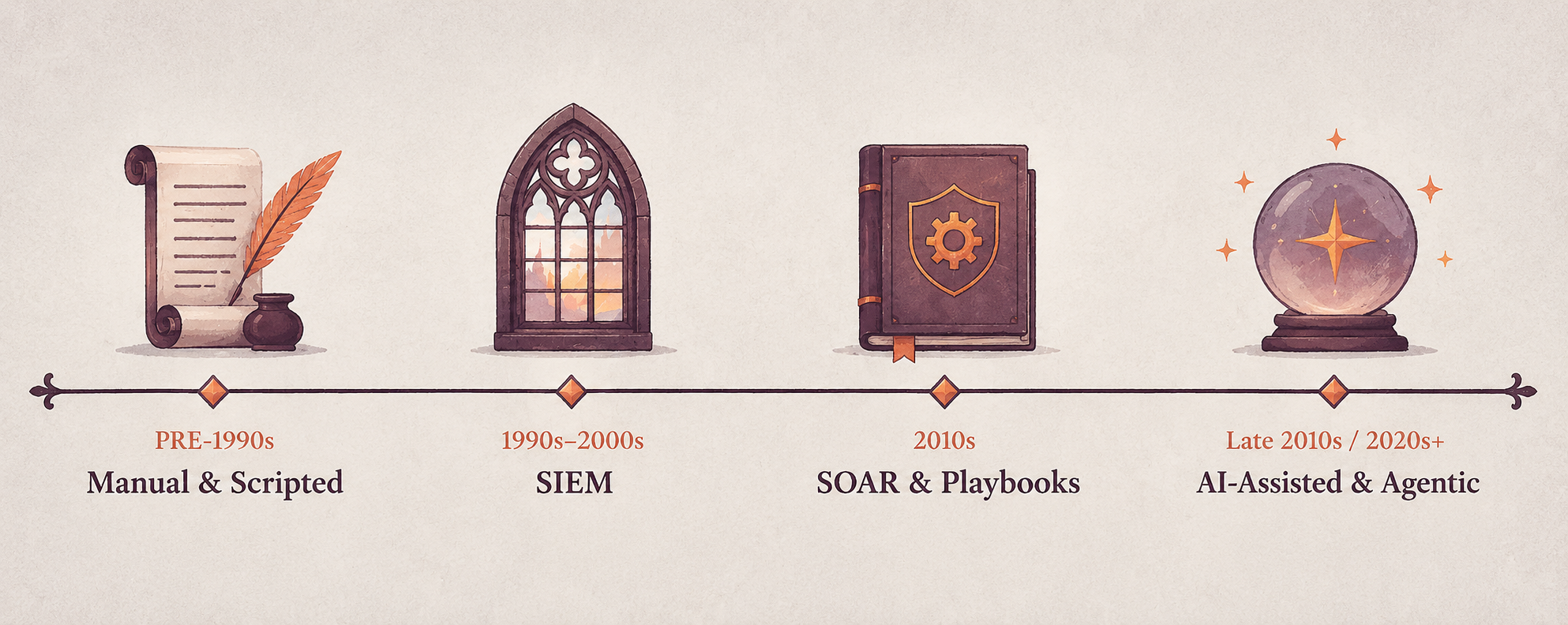
But agentic automation is the present and future of SOC automation. It's what enterprises like Virgin Money are using right now to cut alert volumes and support overwhelmed SOC teams.
Learn more about how SOC automation helped Virgin Money reduce its alert backlog by more than 60% in less than two months.
Why Automate in the SOC?
The business case for SOC automation is simple.
Analysts can’t keep up with the number of tasks they have to do on a day-to-day basis, particularly now with the Hugging Face / OpenAI incident indicating fully agentic attacks with tens of thousands of uncorrelated alerts portending that real incidents are getting missed (or spotted too slowly), and breaches happen that should have been stopped.
NIST's incident response guidance (SP 800-61 Rev. 3) notes that the volume of potentially adverse events is generally too high for analysts to review manually, while response speed has to reflect how time-critical an incident is.
Automation helps address both problems by:
- Reducing the amount of routine work analysts have to handle themselves. 35% of security teams say they feel overwhelmed with repetitive manual tasks.
- Allowing investigations and response actions to happen faster. In one study, organizations using AI and automation extensively across security operations shortened the breach lifecycle by an average of 80 days and reduced breach costs by an average of $1.9 million.
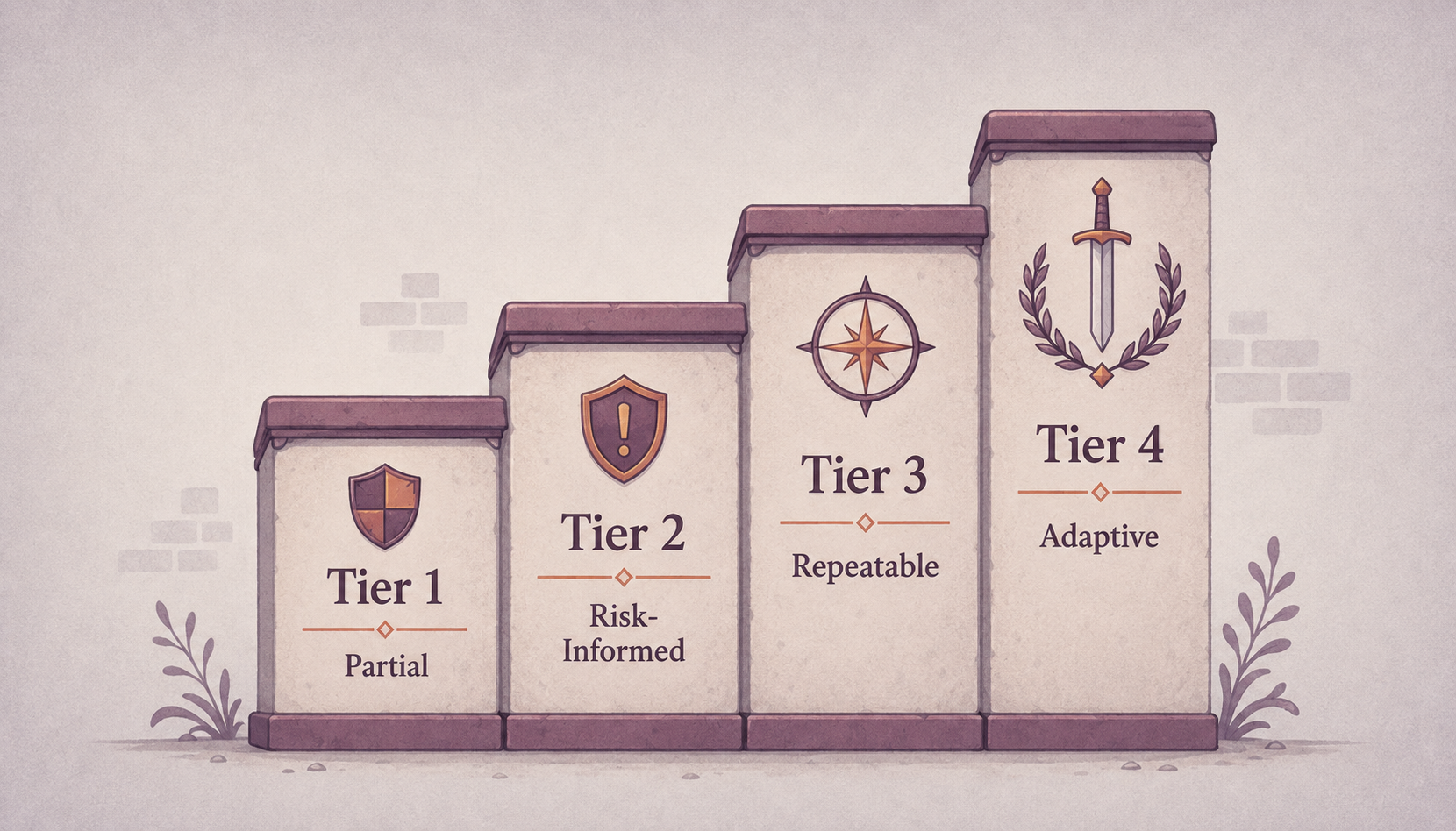
But speed and volume are not the only reasons for SOC automation. Automation can also make SOC processes more consistent. With an automation layer in place, the same investigation steps can be followed each time an alert occurs, rather than the process varying depending on which analyst handles it.
This aligns with the broader emphasis on repeatability in NIST CSF 2.0, which describes cybersecurity risk management progressing from “irregular, case-by-case basis” at CSF Tier 1 to “Repeatable” practices at CSF Tier 3.
Does SOC automation replace people?
The short answer is no. The long answer is that SOC automation does change the day-to-day for people who work in security operations. It saves the SOC’s best people from burning out on routine tasks and lets them do the interesting investigative work that requires human insights as well as leading them to become less analyst and more orchestrator, so you can retain them for longer and reduce staff churn.
As MITRE's 11 Strategies of a World-Class Cybersecurity Operations Center puts it: “Automation assists, but does not fully replace, the judgment of advanced human analysts.”
7 Automation Technologies SOCs Use
SOC automation ideally is a collection of technologies that, over time, automate more and more of what security analysts do.
Below are some of the most common approaches to SOC automation.
- Scripts and APIs. Scripting tools like Python and PowerShell can be used to automate tasks that are repetitive. This can be things like looking up an IP address, collecting information from an endpoint, updating a blocklist, or passing information between different security products. These automations can save time, but they also take time upfront because they need to be built and continuous time to be maintained.
- EDR automations. Endpoint detection and response (EDR) is security software that monitors devices like laptops, desktops, and servers for suspicious activity and helps security teams investigate and respond to threats, largely by pattern matching.
- Built-in SIEM automations. Security information and event management (SIEM) platforms collect security data from different systems, compare activity across them, and surface an alert when something matches a predefined rule. Security teams can view and analyze that data in one central place rather than having to check every system (e.g., firewalls, endpoints, servers, etc.) individually. Some modern SIEMs can also automatically take certain actions after they detect a threat.
- SOAR. SOAR platforms take automation even further than SIEMs. They connect different security tools and run predefined workflows (usually called playbooks).
- XDR. Extended Detection and Response (XDR) brings together security data from multiple areas, such as endpoints, email, networks, cloud systems, and identities, to detect and respond to threats across an organization.
- Security data pipelines. Security data pipelines manage security data before it reaches the SIEM. They can automatically collect, parse, normalize, enrich, filter, and route telemetry, helping teams control the volume and quality of data reaching their downstream security tools.
- AI and security agents (Agentic Security Operations platforms). Artificial intelligence (AI) and security agents automate more complex SOC work that previously needed a human analyst to think through and decide what to do. For example, instead of just following a fixed rule, an AI agent might investigate an alert, gather information from different security tools, work out what likely happened, suggest what to do next, and sometimes take action itself.
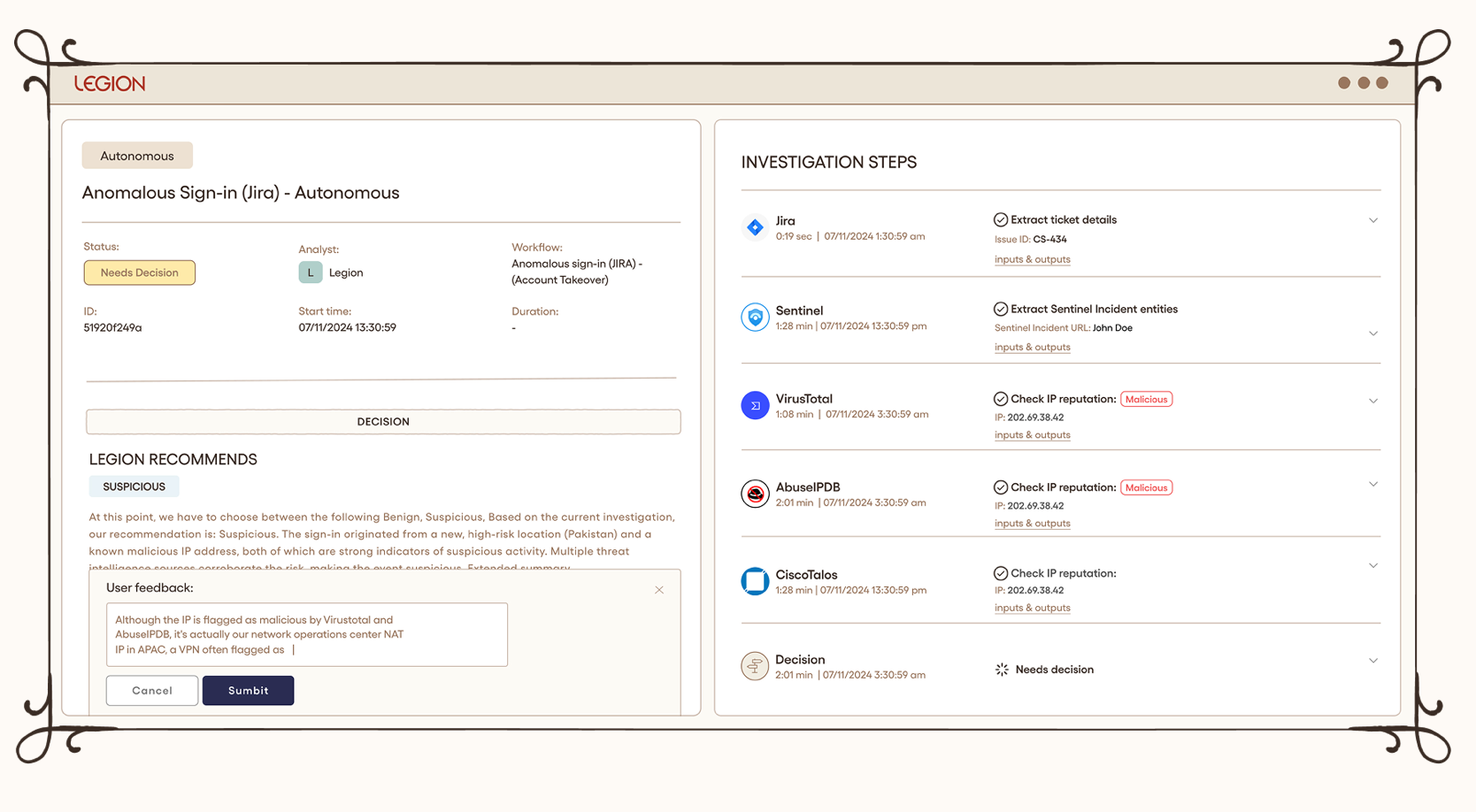
See how Legion makes SOC workflows repeatable and consistent.
Agentic Security Operations platforms like Legion don’t necessarily replace SIEM, SOAR, EDR, or similar tools but rather work on top of or within those tools, using their data and capabilities to automate more of the analyst’s job.
In one study, three in four analysts reported that AI tools have already made their work more satisfying by reducing alert fatigue and automating repetitive triage.
57% of organizations report success using AI for alert triage and risk scoring, and 26% report success automating incident response.
Tier 1, 2 and 3 SOC Automation Use Cases
A common way to think about automation is by SOC tier.
Tier 1 (triage)
Tier 1 SOC work is where automation pays back the fastest, because the work is repetitive and the cost of an error is relatively low. Learn more about how Legion automates tier 1 SOC tasks.
Common tier-1 and alert triage workflows include:
- Alert enrichment.
- Indicator and reputation lookups.
- Phishing analysis.
- Identity and system context gathering
- Duplicate alert identification
- Alert classification and prioritization.
- Ticket creation.
- Initial false-positive handling.
Automating this type of work also broadens the scope of what can be categorized as Tier 1, because with agents running triage and investigation, security operations centers can take on more noise, more alerts, and worry less about false-positive-burnout.
Tier 2 (investigation and response)
Tier 2 is where analysts move from routine alert handling into deeper investigation and potentially disruptive response actions, so automation needs tighter controls.
An example is rule tuning. Analysts see which detections generate repeat noise, trace it back to the benign activity behind it, and narrow the logic so the rule stops firing on it.
Tier 3 (threat hunting and advanced investigations)
Tier 3 tasks can include running threat-hunting queries, IOC sweeps, cross-environment investigations, hypothesis generation, and advanced forensic analysis.
This is particularly interesting for AI and agentic automation because these investigations do not always follow exactly the same path.
An analyst investigating suspicious authentication activity, for example, may change direction depending on what each query reveals. An agent capable of reasoning across the investigation can potentially do the same rather than relying on one fixed playbook.
But SOC Automation Use Cases Don’t Have to Be Defined By Tier
SOC tiers are a useful way to categorize SOC automation use cases, but the same types of work often appear across different tiers.
A better question is: “What makes a workflow a good fit for automation?”
In our experience, a SOC task is generally a good candidate for automation when it:
- Repeats. Analysts keep doing essentially the same task over and over again.
- Happens across different tools. Analysts work in SaaS consoles, EDR dashboards, legacy systems, cloud panels, and internal portals.
- Needs security context to answer. Someone has to know what the system does, who owns it, and whether the activity is expected or unusual (i.e., judgment that is hard to script).
Why SOC Automation Projects Fail
One of the most common reasons why SOC automation projects fail to deliver value in the enterprise is a lack of skills or time to build workflows.
More than half (52.6%) of organizations cite skills gaps as a barrier to automation, 44% say automation and AI roles are difficult to hire for, and 35% report not having the internal skills needed to build or maintain workflows at all.
Another reason is integration problems. 31% point out integration gaps between tools. If an automation can't access or correctly interpret the information an analyst uses, then it can't reliably replicate the investigation.
Then there’s trust, or lack of it. 47.1% of security leaders distrust automated results. Teams need to be able to see what an automation did and why before they are comfortable with giving it more control.
How Legion Automates The SOC
Legion is the agentic security operations platform that automates enterprise SOC work.
What we’ve found is that most SOC work is repetitive but not yet standardized. Or it might be the case that playbooks exist, but they are likely to have been written by engineers who don’t run the workflow themselves, and they go out of date as soon as a tool or an interface changes.
That’s why Legion doesn’t rely on written process documentation. Instead, we work by learning from what your analysts actually do and combine that with wider context (including documented processes, logs, cases, and more).
We uses vision models to observe how and why experienced people investigate the way that they do, then turn that into a visual workflow the team can inspect and edit. This means there’s no need for you to build API integrations or set up connectors, and Legion can also work with internal tools that have no existing integration.
Every action Legion takes is recorded with the evidence behind it, including screenshots of the actual screens it reads, so you can check how it reached the conclusion instead of trusting that it is correct.
As Neil Robinson, CISO at Virgin Money, put it: "Legion has just completely transformed the way I think about automation. You take your existing operation and really just 10x it."
How to Implement SOC Automation
If we were to advise an organization on how to get automation working (and keep it working) within their SOC, we would suggest the following steps.
1. Decide who owns SOC automation
Traditionally, security engineering teams would build SOC automations for analysts.
The problem with this is that engineers don’t necessarily do those investigations themselves, which means that the automation may or may not reflect how investigations happen in real life. Plus, it leaves analysts dependent on engineering when something needs to be fixed or updated, which creates a bottleneck (this has been a longstanding issue with SOAR tools). It is further exacerbated by the fact that most automation systems require clean APIs, which, particularly for homegrown or legacy systems, simply don’t exist.
There’s also the risk of important knowledge leaving with the person who built the automation. Other people may know what the automation does, but not why it was designed the way that it was. Then, when a security process or tool changes, nobody will know how to update it, and the automation will be abandoned.
The solution is automation owned by analysts. The people who run the investigations should be able to build and update their own automations, they should incorporate ALL tools in the enterprise, and be able to document the reasoning behind each one so that knowledge stays with the organization even when people leave.
Legion is built specifically for this. Analysts create workflows by doing investigations they normally would, without writing any code or integrations, and what comes out is a visual map they can inspect and edit themselves, so updating it doesn’t mean going back to engineering.
2. Record how SOC work is done now
Before you automate your SOC tasks, you first need to understand how analysts actually perform them.
One way to do this is to ask analysts to write down each step they take. We don’t recommend it because what analysts write and what analysts do might be different:
- Small steps can be forgotten.
- Two analysts can describe the same workflow differently.
- The document goes out of date as soon as a tool or interface changes.
A far better approach is to record analysts in real time. That’s what Legion does. It observes analysts while they work, capturing how they investigate alerts, which tools they use, what steps they take, and the decisions they make, then turns these into a workflow diagram that also incorporates best practices and optimal processes that the AI creates so you can reduce inefficiencies created by the ‘duct tape and thumbtack’ approach that is often the status quo.
You get two things at the end of this: a) the actual sequence of steps analysts follow, which you can then automate, and b) a view of how the team works, i.e., which tasks are most time-consuming, where investigations get stuck, and where analysts approach the same situation differently.
3. Choose the first SOC automation candidate
Once you know how your team works, you can then decide which workflow to automate first.
Choose one workflow to begin with, ideally something that analysts deal with frequently and investigate roughly the same way each time.
A good example is phishing alerts. Security teams typically receive a lot of phishing alerts, and the investigation usually follows a fairly standard process, i.e., check the email, inspect links and attachments, look at the sender, determine whether it’s malicious, and decide what to do next.
Leave the more complex cases that depend heavily on human judgment until you’ve built up confidence in your automation process.
4. Map where the context lives
Identify which systems have the information analysts need for their investigations.
For instance, an analyst investigating a suspicious activity might need to check the user’s identity and permissions, information about the affected device, previous incidents, or email records. This information could be spread across several different systems.
Then, make sure that automation can actually retrieve and use this information when it needs to. Traditional SOC automation usually connects to tools via APIs, which can exclude internal or legacy systems that don’t have them, so analysts might still have to perform missing steps manually.
On the other hand, a browser-based automation platform like Legion can access the exact same information that analysts can.
5. Baseline the workflow before you automate it
Measuring how much time a workflow takes before you automate it allows you to later prove that the automation actually saved time.
The calculation is simple:
Time spent = alert volume x handling time per alert.
For example, if your team gets 100 phishing alerts a week and each alert takes 10 minutes to investigate on average, that’s about 1,000 minutes of analyst work. After automation, you can measure that exact same workflow again and compare the number.
6. Whitebox auditability is key
Legion is fully white box, so you can deploy it right away. There’s no supervised on-ramp required, because you can see exactly how it thinks from the start. Every action, every piece of context, and every conclusion is fully visible and editable, never a black box you're asked to trust blindly. That's what makes it predictable immediately: you know why it reached a verdict, you can correct it on the spot, and it'll apply that correction consistently from then on.
7. Expand to other SOC workflows
Once you get one workflow running successfully, start automating another one by taking it through the same process - observing how analysts do it, building the automation, supervising it, and only then considering making it autonomous.
Automate Your SOC with Legion
Ready to automate your SOC? Get a demo of Legion today.

A practical guide to SOC automation — what it means today, why it often fails, and how Legion helps teams automate without integrations.
Security investigations rarely start with all the context needed to reach the right decision, and we see plenty of examples of this in real environments. Let’s look at an anonymized but recent example to show why AI knowledge management matters in security investigations.
Every quarter, a publicly traded enterprise’s finance team uploads the company's still-unreleased earnings package which consists of revenue, forecasts, and results that won't go public until earnings day to a restricted SharePoint site for executive review. The package contains sensitive financial information so the upload triggers a DLP alert for review. Pretty standard stuff.
That alert triggered an analyst investigation where the incident response team confirmed the uploader was indeed a part of the reporting team, the destination was the approved site, and access was limited to only the small group of executives who were supposed to see it. Nothing dangerous, so it was safely closed as benign. This single investigation established the conditions that made the activity safe: who was expected to upload the file, where it was supposed to go, and who was supposed to have access.
But the lingering question is… what should be carried forward and/or codified from that investigation? This question is one that we’re obsessed with answering and helping our customers address.
With Legion, instead of carrying forward a single verdict from a single investigation, enterprises can uniquely capture the conditions that each investigation establishes together with the underlying and complementing evidence behind them. On a continuous basis. This holistic view matters, particularly in today’s world, because the same activity type doesn't always mean the same thing, and this is a constantly moving target as environments change. Using our ‘finance team uploading earnings files into SharePoint’ example, one of the conditions that was met, who had access to the folder, can change very quickly. So perhaps the next time, the package is the same, the site is the same, the timing is the same, but the folder may have been shared with an external account or a new unverified user.
The challenge isn't collecting more data. Most enterprises already have plenty of it, scattered across identity providers, endpoints, SaaS apps, and past investigations. The challenge is turning that raw data into knowledge that's reliable enough, and accessible enough, for agents to actually reason over: preserving what made something true, connecting it to the organizational context around it, and continuously testing whether it still holds as the organization changes.
Knowledge (including AI knowledge) needs conditions, not conclusions
That's why Legion represents organizational knowledge and context as a continuously evolving model that connects identities, teams, systems, data, access, behaviors, and the evidence establishing how they all relate to one another.
Legion’s knowledge isn't built from investigations alone. Legion brings information from across the environment, including identities, access, systems, infrastructure, and the relationships between them, into the same layer. Past investigations add another important source, giving Legion an accumulated history from day one: what analysts already checked, what they found, and the evidence that supported those decisions.
Raw data on its own doesn't tell an agent much. An identity, a login, a file upload, a network connection, in isolation, are just data points. What makes this usable is the relationship it has to everything around it. That's what turns data into knowledge an agent can actually act on: not just what happened, but who was involved, what it touched, what normally follows it, and what it means if it doesn't.
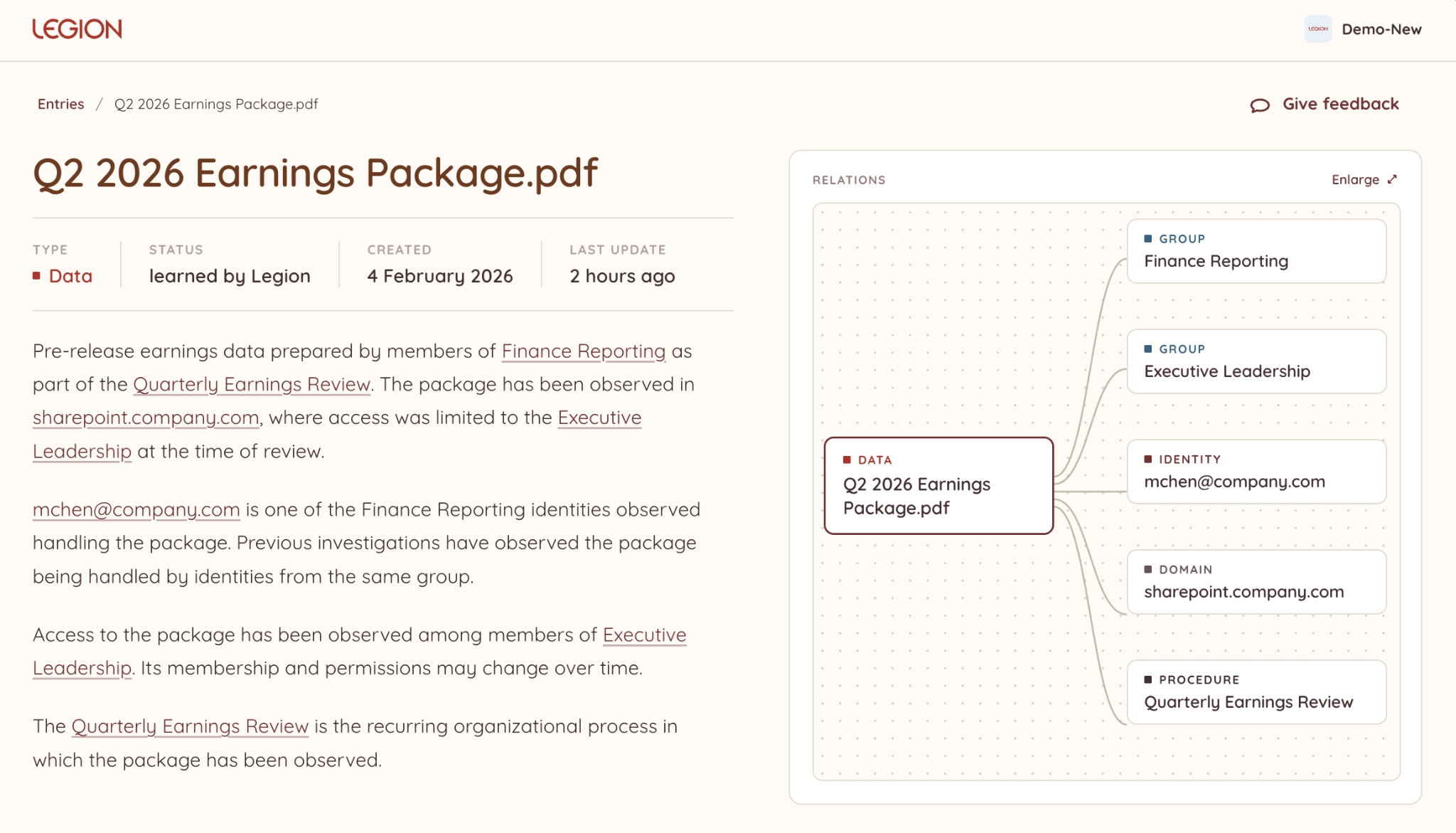
That gap between "looks the same" and "is the same" is hard to manage at enterprise scale, and Legion Knowledge is designed to connect the data flowing in and out of thousands of employees, dozens of teams, hundreds of new and existing tools changing in real time, and access to relationships that change over time. This empowers security teams, and their agents, to stay on top of every legitimate exception, relationship, and operating pattern at agentic scale.
We see all the time that not everything security tools observe should become codified as organizational best practices. Before new information can influence future investigations, there needs to be enough evidence to support it. Otherwise, an observation can become an assumption that extends beyond what the evidence actually established, and an assumption an agent can't verify is a liability, not an insight.
Research on memory management in LLM agents shows why this matters. Researchers at Harvard, Michigan State, and other institutions found that agents exhibit what they call "experience-following": the more similar a new task is to an experience retrieved from memory, the more likely the agent is to follow that past execution. That's useful when the retrieved experience applies. When it doesn't, the agent can carry an assumption from one task into the next that the new evidence doesn't support. Reliable knowledge is what keeps that experience-following useful instead of risky.
Useful organizational knowledge is more than a collection of isolated facts. The relationships and intricacies between those facts provide the context needed to interpret them: not just what is known about an identity, system, or activity, but how each relates to the organization around it. Preserving those relationships is also what surfaces the insights security teams actually need: correlation across seemingly unrelated events, the blast radius of a compromised identity or system, and where the real detection opportunities sit. None of that comes from more data. It comes from data that's been made reliable enough to connect.
Strong evidence can still become outdated without AI knowledge management
Preserving the right conditions solves one problem, but it creates another: conditions change.
In our finance example, previous investigations may provide strong evidence that only a specific group of executives had access to the folder. That evidence doesn't become wrong when someone new is granted access; they could be, simply, a new member of the exec team.
That's why Legion separates confidence from freshness: confidence reflects how strongly the evidence supports what is known, while freshness reflects how recently those conditions have been verified.
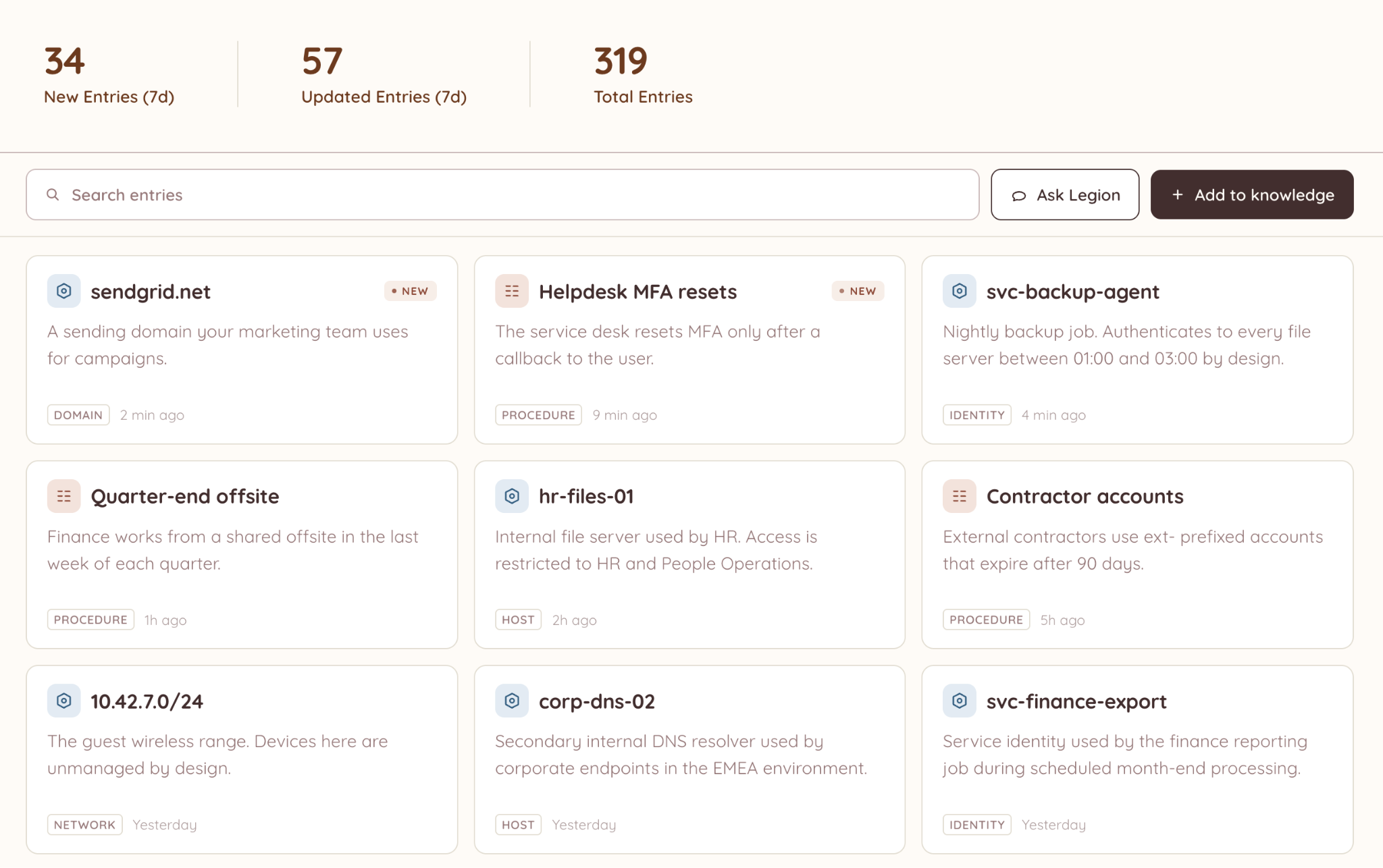
That distinction matters when existing knowledge is used in a new investigation, or acted on by an agent. Something can remain strongly supported by evidence while becoming too stale to rely on without verifying that the same conditions still hold. An agent that can't tell the difference between confident-and-fresh and confident-and-stale is an agent that will eventually act on the wrong assumption.
New evidence has to reconcile with existing knowledge
Every new investigation produces information that could become organizational knowledge. But observing something doesn't automatically make it a best practice. Before new evidence changes the output, Legion evaluates it against what the organization already knows. It may reinforce something already established, add something new, or contradict it.
New evidence doesn't necessarily make the old evidence wrong. Both may be valid: one describes what was true when it was established, while the other shows that something has since changed. Preserving the evidence and timing behind both lets security teams understand that change rather than simply replacing one version with another.
This makes evaluation part of the learning process, not just a gate at the moment knowledge is created. An investigation produces new evidence, that evidence is evaluated against existing knowledge, and only then can it change what Legion, and the agents built on top of it, carry into future investigations.
Learning is automatic. Authority isn't.
Automatic learning shouldn't make organizational knowledge opaque to the humans who rely on it. If that knowledge is going to shape future investigations, and the agents acting on them, the people who know the organization should be able to see what was learned and contribute to its quality.
Human feedback adds another signal to that process. A validation can strengthen what Legion has learned, while a correction or rejection can challenge it. And for people to make those judgments, the knowledge has to remain traceable: where it came from, the evidence behind it, and how it has changed over time.
AI knowledge has to remain trustworthy
Organizational knowledge is useful only as long as there is a reason to keep trusting it. Something can be well supported and still become outdated. New evidence can strengthen what is already known or show that the environment has changed. And a conclusion that was right six months ago shouldn't become an assumption simply because nothing has challenged it yet.
That's the distinction we built Legion around. The goal isn't simply to collect more data about an organization. It's to make that data reliable and accessible enough, for analysts and agents alike, to know what still deserves to be trusted.

How Legion turns security data into reliable, AI agent-ready knowledge to preserve evidence, track freshness, and surface what still deserves trust.
