
How IOC Indexing Unlocks Automated (AI) Security Alert Correlation
Automation of security alert correlation with AI (LLMs) depends on replacing raw indicators with compact symbolic references.

.png)
Introduction
TL;DR: Using LLMs to automate security alert correlation won’t work when they’re fed unmanaged IOCs including emails, URLs, IPs, domains, and hostnames. These inflate token costs, produce inconsistent references, and break structured output and automation reliability. Legion Security’s IOC indexing system replaces raw indicators with compact symbolic references that the model reuses throughout its reasoning. Across 100 evaluation runs, this took JSON validity from ~80% to 100% and IOC reference compliance to 100%, resulting in the ability to reliably automate security alert correlation.
Automating security alert correlation and other modern security investigations with LLM-based agents means using an agentic LLM to power a multi-step security investigation.
A typical workflow begins with an alert - say, a reported phishing email - and the agent iteratively queries tools such as Microsoft Defender Threat Explorer, Splunk, or CrowdStrike to gather evidence, assess scope, and recommend containment actions.
At each step, the agent receives query results containing raw IOCs: sender addresses, embedded URLs, source IPs, recipient domains, and device hostnames. It must reason about these indicators, decide whether to refine its search or conclude the investigation, and return its findings as structured output.
Without any re-engineering of indicators of compromise (IOCs) an agentic LLM can work well for short investigations.
But as the number of steps in an investigation grows, an issue with alert automation emerges.
The agent's context window fills with repeated, verbose indicator values, the model begins echoing raw IOCs inconsistently, and the structured outputs it produces become increasingly fragile.
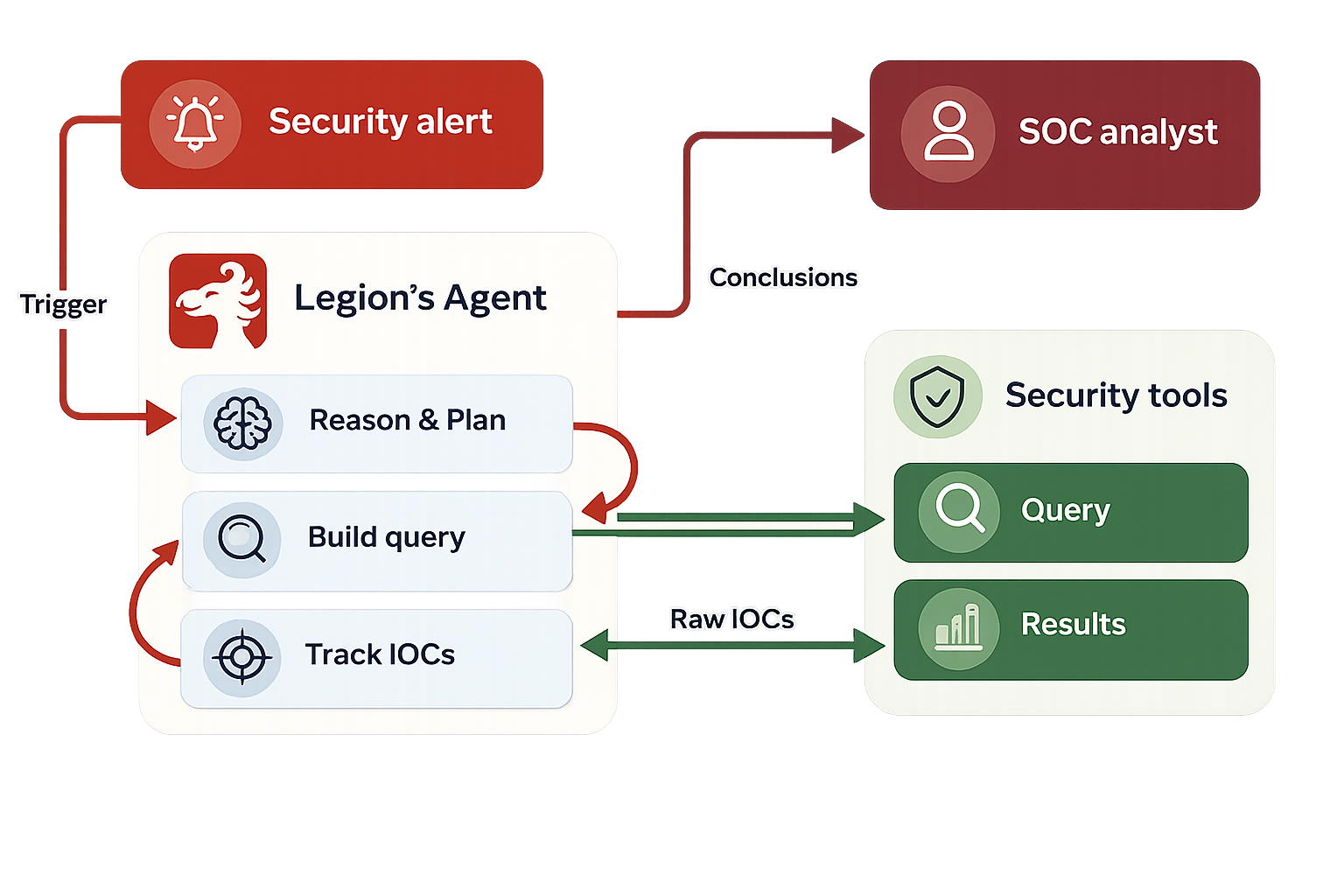
[Figure 1: High-level architecture of an AI-driven investigation agent.]
Consider a phishing investigation that proceeds through four steps:
- Initial query: Search for emails from a reported sender to a specific recipient. The results contain the sender's email address and a handful of URLs.
- Scope expansion: Search for all emails from the same sender across the organization. The results return 22 emails with SharePoint URLs, tracking links, and font-file references.
- URL analysis: Search by specific URLs found in step 2. Additional domains and redirects surface.
- Conclusion: The agent summarizes its findings and lists all relevant IOCs.
By step 4, the agent's prompt contains the full history of steps 1 through 3 - including every raw URL, email address, and domain mentioned in each step's results and the agent's own reasoning. Some of these URLs are long tracking links with base64-encoded parameters, easily exceeding 200 characters each.
This accumulation creates three concrete problems.
- Token bloat. Raw IOC values, particularly URLs with tracking parameters and encoded payloads, consumed a disproportionate share of the context window. A single newsletter email might contain 30+ URLs, each repeated in the query results, the agent's reasoning, and the indicators list, tripling the token cost per IOC, per step.
- Over-reporting. When asked to list relevant indicators, the model would frequently dump every IOC it had ever seen into the response - even when the current step involved only one or two. In one case, an agent listed all 145 email addresses from its registry when the current query concerned a single sender.
- Structural fragility. Query results from security tools sometimes contained comma-separated URL lists embedded in strings. When the model attempted to reproduce these in its JSON output, it produced malformed structures - unescaped commas, broken string boundaries, and invalid nesting. In our baseline evaluation, only approximately 80% of model responses parsed as valid JSON.
Legion AI’s Approach To Building Better AI Security Alert Correlation
We address the AI security workflow problems that emerge from complex invesigations with a three-part system:
- A unified IOC manager that extracts and indexes indicators.
- An IOC prompt adjustment that instructs the model on how to use indexed references.
- A preprocessing step that cleans malformed tool output before it reaches the model.
IOC Extraction and Indexing
The core of the system is an IOC manager that maintains a registry of all indicators encountered during an investigation. When new text enters the pipeline - whether from tool query results or from the agent's own prior reasoning - the manager scans it using a set of type-specific patterns covering URLs, email addresses, IPv4 addresses, file hashes, hostnames, and domains.
Each newly discovered IOC is assigned a compact symbolic reference following a consistent naming convention: the first email becomes EMAIL01, the first URL becomes URL01, the second domain becomes DOMAIN02, and so on. The original value is stored in the registry, and all occurrences in the text are replaced with the corresponding reference.
Extraction order matters. URLs are processed first because a URL contains both a domain and potentially an IP address. By extracting URLs before domains and IPs, we prevent the system from fragmenting a single indicator into multiple overlapping entries.
The manager also performs selective extraction. In a typical prompt, the first section contains static task instructions - tool descriptions, output format specifications, and investigation guidelines. IOC extraction is applied only to the dynamic sections (step history and query results), leaving instruction text unchanged. This prevents false positives from example IOCs embedded in the prompt template.
Deduplication is handled through a value-to-reference mapping. If the same IOC appears in step 1 and again in step 3, it receives the same reference both times, ensuring consistent tracking across the entire investigation.
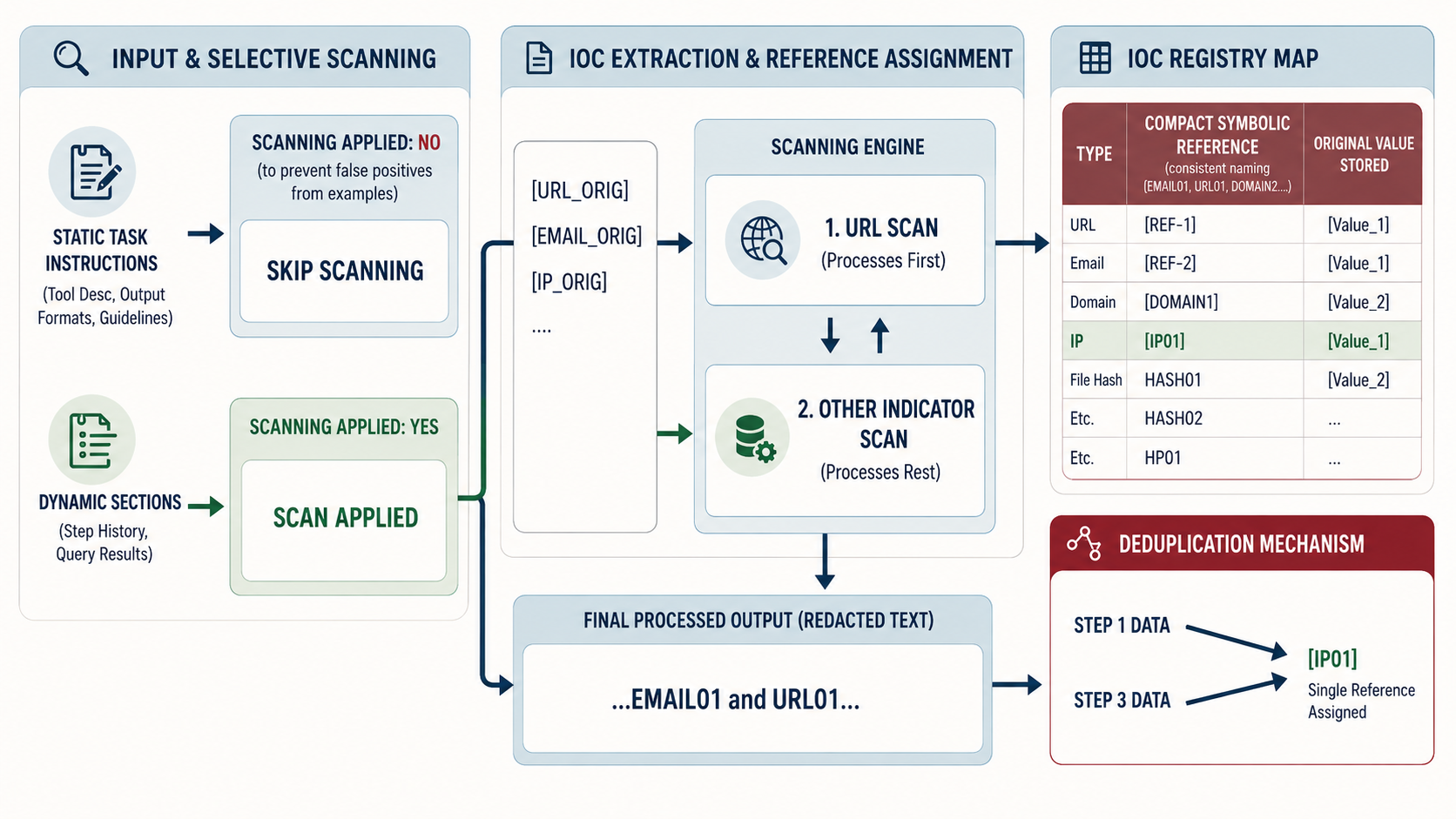
[Figure 3: The IOC extraction pipeline.]
IOC Prompt Adjustment
Extraction alone is not sufficient. Even when the input prompt uses symbolic references, the model may revert to generating raw IOC values in its output, particularly if the system prompt or prior conversation history contains raw values, or if the model has seen the actual value during context processing.
To address this, we developed an IOC prompt adjustment, a compact, structured appendix appended to the user prompt that explicitly instructs the model on how to handle IOCs. The adjustment establishes three rules:
In reasoning
Always use symbolic references. Never write raw email addresses, URLs, IP addresses, or domains. Instead of writing a raw sender address followed by a description of the campaign, use the corresponding reference identifier throughout.
In the indicators field
Distinguish between known and new IOCs.
For indicators already present in the registry, use the symbolic reference. For indicators being reported for the first time, newly discovered in the current step's results, use the actual value, so it can be added to the registry for subsequent steps.
Relevance filtering
Only include IOCs that are directly relevant to the current investigation step. Do not copy all registry entries into every response.
The IOC prompt adjustment includes a populated copy of the current IOC registry, mapping each reference to its actual value, so the model can look up identifiers when constructing its reasoning. It also provides correct and incorrect examples, a validation checklist, and explicit rejection criteria.
We tested two versions of the IOC prompt adjustment:
- A comprehensive version with extensive examples and redundant emphasis
- An optimized version that distills the same rules more concisely.
Both achieved equivalent compliance rates, suggesting that clarity of instruction matters more than volume of repetition.
Input Preprocessing
The second component addresses a problem upstream of the model: malformed tool output.
Security tool APIs sometimes return URL lists as comma-separated values within a single string field, rather than as properly structured arrays. When passed through to the model as-is, these malformed strings caused structured output generation failures.
Our preprocessing step detects comma-separated URL patterns in query results and reformats them into clean, numbered lists before the text reaches the model. This small transformation, applied before IOC extraction, resolved the structured output validity issue independently of the other components.
Security Alert Correlation Evaluation
Setup
We evaluated the system using 10 real-world investigation traces captured from production. Each trace represents a complete phishing investigation conducted through several security tools, containing the system prompt, user prompt with step history, and the raw query results that the model must reason about.
For each trace, we ran 10 iterations with the same prompt configuration, measuring two metrics:
- JSON validity: Whether the model's response parsed as valid a structured output.
- IOC reference compliance: Whether the response used symbolic references exclusively in its reasoning field (no raw IOC values) and correctly distinguished between known references and new actual values in its indicators field.
We tested four configurations to isolate the contribution of each component.
Results
JSON validity
The baseline configuration produced valid JSON in approximately 80% of responses. Adding URL preprocessing alone brought this to nearly 100%, confirming that malformed tool output - not model capability - was the root cause of parsing failures. All configurations that included the enforcer achieved 100% validity.
IOC compliance
Without the IOC prompt adjustment, the model never spontaneously adopted symbolic references, compliance was 0% regardless of whether the input text had been processed by the IOC manager. With the prompt adjustment, compliance jumped to 100% across all traces and iterations. This held for both the comprehensive and optimized prompt adjustment variants.
Component independence
The results reveal a clean separation of concerns: URL preprocessing fixes JSON validity, the IOC manager fixes IOC compliance, and provides the underlying registry and extraction infrastructure that makes both possible.
Qualitative Observations
Beyond the quantitative metrics, we observed several qualitative improvements:
- Reduced prompt size. Replacing verbose URLs (some exceeding 200 characters) with compact references, meaningfully reduced token consumption in the step history, particularly for investigations involving newsletter or marketing emails with numerous tracking links.
- Consistent cross-step tracking. The registry ensured that the same IOC received the same reference throughout the investigation, this is particularly helpful with IOCs referenced throughout multiple steps in the investigation.
- Focused indicator reporting. With the IOC manager's relevance-filtering instruction, the model stopped dumping entire registries into its responses. Indicator lists became proportional to the current step's scope rather than the investigation's total history.
AI Security Alert Correlation Discussion
Why extraction without the IOC prompt adjustment fails
A natural question is why input-side extraction alone does not work. If the prompt already contains a symbolic reference instead of a raw email address, why does the model still generate raw values in its output?
The answer lies in how LLMs process context.
The model has access to the full prompt, including sections where the actual IOC value may still appear, task-specific inputs, quoted alert descriptions, or the registry itself.
More fundamentally, the model's training distribution contains overwhelmingly more examples of raw IOC values than of symbolic reference systems. Without explicit instruction, the model defaults to the more familiar pattern.
This finding has a broader implication for LLM-based agent design: transforming the input is necessary but not sufficient when you need the model to adopt a non-default output convention. Explicit behavioral instruction, the IOC prompt adjustment, bridges the gap.
Limitations
Our evaluation has several limitations worth noting. All traces were drawn from a single investigation type (phishing via specific security tools). While the IOC types encountered are representative of broader security operations, there are additional evaluations to be done.
The evaluation was conducted with a single model (chatGPT4.1). Different models may exhibit different compliance characteristics, and the prompt mechanism may need tuning for models with different instruction-following tendencies.
Finally, our compliance metric is binary - a response either uses references correctly or it does not. A more granular metric could capture partial compliance and might reveal subtler performance trends across model versions or investigation complexities.
Conclusion
We presented an IOC indexing system for AI-driven security investigations that addresses three interrelated problems: token bloat from repeated raw indicator values, inconsistent IOC tracking across investigation steps, and structural fragility in model-generated structured outputs.
The system combines automated IOC extraction with symbolic reference assignment, explicit behavioral guidance through prompt engineering, and input preprocessing to handle malformed tool output. Across 100 evaluation runs on 10 production investigation traces, the full system achieved 100% JSON validity and 100% IOC reference compliance, up from approximately 80% and 0%, respectively, at baseline.
The key insight is that managing IOCs in the context of LLM-based agents requires intervention at both the input and output stages. Extraction and indexing normalize the input, but only explicit prompt-level guidance ensures the model adopts the reference convention in its generated output. Neither component alone is sufficient; together, they eliminate the problem entirely.
As SOC automation platforms handle increasingly complex, multi-step investigations, structured approaches to managing the information that flows through the agent's context window become essential. IOC indexing is one instance of a more general pattern: giving the agent a well-organized working memory that scales with investigation complexity rather than against it.
TL;DR: SOC automation is designed to help organizations automate manual, repetitive tasks, but it’s not always straightforward to implement said automation. SOC automation projects can stall for reasons including teams lacking the skills or time needed to build workflows, automation tools not having the required integrations, and analysts not trusting the output they can’t inspect. Legion automates your SOC by learning your workflows, watching how your analysts actually investigate, combining those insights with logs, cases, and more, then running proven workflows with autonomous operations.
SOC automation is on every security leader’s agenda. In a recent report, 61% of CISOs said they are currently investing in automation. Our experience is that the true proportion of CISOs thinking about automation as a solution to problems like growing MTTRs or alert overwhelm right now is closer to 100%.
But deciding to invest in (and even getting a budget for) SOC automation is the easy part.
This guide covers what comes after you get the go-ahead to push for automation. It includes the automation approaches available today, which workflows are worth automating, the reasons SOC automation programs stall, and a practical sequence for implementing one. It also covers how and where Legion fits into a SOC automation project.
>> Short on time and want to see what SOC automation looks like in practice? Watch a 3-minute demo of Legion in action.
What Is SOC Automation?
Modern SOC teams look for agentic automation tools like Legion to actually learn how your team works, pull in context from outside the SOC, and recommend and perform automations that improve how SOCs function.
Of course, automation is not new to the SOC.
At a high level, SOC automation uses technology (including, but not limited to, AI) to perform security operations work that an analyst would otherwise have to do manually. A SOC might want to automate work like gathering context on an alert, running an indicator lookup, opening a ticket, blocking a domain, isolating an endpoint, and writing up the record afterward.
And security teams have been creating their own scripts to automate routine processes and relying on deterministic SIEM automations since at least the late 1990s. Security Orchestration, Automation and Response (SOAR) tools, which automates predetermined playbooks, have been heavily leveraged in SOCs for over a decade now.
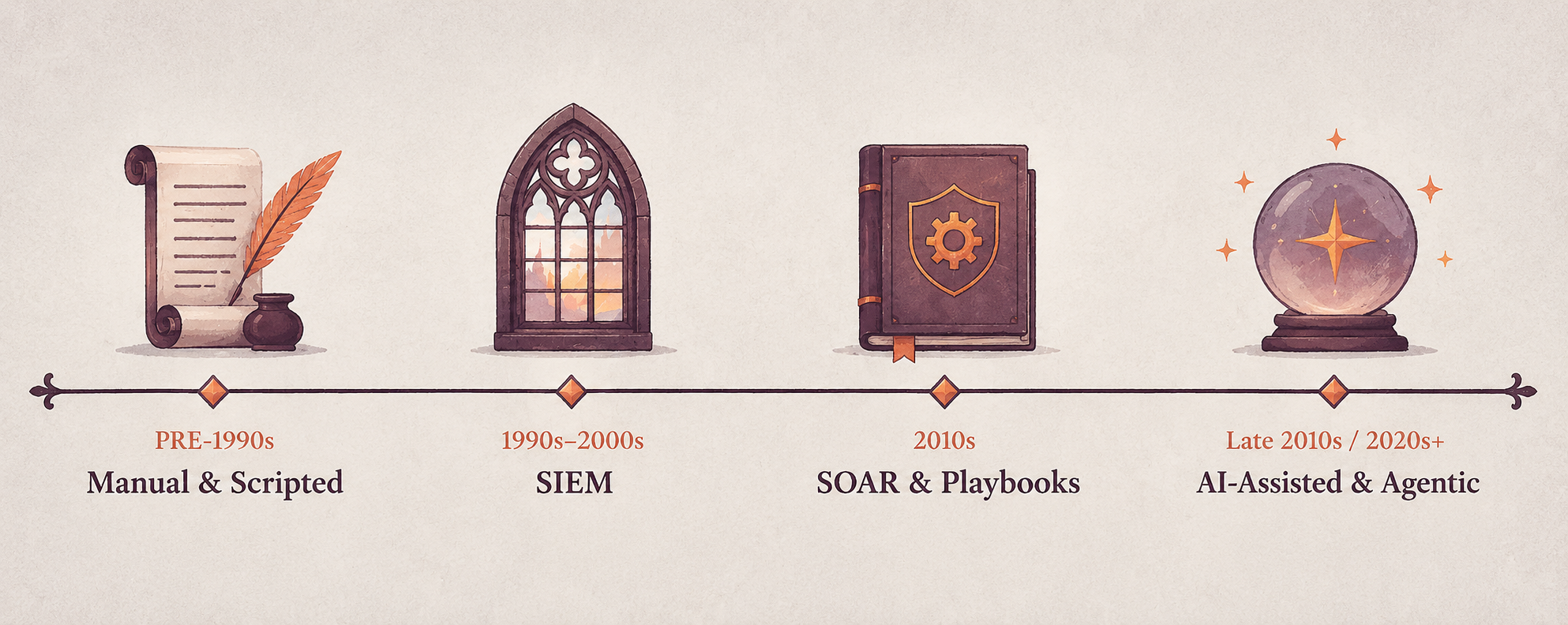
But agentic automation is the present and future of SOC automation. It's what enterprises like Virgin Money are using right now to cut alert volumes and support overwhelmed SOC teams.
Learn more about how SOC automation helped Virgin Money reduce its alert backlog by more than 60% in less than two months.
Why Automate in the SOC?
The business case for SOC automation is simple.
Analysts can’t keep up with the number of tasks they have to do on a day-to-day basis, particularly now with the Hugging Face / OpenAI incident indicating fully agentic attacks with tens of thousands of uncorrelated alerts portending that real incidents are getting missed (or spotted too slowly), and breaches happen that should have been stopped.
NIST's incident response guidance (SP 800-61 Rev. 3) notes that the volume of potentially adverse events is generally too high for analysts to review manually, while response speed has to reflect how time-critical an incident is.
Automation helps address both problems by:
- Reducing the amount of routine work analysts have to handle themselves. 35% of security teams say they feel overwhelmed with repetitive manual tasks.
- Allowing investigations and response actions to happen faster. In one study, organizations using AI and automation extensively across security operations shortened the breach lifecycle by an average of 80 days and reduced breach costs by an average of $1.9 million.
But speed and volume are not the only reasons for SOC automation. Automation can also make SOC processes more consistent. With an automation layer in place, the same investigation steps can be followed each time an alert occurs, rather than the process varying depending on which analyst handles it.
This aligns with the broader emphasis on repeatability in NIST CSF 2.0, which describes cybersecurity risk management progressing from “irregular, case-by-case basis” at CSF Tier 1 to “Repeatable” practices at CSF Tier 3.
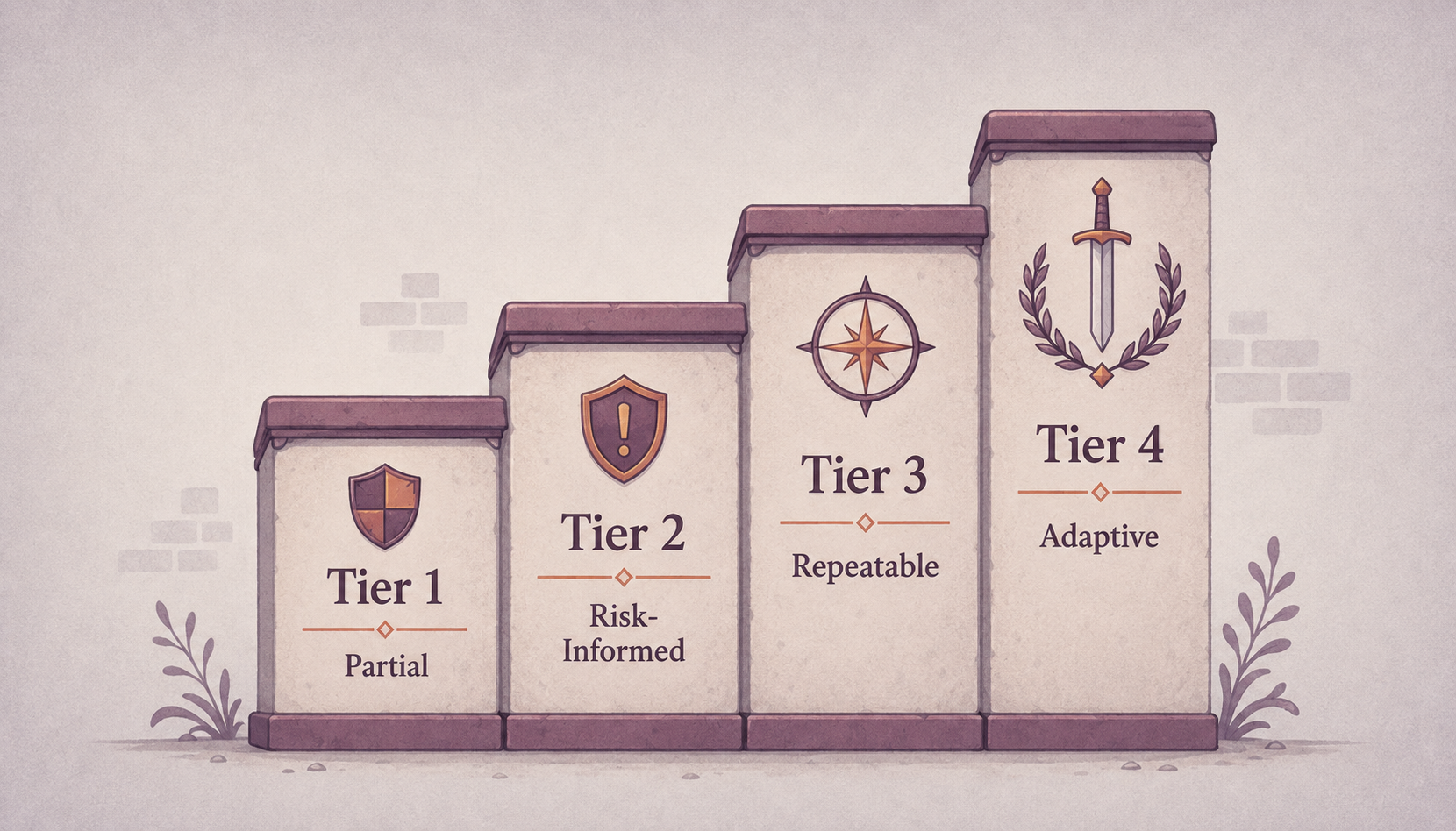
Does SOC automation replace people?
The short answer is no. The long answer is that SOC automation does change the day-to-day for people who work in security operations. It saves the SOC’s best people from burning out on routine tasks and lets them do the interesting investigative work that requires human insights as well as leading them to become less analyst and more orchestrator, so you can retain them for longer and reduce staff churn.
As MITRE's 11 Strategies of a World-Class Cybersecurity Operations Center puts it: “Automation assists, but does not fully replace, the judgment of advanced human analysts.”
7 Automation Technologies SOCs Use
SOC automation ideally is a collection of technologies that, over time, automate more and more of what security analysts do.
Below are some of the most common approaches to SOC automation.
- Scripts and APIs. Scripting tools like Python and PowerShell can be used to automate tasks that are repetitive. This can be things like looking up an IP address, collecting information from an endpoint, updating a blocklist, or passing information between different security products. These automations can save time, but they also take time upfront because they need to be built and continuous time to be maintained.
- EDR automations. Endpoint detection and response (EDR) is security software that monitors devices like laptops, desktops, and servers for suspicious activity and helps security teams investigate and respond to threats, largely by pattern matching.
- Built-in SIEM automations. Security information and event management (SIEM) platforms collect security data from different systems, compare activity across them, and surface an alert when something matches a predefined rule. Security teams can view and analyze that data in one central place rather than having to check every system (e.g., firewalls, endpoints, servers, etc.) individually. Some modern SIEMs can also automatically take certain actions after they detect a threat.
- SOAR. SOAR platforms take automation even further than SIEMs. They connect different security tools and run predefined workflows (usually called playbooks).
- XDR. Extended Detection and Response (XDR) brings together security data from multiple areas, such as endpoints, email, networks, cloud systems, and identities, to detect and respond to threats across an organization.
- Security data pipelines. Security data pipelines manage security data before it reaches the SIEM. They can automatically collect, parse, normalize, enrich, filter, and route telemetry, helping teams control the volume and quality of data reaching their downstream security tools.
- AI and security agents (Agentic Security Operations platforms). Artificial intelligence (AI) and security agents automate more complex SOC work that previously needed a human analyst to think through and decide what to do. For example, instead of just following a fixed rule, an AI agent might investigate an alert, gather information from different security tools, work out what likely happened, suggest what to do next, and sometimes take action itself.
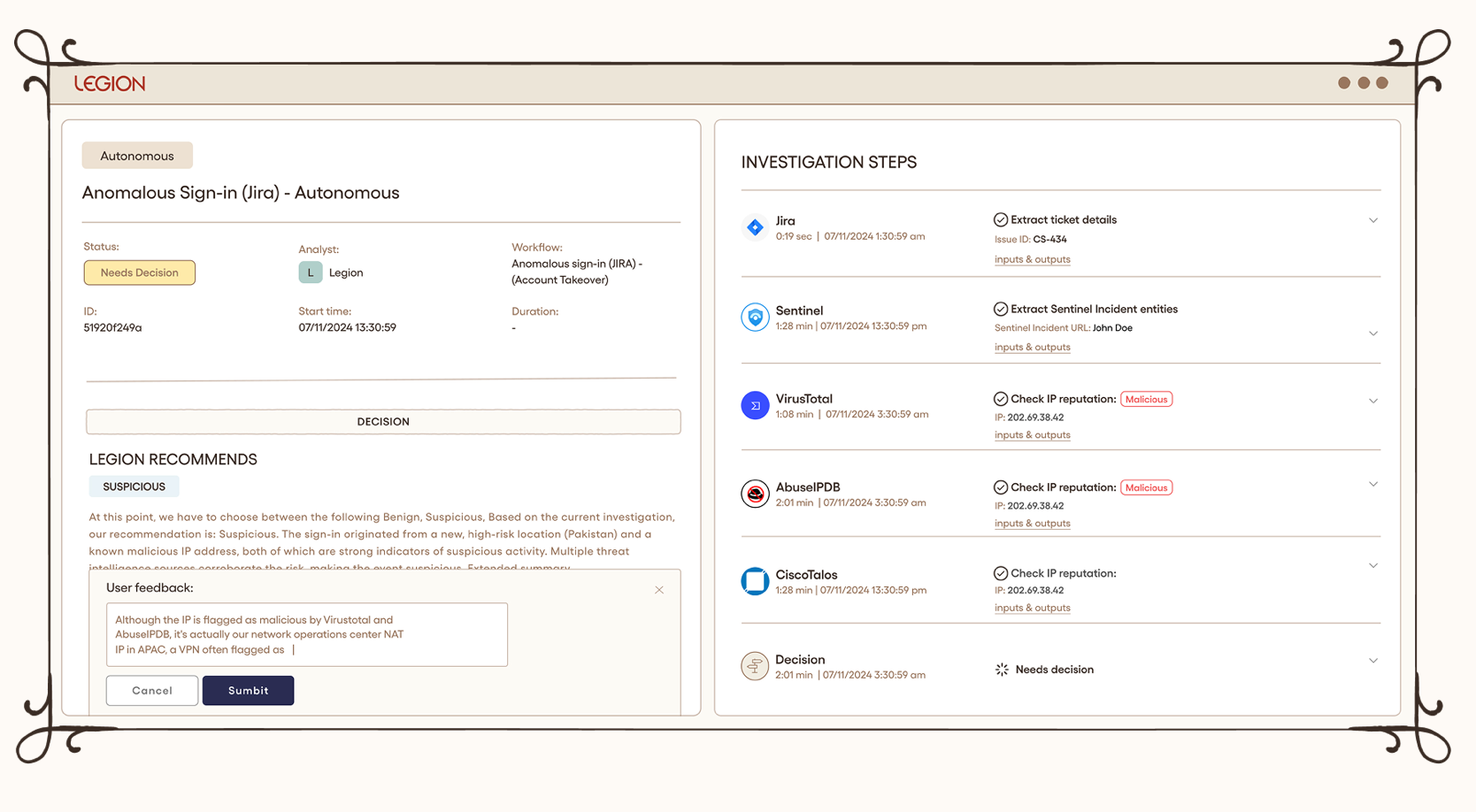
See how Legion makes SOC workflows repeatable and consistent.
Agentic Security Operations platforms like Legion don’t necessarily replace SIEM, SOAR, EDR, or similar tools but rather work on top of or within those tools, using their data and capabilities to automate more of the analyst’s job.
In one study, three in four analysts reported that AI tools have already made their work more satisfying by reducing alert fatigue and automating repetitive triage.
57% of organizations report success using AI for alert triage and risk scoring, and 26% report success automating incident response.
Tier 1, 2 and 3 SOC Automation Use Cases
A common way to think about automation is by SOC tier.
Tier 1 (triage)
Tier 1 SOC work is where automation pays back the fastest, because the work is repetitive and the cost of an error is relatively low. Learn more about how Legion automates tier 1 SOC tasks.
Common tier-1 and alert triage workflows include:
- Alert enrichment.
- Indicator and reputation lookups.
- Phishing analysis.
- Identity and system context gathering
- Duplicate alert identification
- Alert classification and prioritization.
- Ticket creation.
- Initial false-positive handling.
Automating this type of work also broadens the scope of what can be categorized as Tier 1, because with agents running triage and investigation, security operations centers can take on more noise, more alerts, and worry less about false-positive-burnout.
Tier 2 (investigation and response)
Tier 2 is where analysts move from routine alert handling into deeper investigation and potentially disruptive response actions, so automation needs tighter controls.
An example is rule tuning. Analysts see which detections generate repeat noise, trace it back to the benign activity behind it, and narrow the logic so the rule stops firing on it.
Tier 3 (threat hunting and advanced investigations)
Tier 3 tasks can include running threat-hunting queries, IOC sweeps, cross-environment investigations, hypothesis generation, and advanced forensic analysis.
This is particularly interesting for AI and agentic automation because these investigations do not always follow exactly the same path.
An analyst investigating suspicious authentication activity, for example, may change direction depending on what each query reveals. An agent capable of reasoning across the investigation can potentially do the same rather than relying on one fixed playbook.
But SOC Automation Use Cases Don’t Have to Be Defined By Tier
SOC tiers are a useful way to categorize SOC automation use cases, but the same types of work often appear across different tiers.
A better question is: “What makes a workflow a good fit for automation?”
In our experience, a SOC task is generally a good candidate for automation when it:
- Repeats. Analysts keep doing essentially the same task over and over again.
- Happens across different tools. Analysts work in SaaS consoles, EDR dashboards, legacy systems, cloud panels, and internal portals.
- Needs security context to answer. Someone has to know what the system does, who owns it, and whether the activity is expected or unusual (i.e., judgment that is hard to script).
Why SOC Automation Projects Fail
One of the most common reasons why SOC automation projects fail to deliver value in the enterprise is a lack of skills or time to build workflows.
More than half (52.6%) of organizations cite skills gaps as a barrier to automation, 44% say automation and AI roles are difficult to hire for, and 35% report not having the internal skills needed to build or maintain workflows at all.
Another reason is integration problems. 31% point out integration gaps between tools. If an automation can't access or correctly interpret the information an analyst uses, then it can't reliably replicate the investigation.
Then there’s trust, or lack of it. 47.1% of security leaders distrust automated results. Teams need to be able to see what an automation did and why before they are comfortable with giving it more control.
How Legion Automates The SOC
Legion is the agentic security operations platform that automates enterprise SOC work.
What we’ve found is that most SOC work is repetitive but not yet standardized. Or it might be the case that playbooks exist, but they are likely to have been written by engineers who don’t run the workflow themselves, and they go out of date as soon as a tool or an interface changes.
That’s why Legion doesn’t rely on written process documentation. Instead, we work by learning from what your analysts actually do and combine that with wider context (including documented processes, logs, cases, and more).
We uses vision models to observe how and why experienced people investigate the way that they do, then turn that into a visual workflow the team can inspect and edit. This means there’s no need for you to build API integrations or set up connectors, and Legion can also work with internal tools that have no existing integration.
Every action Legion takes is recorded with the evidence behind it, including screenshots of the actual screens it reads, so you can check how it reached the conclusion instead of trusting that it is correct.
As Neil Robinson, CISO at Virgin Money, put it: "Legion has just completely transformed the way I think about automation. You take your existing operation and really just 10x it."
How to Implement SOC Automation
If we were to advise an organization on how to get automation working (and keep it working) within their SOC, we would suggest the following steps.
1. Decide who owns SOC automation
Traditionally, security engineering teams would build SOC automations for analysts.
The problem with this is that engineers don’t necessarily do those investigations themselves, which means that the automation may or may not reflect how investigations happen in real life. Plus, it leaves analysts dependent on engineering when something needs to be fixed or updated, which creates a bottleneck (this has been a longstanding issue with SOAR tools). It is further exacerbated by the fact that most automation systems require clean APIs, which, particularly for homegrown or legacy systems, simply don’t exist.
There’s also the risk of important knowledge leaving with the person who built the automation. Other people may know what the automation does, but not why it was designed the way that it was. Then, when a security process or tool changes, nobody will know how to update it, and the automation will be abandoned.
The solution is automation owned by analysts. The people who run the investigations should be able to build and update their own automations, they should incorporate ALL tools in the enterprise, and be able to document the reasoning behind each one so that knowledge stays with the organization even when people leave.
Legion is built specifically for this. Analysts create workflows by doing investigations they normally would, without writing any code or integrations, and what comes out is a visual map they can inspect and edit themselves, so updating it doesn’t mean going back to engineering.
2. Record how SOC work is done now
Before you automate your SOC tasks, you first need to understand how analysts actually perform them.
One way to do this is to ask analysts to write down each step they take. We don’t recommend it because what analysts write and what analysts do might be different:
- Small steps can be forgotten.
- Two analysts can describe the same workflow differently.
- The document goes out of date as soon as a tool or interface changes.
A far better approach is to record analysts in real time. That’s what Legion does. It observes analysts while they work, capturing how they investigate alerts, which tools they use, what steps they take, and the decisions they make, then turns these into a workflow diagram that also incorporates best practices and optimal processes that the AI creates so you can reduce inefficiencies created by the ‘duct tape and thumbtack’ approach that is often the status quo.
You get two things at the end of this: a) the actual sequence of steps analysts follow, which you can then automate, and b) a view of how the team works, i.e., which tasks are most time-consuming, where investigations get stuck, and where analysts approach the same situation differently.
3. Choose the first SOC automation candidate
Once you know how your team works, you can then decide which workflow to automate first.
Choose one workflow to begin with, ideally something that analysts deal with frequently and investigate roughly the same way each time.
A good example is phishing alerts. Security teams typically receive a lot of phishing alerts, and the investigation usually follows a fairly standard process, i.e., check the email, inspect links and attachments, look at the sender, determine whether it’s malicious, and decide what to do next.
Leave the more complex cases that depend heavily on human judgment until you’ve built up confidence in your automation process.
4. Map where the context lives
Identify which systems have the information analysts need for their investigations.
For instance, an analyst investigating a suspicious activity might need to check the user’s identity and permissions, information about the affected device, previous incidents, or email records. This information could be spread across several different systems.
Then, make sure that automation can actually retrieve and use this information when it needs to. Traditional SOC automation usually connects to tools via APIs, which can exclude internal or legacy systems that don’t have them, so analysts might still have to perform missing steps manually.
On the other hand, a browser-based automation platform like Legion can access the exact same information that analysts can.
5. Baseline the workflow before you automate it
Measuring how much time a workflow takes before you automate it allows you to later prove that the automation actually saved time.
The calculation is simple:
Time spent = alert volume x handling time per alert.
For example, if your team gets 100 phishing alerts a week and each alert takes 10 minutes to investigate on average, that’s about 1,000 minutes of analyst work. After automation, you can measure that exact same workflow again and compare the number.
6. Whitebox auditability is key
Legion is fully white box, so you can deploy it right away. There’s no supervised on-ramp required, because you can see exactly how it thinks from the start. Every action, every piece of context, and every conclusion is fully visible and editable, never a black box you're asked to trust blindly. That's what makes it predictable immediately: you know why it reached a verdict, you can correct it on the spot, and it'll apply that correction consistently from then on.
7. Expand to other SOC workflows
Once you get one workflow running successfully, start automating another one by taking it through the same process - observing how analysts do it, building the automation, supervising it, and only then considering making it autonomous.
Automate Your SOC with Legion
Ready to automate your SOC? Get a demo of Legion today.

A practical guide to SOC automation — what it means today, why it often fails, and how Legion helps teams automate without integrations.

Security investigations rarely start with all the context needed to reach the right decision, and we see plenty of examples of this in real environments. Let’s look at an anonymized but recent example to show why AI knowledge management matters in security investigations.
Every quarter, a publicly traded enterprise’s finance team uploads the company's still-unreleased earnings package which consists of revenue, forecasts, and results that won't go public until earnings day to a restricted SharePoint site for executive review. The package contains sensitive financial information so the upload triggers a DLP alert for review. Pretty standard stuff.
That alert triggered an analyst investigation where the incident response team confirmed the uploader was indeed a part of the reporting team, the destination was the approved site, and access was limited to only the small group of executives who were supposed to see it. Nothing dangerous, so it was safely closed as benign. This single investigation established the conditions that made the activity safe: who was expected to upload the file, where it was supposed to go, and who was supposed to have access.
But the lingering question is… what should be carried forward and/or codified from that investigation? This question is one that we’re obsessed with answering and helping our customers address.
With Legion, instead of carrying forward a single verdict from a single investigation, enterprises can uniquely capture the conditions that each investigation establishes together with the underlying and complementing evidence behind them. On a continuous basis. This holistic view matters, particularly in today’s world, because the same activity type doesn't always mean the same thing, and this is a constantly moving target as environments change. Using our ‘finance team uploading earnings files into SharePoint’ example, one of the conditions that was met, who had access to the folder, can change very quickly. So perhaps the next time, the package is the same, the site is the same, the timing is the same, but the folder may have been shared with an external account or a new unverified user.
The challenge isn't collecting more data. Most enterprises already have plenty of it, scattered across identity providers, endpoints, SaaS apps, and past investigations. The challenge is turning that raw data into knowledge that's reliable enough, and accessible enough, for agents to actually reason over: preserving what made something true, connecting it to the organizational context around it, and continuously testing whether it still holds as the organization changes.
Knowledge (including AI knowledge) needs conditions, not conclusions
That's why Legion represents organizational knowledge and context as a continuously evolving model that connects identities, teams, systems, data, access, behaviors, and the evidence establishing how they all relate to one another.
Legion’s knowledge isn't built from investigations alone. Legion brings information from across the environment, including identities, access, systems, infrastructure, and the relationships between them, into the same layer. Past investigations add another important source, giving Legion an accumulated history from day one: what analysts already checked, what they found, and the evidence that supported those decisions.
Raw data on its own doesn't tell an agent much. An identity, a login, a file upload, a network connection, in isolation, are just data points. What makes this usable is the relationship it has to everything around it. That's what turns data into knowledge an agent can actually act on: not just what happened, but who was involved, what it touched, what normally follows it, and what it means if it doesn't.
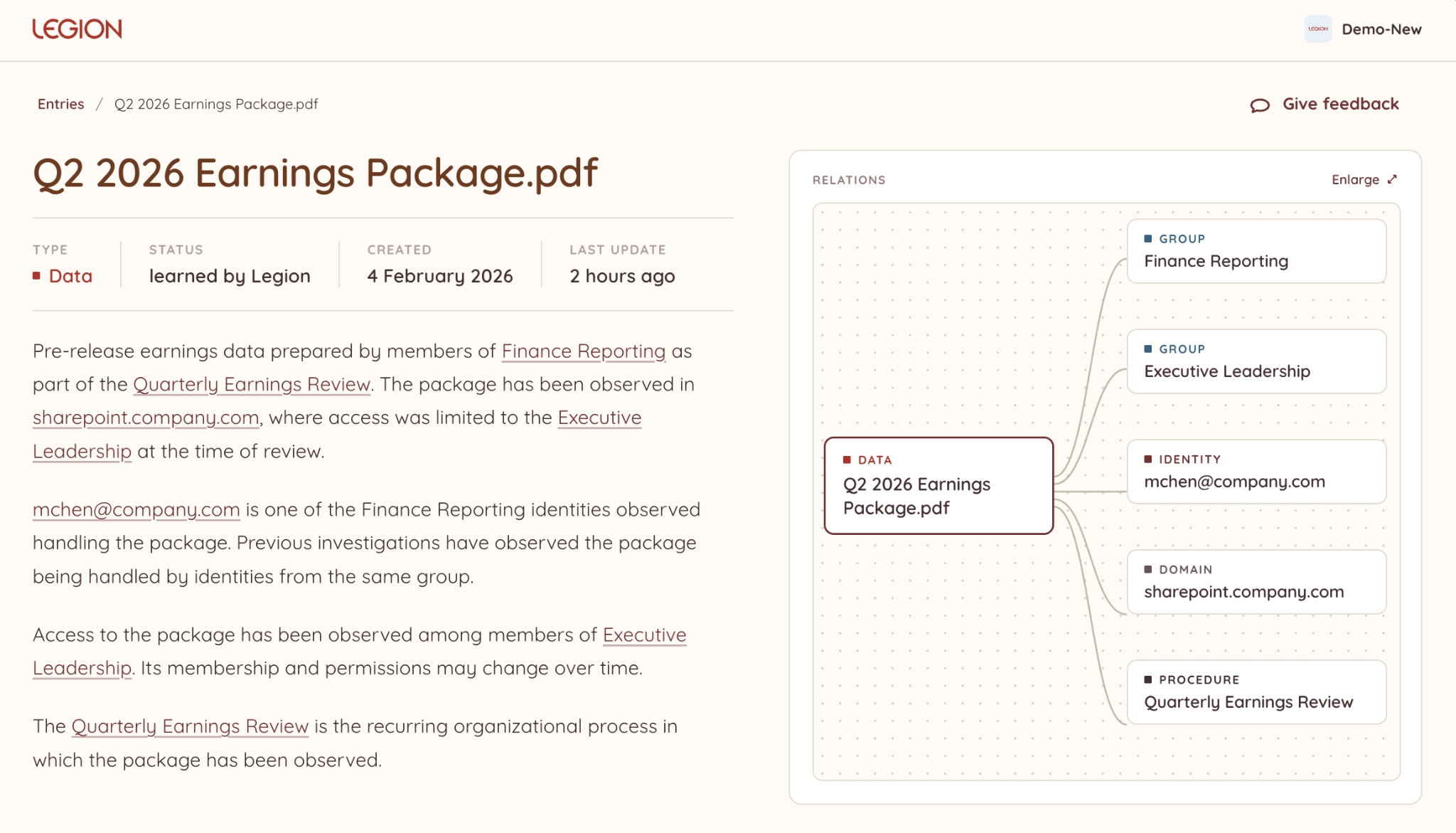
That gap between "looks the same" and "is the same" is hard to manage at enterprise scale, and Legion Knowledge is designed to connect the data flowing in and out of thousands of employees, dozens of teams, hundreds of new and existing tools changing in real time, and access to relationships that change over time. This empowers security teams, and their agents, to stay on top of every legitimate exception, relationship, and operating pattern at agentic scale.
We see all the time that not everything security tools observe should become codified as organizational best practices. Before new information can influence future investigations, there needs to be enough evidence to support it. Otherwise, an observation can become an assumption that extends beyond what the evidence actually established, and an assumption an agent can't verify is a liability, not an insight.
Research on memory management in LLM agents shows why this matters. Researchers at Harvard, Michigan State, and other institutions found that agents exhibit what they call "experience-following": the more similar a new task is to an experience retrieved from memory, the more likely the agent is to follow that past execution. That's useful when the retrieved experience applies. When it doesn't, the agent can carry an assumption from one task into the next that the new evidence doesn't support. Reliable knowledge is what keeps that experience-following useful instead of risky.
Useful organizational knowledge is more than a collection of isolated facts. The relationships and intricacies between those facts provide the context needed to interpret them: not just what is known about an identity, system, or activity, but how each relates to the organization around it. Preserving those relationships is also what surfaces the insights security teams actually need: correlation across seemingly unrelated events, the blast radius of a compromised identity or system, and where the real detection opportunities sit. None of that comes from more data. It comes from data that's been made reliable enough to connect.
Strong evidence can still become outdated without AI knowledge management
Preserving the right conditions solves one problem, but it creates another: conditions change.
In our finance example, previous investigations may provide strong evidence that only a specific group of executives had access to the folder. That evidence doesn't become wrong when someone new is granted access; they could be, simply, a new member of the exec team.
That's why Legion separates confidence from freshness: confidence reflects how strongly the evidence supports what is known, while freshness reflects how recently those conditions have been verified.
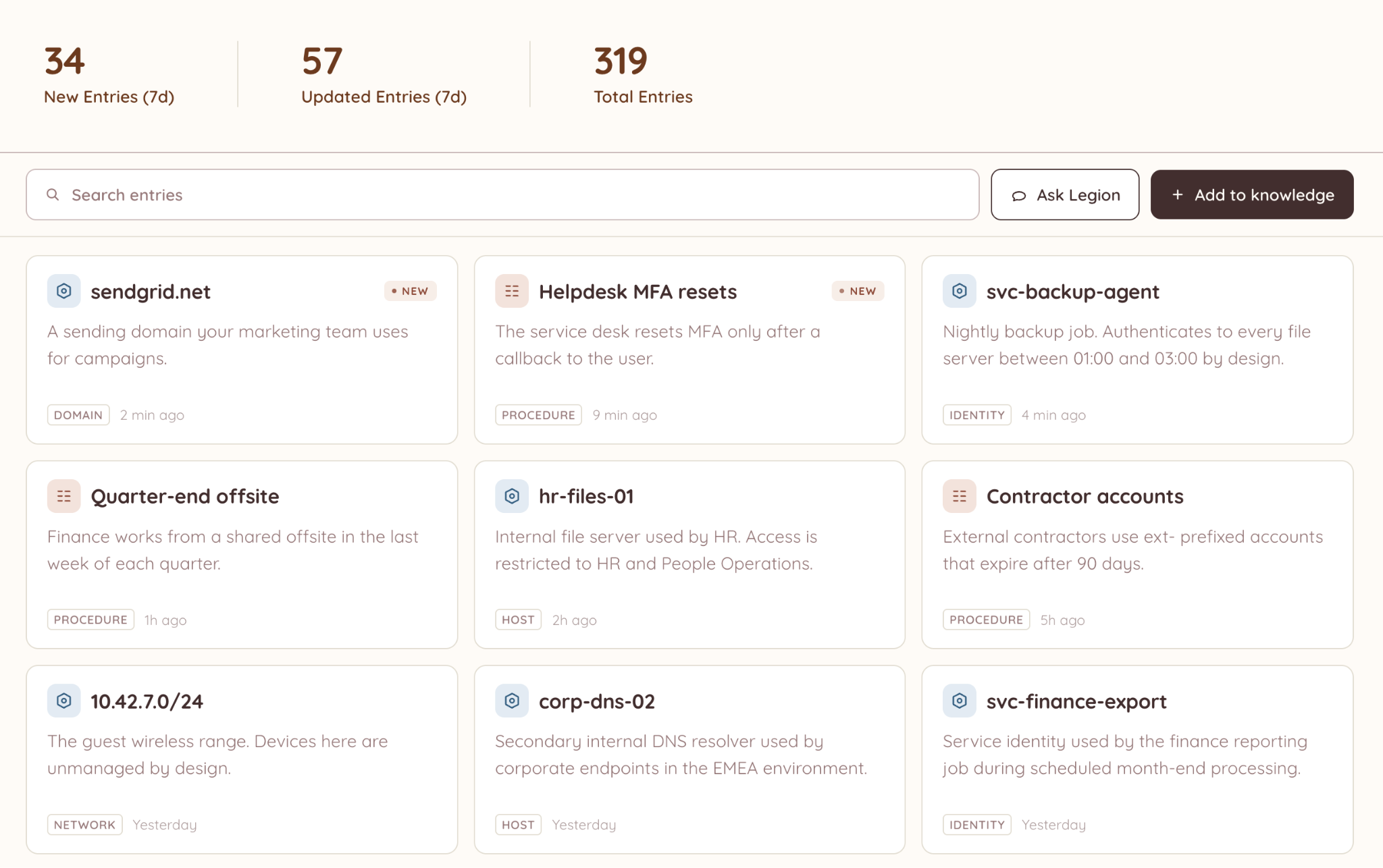
That distinction matters when existing knowledge is used in a new investigation, or acted on by an agent. Something can remain strongly supported by evidence while becoming too stale to rely on without verifying that the same conditions still hold. An agent that can't tell the difference between confident-and-fresh and confident-and-stale is an agent that will eventually act on the wrong assumption.
New evidence has to reconcile with existing knowledge
Every new investigation produces information that could become organizational knowledge. But observing something doesn't automatically make it a best practice. Before new evidence changes the output, Legion evaluates it against what the organization already knows. It may reinforce something already established, add something new, or contradict it.
New evidence doesn't necessarily make the old evidence wrong. Both may be valid: one describes what was true when it was established, while the other shows that something has since changed. Preserving the evidence and timing behind both lets security teams understand that change rather than simply replacing one version with another.
This makes evaluation part of the learning process, not just a gate at the moment knowledge is created. An investigation produces new evidence, that evidence is evaluated against existing knowledge, and only then can it change what Legion, and the agents built on top of it, carry into future investigations.
Learning is automatic. Authority isn't.
Automatic learning shouldn't make organizational knowledge opaque to the humans who rely on it. If that knowledge is going to shape future investigations, and the agents acting on them, the people who know the organization should be able to see what was learned and contribute to its quality.
Human feedback adds another signal to that process. A validation can strengthen what Legion has learned, while a correction or rejection can challenge it. And for people to make those judgments, the knowledge has to remain traceable: where it came from, the evidence behind it, and how it has changed over time.
AI knowledge has to remain trustworthy
Organizational knowledge is useful only as long as there is a reason to keep trusting it. Something can be well supported and still become outdated. New evidence can strengthen what is already known or show that the environment has changed. And a conclusion that was right six months ago shouldn't become an assumption simply because nothing has challenged it yet.
That's the distinction we built Legion around. The goal isn't simply to collect more data about an organization. It's to make that data reliable and accessible enough, for analysts and agents alike, to know what still deserves to be trusted.

How Legion turns security data into reliable, AI agent-ready knowledge to preserve evidence, track freshness, and surface what still deserves trust.

➤ Problem: A backlog of tens of thousands of security alerts and overwhelmed analysts who could not keep up.
➤ Solution: Legion's agentic SOC automation, which learns existing SOC workflows and takes over routine investigations transparently.
➤ Outcome: Legion's agentic SOC automation processed 30,000 backlogged alerts for Virgin Money in under two months, leading to a 60% reduction in their alert backlog.
Neil Robinson, CISO at Virgin Money (a major UK financial services brand and retail bank), was facing a familiar SOC problem: a massive volume of alerts overwhelming their security operations team.
Protecting a large, high-profile attack surface meant that Virgin Money had to deal with a backlog of around 50,000 security alerts. This placed immense pressure on their ~200-person security team.
Within two months of deploying Legion’s Agentic Security Operations Platform to automate repetitive SOC workflows, Virgin Money had reduced its alert backlog by more than 60%.
Alert reduction was the SOC automation benefit Robinson wanted. Legion's other core advantage was that it let his team automate existing security workflows without forcing his SOC to redesign its operations.
“Legion has just completely transformed the way I think about automation. You take your existing operation and really just 10x it.” - Neil Robinson, CISO at Virgin Money
A 200-person SOC with a 50,000 alert backlog
Virgin Money relies on a security organization of around 200 people to protect their bank and its more than 6 million customers from cybersecurity threats.
Like many modern financial institutions, Virgin Money offers a huge range of digital banking services from current accounts to mortgages. They also provide customers with in-person services through branches and hubs.
The digital infrastructure required to support this broad business creates a large attack surface and a huge volume of security alerts.
Many of these alerts are low-value or false positives. Yet they still drain analyst attention that could be better spent on higher-value security investigations. The result was the alert fatigue that security teams know all too well. Too many alerts, too little time.
To solve alert fatigue, Virgin Money wanted to reduce the time analysts spent on low-value alerts. But they needed automation their analysts could inspect and trust.
Transparent SOC automation
Robinson estimates that Virgin Money reviews around 100 new security solutions each year, many of them focused on automation. And for each, integrity and security are top concerns.
More specifically, Robinson wanted whatever solution Virgin Money chose to guarantee that:
- Automation inside a security operation behaves predictably.
- Analysts can see what the automation is doing and why it reached a given decision.
- The system can be trusted with sensitive security workflows.
Robinson was immediately impressed that Legion uses vision models to watch how experienced analysts work on screen, so Virgin Money did not have to define every workflow by hand.
Legion can be deployed on an engineer's desktop to observe the sequence of actions in an investigation and turn that activity into a visual workflow.
“It feels a little bit like magic when you first turn it on, but then it gives you this really nice workflow diagram where you can see exactly what it's doing.” - Neil Robinson, CISO at Virgin Money
Legion did not require Virgin Money to replace its existing SOC processes. Instead, the platform learned how analysts already handled alerts and turned those operating patterns into repeatable automated workflows.
Using vision models combined with other methods to observe how analysts investigate alerts, Legion helps enterprises like Virgin Money either codify SOC processes or optimize them into visual agentic workflows that the team can inspect.
In Virgin Money’s SOC, Legion was able to rapidly capture their operating rhythm rather than forcing the team into a predefined process. Critically for Robinson, the way Legion understood Virgin Money’s SOC (and automated tasks) was fully transparent and traceable.
“Legion gives you this really nice workflow diagram so you can see exactly what it's doing.” - Neil Robinson, CISO at Virgin Money
For Virgin Money, that visibility made automation easier to trust.
Agentic SOC automation cuts alert backlog by 60%
Security teams often accumulate years of operational knowledge inside analyst behavior. This institutional and practitioner knowledge can include which systems to check, what evidence matters, what conditions trigger escalation, and how investigations move between tools.
Much of this knowledge is only partially written down. Understanding it requires observing people at work and then translating those observations into automated workflows that use the same tools in the same or improved ways.
This is agentic SOC automation, where the system can carry out parts of investigations using the same workflows already developed by experienced security staff.
For Virgin Money, deploying Legion’s agentic automation solution cut the alert backlog by 60% in under two months, from approximately 50,000 alerts to 20,000. Automating repeatable investigative work freed analysts to spend more time on security tasks requiring judgment and deeper analysis.
It also changed how the security team viewed automation.
Initial concerns that automation could replace analysts shifted toward seeing Legion as a tool that expands what the existing team can accomplish.
“They now see it as an augmentation. They see it as something that means that they can do a better job for security.” - Neil Robinson, CISO at Virgin Money
Robinson does not expect agentic automation to remove the need for his security team.
“I don’t see it as something that’s going to replace any of my team. I see it as something that’s going to help us defend the increasing speed of the attack.” - Neil Robinson, CISO at Virgin Money
From SOC alert fatigue to responding at the speed of attacks
Agentic SOC automation can capture how experienced analysts already investigate alerts, reproduce those workflows at scale, and leave human analysts focused on the cases where their judgment matters most.
For Virgin Money, that approach helped cut a 50,000-alert backlog to 20,000 in less than two months.
The larger change was that automation stopped being something layered on top of the SOC and became a way of scaling the workflows the security team already trusted. Ultimately, this has created a new approach to scaling security operations for Virgin Money, one built on a partnership with Legion’s team.
“I think what you've really got to understand if you're working with Legion is that they really are a special company. Any good partnership is about the people as much as it is about the technology” - Neil Robinson, CISO at Virgin Money
Hear Virgin Media's CISO describe what working with Legion was like
Hear directly from Neil Robinson, CISO at Virgin Money, on how Legion’s agentic security operations platform learned his team’s existing investigation workflows and scaled them without forcing new tools or processes onto analysts. Neil shares how Legion delivered faster, more repeatable, and more secure investigations, aligned to how his team already operates, rather than a generic playbook applied from outside.
Legion SOC automation case study