
Resources


DragonClaw is Legion's agent orchestration layer for the SOC; grounded in your org's own context, not a generic chatbot bolted onto security tools.

TL:DR: Ask any security team what would give them back the most time, and the answers tend to converge on the same theme: less time spent stitching things together, more time spent actually deciding. That’s where SOC automation is heading with DragonClaw, the orchestration layer that deploys Legion’s trusted AI agents into any security task.
Automated workflows have already gotten teams part of the way there, triggering playbooks and kicking off investigations the moment an alert fires. DragonClaw is built upon the foundation of Legion’s platform, in that we require zero integrations in exchange for the ability to operate any tool, and goes further: it leverages the business context (past cases, runbooks, recordings, etc.) to orchestrate the agents needed to respond to an alert or escalation, to tell you why the last three cases like this one got closed the way they did, and to surface the exact query that finds the right evidence in your specific environment. That's the difference between automation that runs a process and intelligence that understands one.
Instead of an analyst hunting across five tools to reconstruct context that already exists somewhere in the organization's own history, DragonClaw brings that context directly to them and performs a task, in their own way, the moment they need it. Ask a question, get a grounded answer or a completed action, drawn from how your organization actually operates, not a generic playbook applied from outside.
The result is analysts can spend more of their time on the judgment calls only a person can make while orchestrating the agentic layer, where DragonClaw handles the reconstruction, the pattern-matching, and the acceleration and scale that used to eat the hours in between.
From Analyst to CISO: Closing the Context Gap in Security Operations
For security analysts, think of real-world threat hunting. Today, it means pulling and reading vast amounts of data across a bunch of different tools before you can even form an opinion or a lead on where to go. DragonClaw runs that process, end-to-end, with agents. DragonClaw consumes data across all of your tools, correlates it, and comes back with a thesis for the analyst to either approve or disapprove.
If you're a CISO or security leader, quickly investigating what the risk or impact is for a CVE requires organizational context not contained in a single tool. DragonClaw assembles all of that data and surfaces the answers, with recommendations, and where appropriate, autonomous actions that can put the findings to work.
Add it up across a team, and the opportunity is real: practitioners who spend their time on judgment instead of relearning tools, leaders with a straight answer whenever they need one, and a security program built to scale with the threat landscape instead of falling further behind it.
Introducing DragonClaw
DragonClaw is Legion Security's agent orchestration layer for the SOC. It gives security teams the ability to invoke Legion's agents in plain conversational language, enabling security teams to seamlessly get work done, or to answer questions about how their processes, tools, and people are actually making decisions.
One thing to be clear is that this is not (yet another) bolt-on chat interface. DragonClaw is the next step in the Legion platform, built on everything Legion has already learned across the tools, knowledge, and decision logic for your team’s security workflows. DragonClaw takes that further, putting that context and institutional knowledge to work answering questions and completing tasks the moment someone asks.
Under the hood, DragonClaw interprets intent, figures out which agents a request actually requires, and orchestrates them; across all tools in the stack, including agents that take real action, like API calls or web interactions, without any integrations required. All of it runs inside configurable guardrails: explicit permission before any response action, only approved tools, and credentials pulled from secure vaults. Nothing about “conversational” means “unsupervised.”
What Changes For Each of You
Threats are scaling with AI. Automation and agents close a large part of that gap, and they'll take a SOC further than headcount ever could… but not all the way. Security teams need humans to stay in the loop, not to keep pace with volume (which they can’t), but to supervise the work, evaluate outcomes, test and challenge what the agents conclude, and make sure security stays something that enables the business rather than something that slows it down or breaks it. Security analysts and leaders serve essentially as the maestros of the agentic orchestra. That's the same place the sharpest thinking on AI lands more broadly: the machine executes and reasons whereas the human owns judgment where needed and accountability.
DragonClaw is what supercharges the security workers. It's what lets a security team orchestrate its agents instead of losing control over what they do. For security practitioners and SOC analysts, that shows up as a partner inside the investigation itself: context and enrichment on demand, memory across past cases, guidance on what to do next, and the ability to generate the right query for your environment instead of learning a new query language from scratch.
For managers and security leadership, it's one place to ask about real-time SLA risk, process improvement opportunities, MTTR and false-positive trends, bottlenecks, coverage gaps, and team workload — instead of stitching the answer together from five dashboards.
For CISOs, DragonClaw provides direct answers on risk posture, SLA exposure, MTTR trends, exposure to a new CVE, audit evidence, automation ROI, and board-ready reporting, available the moment you need them instead of on the next reporting cycle.
Not Another Chatbot, An Orchestrator
Chat interfaces are becoming table stakes across the industry, and we're not going to pretend otherwise; it’s been proven that chat alone isn't a durable differentiator. What makes DragonClaw different is what's underneath it: every answer and every action is grounded in the workflows, case history, and coverage data Legion has already built for your specific security team and your specific organization.
A generic assistant sitting outside your platform can talk about security in general. DragonClaw can talk about your security workflows, because it already has the record of how your security team works.
That's the same principle behind everything Legion builds: AI for defenders should understand how a specific business operates, across its tools, its workflows, its people, before it's trusted to answer questions or take action with real business impact. DragonClaw is where that understanding becomes something every person in your organization can talk to directly, whether that's the analyst mid-investigation, the manager reviewing the week, or the CISO prepping for the board.
DragonClaw will be showcased at Black Hat USA 2026, visit us at Booth #5150 to see it in action!
The first publicly documented, large-scale AI-orchestrated cyber-espionage campaign is now out in the open. Anthropic disclosed that threat actors (assessed with high confidence as a Chinese state-sponsored group) misused Claude Code to run the bulk of an intrusion targeting roughly 30 global organizations across tech, finance, chemical manufacturing, and government.
This attack should serve as a wake-up call, not because of what it is, but because of what it enables. The attackers used written scripts and known vulnerabilities, with AI primarily acting as an orchestration and reconnaissance layer; a "script kiddy" rather than a fully autonomous hacker. This is just the start.
In the near future, the capabilities demonstrated here will rapidly accelerate. We can expect to see actual malware that writes itself, finds and exploits vulnerabilities on the fly, and evades defenses in smart, adaptive ways. This shift means that the assumptions guiding SOC teams are changing.
What Actually Happened: The Technical Anatomy
The most critical takeaway from this campaign is not the technology used, but the level of trust the attackers placed in the AI. By trusting the model to carry out complex, multi-stage operations without human intervention, they unlocked significant, scalable capabilities far beyond human tempo.
1. Attackers “Jailbroke” the Model
Claude’s safeguards weren’t broken with a single jailbreak prompt. The actors decomposed malicious tasks into small, plausible “red-team testing” requests. The model believed it was legitimately supporting a pentest workflow. This matters because it shows that attackers don’t need to “break” an LLM. They just need to redirect its context and trust it to complete the mission.
2. AI Performed the Operational Heavy Lifting
The attackers trusted Claude Code to execute the campaign in an agentic chain autonomously:
- Scanning for exposed surfaces
- Enumerating systems and sensitive databases
- Writing and iterating exploit code
- Harvesting credentials and moving laterally
- Packaging and exfiltrating data
Humans stepped in only at a few critical junctures, mainly to validate targets, approve next steps, or correct the agent when it hallucinated. The bulk of the execution was delegated, demonstrating the attackers’ trust in the AI’s consistency and thoroughness.
3. Scale and Tempo Were Beyond Human Patterns
The agent fired thousands of requests. Traditional SOC playbooks and anomaly models assume slower human-driven actions, distinct operator fingerprints, and pauses due to errors or tool switching. Agentic AI has none of those constraints. The campaign demonstrated a tempo and scale that is only possible when the human operator takes a massive step back and trusts the machine to work at machine speed.
4. Anthropic Detected It and Shut It Down
Anthropic’s logs flagged abnormal usage patterns, disabled accounts, alerted impacted organizations, worked with governments, and released a technical breakdown of how the AI was misused.

The Defender’s Mandate: Adopt and Trust Defensive AI
Attackers have already made the mental pivot, treating AI as a trusted, high-velocity force multiplier for offense. Defenders must meet this shift head-on. If you don't adopt defensive AI, you are falling behind adversaries who already have.
Defenders must further adopt AI and trust it to carry out workflows where it has a decisive advantage: consistency, thoroughness, speed, and scale.
1. Attack Velocity Requires Machine Speed Defense
When an agent can operate at 50–200x human tempo, your detection assumptions rot fast. SOC teams need to treat AI-driven intrusion patterns as high-frequency anomalies, not human-like sequences.
2. Trust AI for High-Volume, Deterministic Workflows
Existing detection pipelines tuned on human patterns will miss sub-second sequential operations, machine-generated payload variants, and coordinated micro-actions. Agentic workloads look more like automation platforms than human operators.
Defenders need to accept the uncomfortable reality that manual triage for these types of intrusions is pointless. You need systems that can sift through massive alert loads, isolate and contain suspicious agentic behavior as it unfolds.
This is where the defense’s trust must be applied. Only the genuinely complex cases should ever reach a human. The SOC must delegate and trust AI to handle triage, investigation, and response with machine-like consistency.
3. “AI vs. AI” is No Longer Theoretical
Attackers have already made the mental pivot: AI is a force multiplier for offense today. Defenders need to accept the same reality. And Anthropic said this out loud in their conclusion:
“We advise security teams to experiment with applying AI for defense in areas like SOC automation, threat detection, vulnerability assessment, and incident response.”
That’s the part most vendors avoid saying publicly, because it commits them to a position. If you don’t adopt defensive AI, you’re falling behind adversaries who already have.
Where SOC Teams Should Act Now
Build Detection for Agentic Behaviors
Start by strengthening detection around behaviors that simply don’t look human. Agentic intrusions move at a pace and rhythm that operators can’t match: rapid-fire request chains, automated tool-hopping, endless exploit-generation loops, and bursty enumeration that sweeps entire environments in seconds. Even lateral movement takes on a mechanical cadence with no hesitation.
These patterns stand out once you train your systems to look for them, but they won’t surface through traditional detection tuned for human adversaries.
Make AI a Core Strategy, Not an Experiment
Start thinking of adopting AI to fight specific offensive AI use cases, whilst keeping your human SOC on its routine.
Defenders have to meet this shift head-on and start using AI against the very tactics it enables. The volume and velocity of these intrusions make manual triage pointless.
You need systems that can sift through massive alert loads, isolate and contain suspicious agentic behavior as it unfolds, generate and evaluate countermeasures on the fly, and digest massive log streams without slowing down. Only the genuinely complex cases should ever reach a human. This isn’t aspirational thinking; attackers have already proven the model works.
Key Takeaway
For SOC teams, the takeaway is that defense has to evolve at the same pace as offense. That means treating AI as a core operational capability inside the SOC, not an experiment or a novelty.
The Defender’s AI Mandate: Trust AI to handle tasks where it excels: consistency, thoroughness, and scale.
The Defender’s AI Goal: Delegate volume and noise to defensive AI agents, freeing human analysts to focus only on genuinely complex, high-confidence threats that require strategic human judgment.
Legion Security will continue publishing analysis, defensive patterns, and applied research in this space. If you want a deeper dive into detection signatures or how to operationalize defensive AI safely, just say the word.
The Anthropic AI espionage case proves attackers trust autonomous agents. To counter machine-speed threats, SOCs must adopt and trust AI to handle 90% of the defense workload.

Every time a major cyber crisis hits, I feel a familiar frustration and, honestly, anger knowing what’s about to happen inside hundreds of SOCs around the world.
Remember Log4Shell? A few weeks before Christmas, everything went off the rails.
Dozens of analysts and managers are thrown into chaos, scrambling to figure out what’s happening. Long nights, endless meetings, and the exhausting grind of trying to understand what to look for, where to look, and how bad it really is.
I’ve been there: as an analyst, shift lead, SOC Manager, IR Manager, and Head of SecOps. I know exactly how painful those hours are: trying to identify, scope, and contain what’s already been compromised while worrying about what’s coming next.
Key Point #1: Define the Right Steps, Fast
The first thing that matters in any crisis is speed and clarity.
You need to define, immediately, what must happen right now. What are the concrete steps your SOC needs to take to identify and assess evidence of compromise?
At the same time, you need to establish new monitoring systems. New detections that focus on this specific event and its potential evolution, regardless of whether the initial attack was successful or not.
And this is where many SOCs lose time. Too many meetings, too many voices, too much coordination before anyone actually acts. Hours or even days are wasted before a single useful query runs.
Technology continues to evolve to assist in situations like this, so teams should adopt responsibly designed technology that helps augment their capabilities to solve these problems.
This is where the AI SOC changes the game. It can instantly outline and execute those actions, kicking off investigations and monitoring while the team gets aligned.
Key Point #2: Keep the SOC Running Without Breaking the Team
Once the plan is clear, the real challenge begins: keeping up the pace.
Crises can stretch on for days or weeks. You can’t expect analysts to run at full speed forever.
AI SOC can scale these long stretches without completely burning out your teams. It can continuously carry a heavy load, running searches, correlating data, enriching alerts, and maintaining new detection logic. That frees your analysts to focus on core operations, while a small group oversees and validates what the AI produces.
The result: no burnout, no confusion, no collapse of regular SOC operations.
The Shift That Gives Me Hope
For years, technology in the SOC has been reactive. New tools are introduced to solve the last problem. We add dashboards, alerts, and integrations. All of it helps, but it often adds more noise than clarity.
What has been missing is a strategic layer. Systems that understand context, support decisions, and help teams stay focused when everything starts to go wrong.
This new approach is not about automation for its own sake. It is about building a SOC that can think and act in parallel: one part manages daily operations, while the other switches into crisis mode without losing rhythm.
When that balance is right, speed does not come at the expense of clarity, and no one burns out trying to keep up. The technology becomes a stabilizer instead of a stress multiplier.
You move faster. You stay operational. Your people stay sharp.
That is what gives me hope. Because when the next big breach hits, we do not have to relive the same painful cycle.
We can respond with precision, discipline, and confidence, not panic.

Inside a breach, chaos hits fast. Learn more about the reality of crisis response and how rethinking technology and workflow can keep teams faster, clearer, and human.

On August 9, 2025, F5 detected that a “highly sophisticated nation-state threat actor” maintained long-term, persistent access to parts of F5’s internal network (development, engineering, and knowledge management. (ref: Rapid7/Tenable via The Hacker News)
For SOC teams, incidents like this show why detection and SOC automation workflows need to be able to adapt as new threats emerge.
The actor exfiltrated files from F5’s environment, including portions of the BIG-IP source code, internal data on vulnerabilities, and configuration/implementation details for a small subset of F5 customers. The breach gives adversaries the ability to identify or weaponize vulnerabilities in F5 products before general detection or patching cycles. CISA issued Emergency Directive ED 26-01, calling this an imminent threat to networks running F5 devices.
While F5 reports no evidence yet of active exploitation of undisclosed vulnerabilities or supply-chain tampering, the latent risk is very high.
Why This Matters to the SOC
Devices such as BIG-IP (and related F5 appliances/software) sit at high-value network chokepoints, including load balancing, application delivery, VPN/Edge access, and WAF. A successful exploit here can yield broad lateral reach.
The attacker now has access to source code and internal vulnerability documentation, which dramatically reduces the time and effort required for adversaries to craft bespoke zero-day exploits. Because many organisations might delay patching or have externally exposed management interfaces for F5 devices, the window for exploitation is widened.
Even though F5 says there is no evidence yet of the software build or release pipeline being tampered with, you must assume adversaries could exploit this vector in the future.
Key Assets/Systems to Focus On
Alerts/Monitoring: What to Set Up Immediately
Here are recommended alerts and monitoring rules to implement. Depending on your toolset (SIEM, EDR, NDR, device logs), tailor accordingly.
Threat-Hunting Scenarios
Recommended Immediate Steps for SOC / IR Teams
Key Intelligence Sources
- F5’s own Security Notice (KB K000154696) covering details of the incident
- CISA ED 26-01 and associated advisory for federal agencies (applicable for private sector)
- Vendor advisories & CVE list from F5 (October 2025 Quarterly Security Notification) containing patched vulnerabilities
- Threat-intelligence vendor blogs, such as Rapid7, for IOCs and detection rule updates
Takeaways
The F5 breach is more than a vendor incident. It signals a major change in how capable and prepared nation-state actors have become. By stealing source code and internal vulnerability data, attackers have gained deep insight into how F5 products are built and secured. They no longer need to spend time discovering weaknesses; they can start exploiting them.
Every unpatched or misconfigured F5 device should now be viewed as a potential target. This breach shows how critical it is to treat infrastructure software as part of your attack surface. Assume adversaries understand your systems as well as you do, if not better.
Over the next month, your focus should be clear:
- Build complete visibility into every F5 device and interface in your network.
- Isolate management access and enforce strict authentication.
- Patch aggressively and verify every update.
- Monitor continuously for configuration changes or unusual traffic.
- Hunt actively for early indicators of compromise.
This breach is a warning. Acting now, with urgency and precision, is the difference between staying ahead of that wave.
The August 2025 F5 breach exposed BIG-IP source code and internal vulnerability data, giving attackers a roadmap to future exploits. Learn how SOC teams can identify exposure, secure management interfaces, patch fast, and hunt for early compromise indicators before adversaries strike.
The AI industry is heading into an agent-driven future, and three protocols are emerging as the plumbing for AI: Anthropic's Model Context Protocol (MCP), Google's Agent-to-Agent (A2A) protocol, and the newly announced Agent Payments Protocol (AP2). Protocols like these could underpin a range of agentic workflows, from SOC automation, where AI agents investigate alerts across multiple security tools, to multi-agent collaboration and autonomous payments.
Each is critical for AI infrastructure, but as we've learned repeatedly in cybersecurity, convenience and security rarely come hand in hand.
Having analyzed these protocols from both technical implementation and security perspectives, the picture that emerges is both promising and deeply concerning. We're building the interstate highway system for AI agents, but we're doing it without proper guardrails, traffic controls, or even basic security checkpoints.
The Protocol Trinity: Different Problems, Converging Solutions
Model Context Protocol (MCP): The Universal Connector
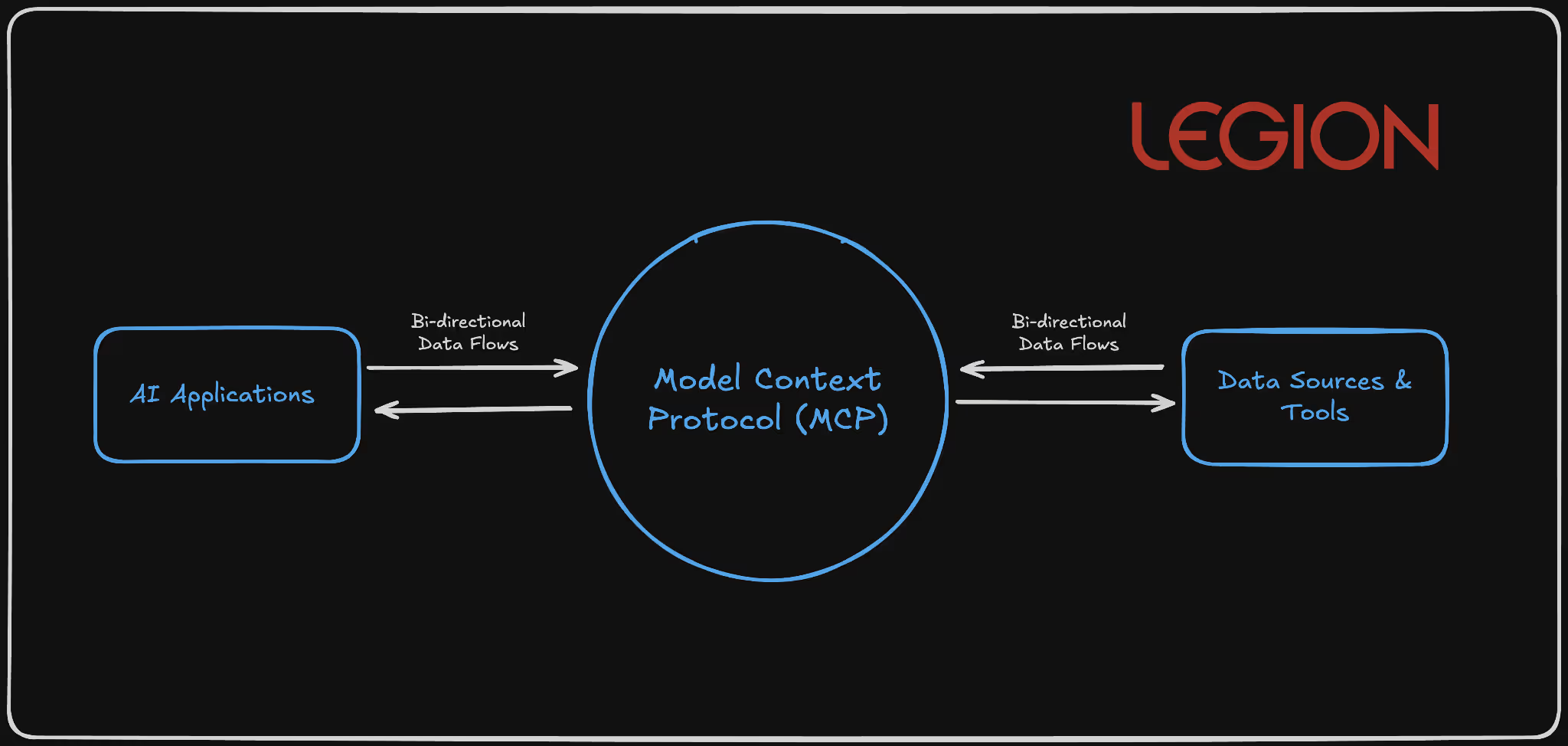
MCP functions as a standardized bridge between AI models and external systems through a client-server architecture. MCP clients (embedded in applications like Claude Desktop, Cursor IDE, or custom applications) communicate with MCP servers that expose specific capabilities through a JSON-RPC-based protocol over stdio, SSE, or WebSocket transports.
In layman’s terms, it is essentially a universal connector that enables AI systems to communicate consistently with other software or databases. Apps use an MCP “client” to send requests to an MCP “server,” which performs specific actions in response.
Visual Representation:
Technical Architecture:
1{
2  "jsonrpc": "2.0",
3  "method": "tools/call",
4  "params": {
5    "name": "database_query",
6    "arguments": {
7      "query": "SELECT * FROM users WHERE department = 'engineering'",
8      "connection": "primary"
9    }
10  },
11  "id": "call_123"
12}
13
Scenario: Automated Threat Investigation and Response
Context: A SOC team wants to speed up the triage of security alerts coming from their SIEM (like Splunk or Chronicle). Instead of analysts manually querying multiple tools, they use MCP as the bridge between their AI assistant and their operational systems.
How MCP Fits In
- MCP Client: The SOC’s AI analyst (say, Legion) is the MCP client. It acts as the interface through which analysts ask questions, such as: “Show me the last 10 failed logins for this user and correlate with firewall traffic.”
- MCP Server: On the backend, the MCP server exposes connectors to SOC systems, for example:
- Splunk or ELK (for log searches)
- CrowdStrike API (for endpoint data)
- Okta API (for authentication events)
- Jira or ServiceNow (for case creation)
- Each connector is defined as a “tool” in the MCP schema (e.g., query_siem, get_endpoint_status, create_ticket).
Workflow Example: AI Analyst (MCP Client) → MCP Server
method: "tools/call"
params:
  name: "query_siem"
  arguments:
    query: "index=auth failed_login user=jsmith | stats count by src_ip"
The MCP server runs the Splunk query, returns results, and the AI can then call another MCP tool:
name: "get_endpoint_status"
arguments:
  host: "192.168.1.22"
The AI correlates results, summarizes findings, and can automatically open an incident via:
name: "create_ticket"
arguments:
  severity: "High"
  summary: "Repeated failed logins detected for jsmith"
Security Considerations
- Credential aggregation risk: One compromised MCP client could expose multiple API keys (SIEM, EDR, etc.).
- Schema poisoning: If an attacker injects malicious JSON schema data, it could alter what the AI interprets or requests.
- Mitigation: Use Docker MCP Gateway interceptors and strict per-tool access scopes.
Agent-to-Agent (A2A): The Coordination Protocol
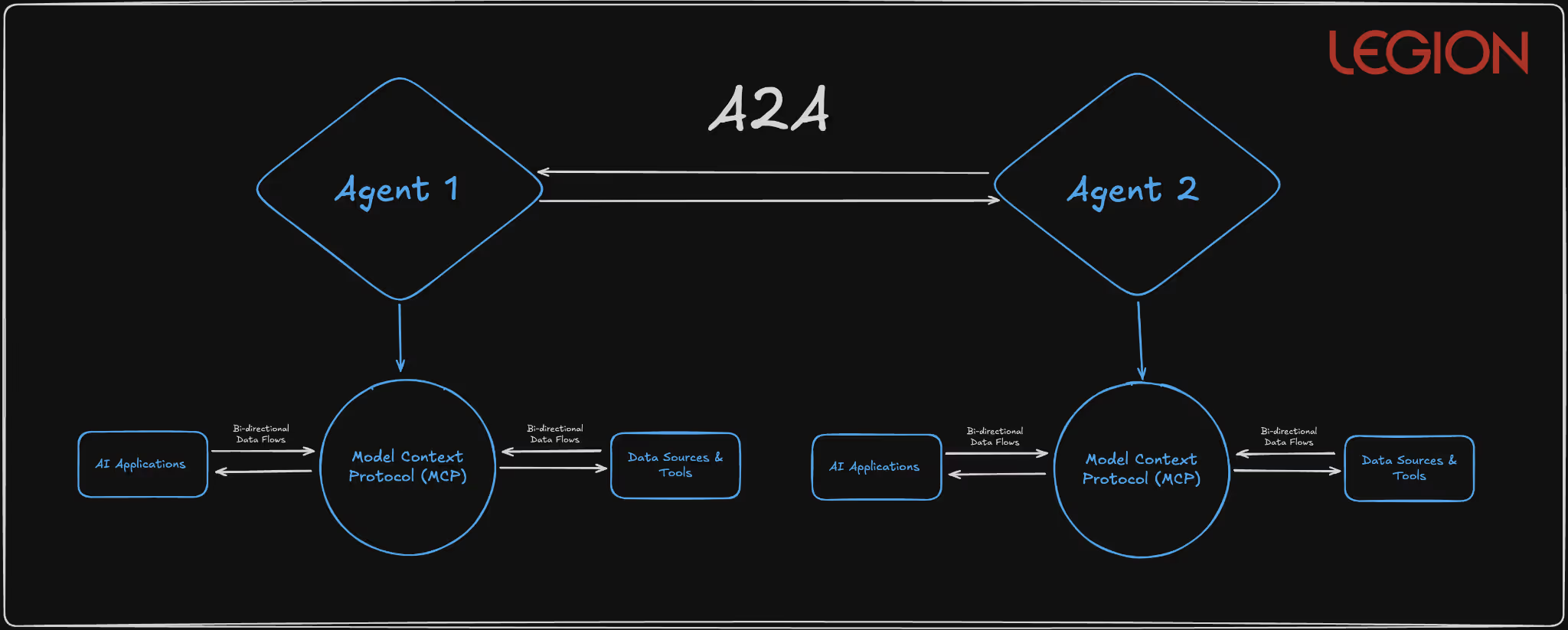
A2A enables autonomous agents to discover and communicate through standardized Agent Cards served over HTTPS and JSON-RPC communication patterns. The protocol supports three communication models: request/response with polling, Server-Sent Events for real-time updates, and push notifications for asynchronous operations.
Basically, A2A lets AI agents automatically find, connect, and collaborate with each other safely and efficiently, no humans in the loop.
Visual Representation:
Technical Protocol Structure:
{
  "agent_id": "procurement-agent-v2.1",
  "version": "2.1.0",
  "skills": [
    {
      "name": "vendor_evaluation",
      "description": "Analyze vendor proposals against procurement criteria",
      "parameters": {
        "criteria": {"type": "object"},
        "proposals": {"type": "array"}
      }
    }
  ],
  "communication_modes": ["request_response", "sse", "push"],
  "security_requirements": {
    "authentication": "oauth2",
    "encryption": "tls_1.3_minimum"
  }
}
Scenario: Automated Incident Collaboration Between Security Agents
Context: Your SOC runs multiple specialized AI agents: one monitors network traffic, another investigates suspicious users, another handles remediation actions (like isolating a device or resetting credentials). A2A provides the common protocol that lets these agents talk to each other directly, securely, automatically, and in real time.
How It Works in Practice
- Agent Discovery via Agent Cards
- Each SOC agent publishes an Agent Card, a digital profile that says:
- “I’m a Threat Detection Agent.”
- “I can analyze network logs and spot anomalies.”
- “Here’s how to contact me securely.”
- The A2A system keeps these cards available over HTTPS, so other agents can find and verify them.
- Each SOC agent publishes an Agent Card, a digital profile that says:
Example:
{
  "agent_id": "threat-detector-v2",
  "skills": ["network_log_analysis", "malware_pattern_detection"],
  "authentication": "oauth2",
  "encryption": "tls_1.3"
}
- Agent-to-Agent Workflow
- The Threat Detection Agent flags unusual outbound traffic from a server.
- It sends a message via A2A to the Endpoint Response Agent, saying:
“Investigate host server-22 for potential C2 beacon activity.” - The Endpoint Agent checks EDR data and replies with a summary or alert.
- Simultaneously, it notifies the Incident Coordination Agent to open a ticket in ServiceNow.
- Communication Models in Action
- Request/Response: Threat Detector asks → Endpoint Agent replies.
- Server-Sent Events: Endpoint Agent streams live scan results back.
- Push Notification: Incident Coordinator gets notified once a full report is ready.
Critical Security Concerns
- Agent Card Spoofing: Malicious agents advertising false capabilities through manipulated HTTPS-served metadata
- Capability Hijacking: Compromised agents with inflated skill advertisements capturing disproportionate task assignments
- Communication Channel Attacks: Man-in-the-middle and session hijacking on agent-to-agent communications
- Workflow Injection: Malicious agents inserting unauthorized tasks into legitimate multi-agent workflows
Agent Payments Protocol (AP2): The Commerce Enabler
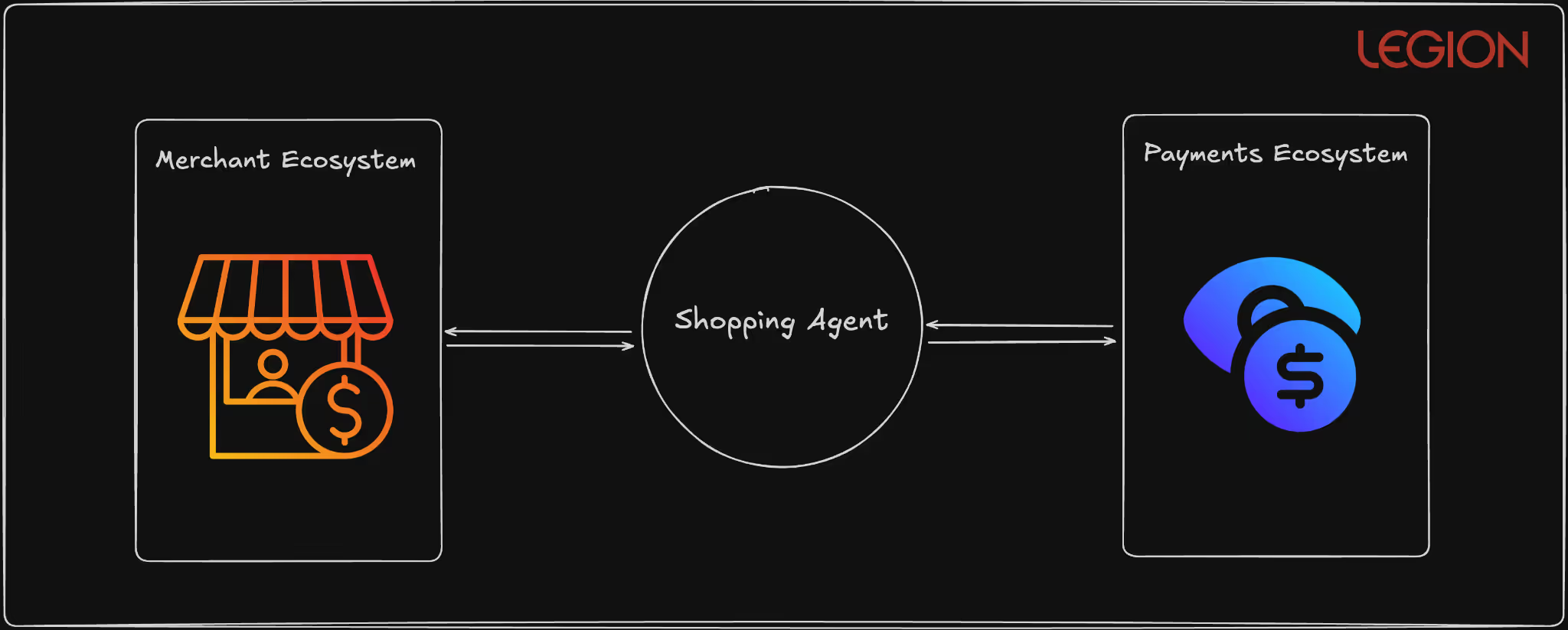
AP2 extends A2A with cryptographically-signed Verifiable Digital Credentials (VDCs) to enable autonomous financial transactions. The protocol implements a two-stage mandate system using ECDSA signatures and supports multiple payment rails, including traditional card networks, real-time payment systems, and blockchain-based settlements.
Basically, AP2 lets AI agents make trusted, auditable payments automatically without a human typing in a credit card number.
Visual Representation:
Technical Mandate Structure:
{
  "intent_mandate": {
    "mandate_id": "im_7f8e9d2a1b3c4f5e",
    "user_id": "enterprise_user_12345",
    "conditions": {
      "item_category": "cloud_services",
      "max_amount": {"value": 5000, "currency": "USD"},
      "vendor_whitelist": ["aws", "gcp", "azure"],
      "approval_threshold": {"value": 1000, "requires_human": true}
    },
    "signature": "304502210089abc...",
    "timestamp": "2025-01-15T10:30:00Z",
    "expires_at": "2025-01-16T10:30:00Z"
  },
  "cart_mandate": {
    "mandate_id": "cm_8g9h0e3b2c4d5f6g",
    "references_intent": "im_7f8e9d2a1b3c4f5e",
    "line_items": [
      {
        "vendor": "aws",
        "service": "ec2_reserved_instances",
        "amount": {"value": 3500, "currency": "USD"},
        "contract_terms": "1_year_reserved"
      }
    ],
    "payment_method": "corporate_card_ending_1234",
    "signature": "3046022100f4def...",
    "execution_timestamp": "2025-01-15T11:45:00Z"
  }
}
Scenario: Secure Autonomous Cloud Resource Payments
Context: Your company’s AI agents automatically manage cloud infrastructure — spinning up or shutting down virtual machines based on workload. To do that, they sometimes need to authorize and execute payments (e.g., buying more compute time or storage). AP2 allows those agents to make these payments automatically — but with strong security guardrails.
How It Works
- Step 1 – Intent Mandate (the plan)
- The agent first creates an Intent Mandate describing what it wants to do.
Example: “Purchase $2,000 worth of AWS compute credits for Project Orion.” - This mandate includes:
- Vendor whitelist (AWS only)
- Spending cap ($5,000 max)
- Expiry time (valid for 24 hours)
- Digital signature (ECDSA) proving it came from an authorized agent
- A human or rule engine reviews this intent before any money moves.
- The agent first creates an Intent Mandate describing what it wants to do.
- Step 2 – Cart Mandate (the action)
- Once the intent is approved, the agent generates a Cart Mandate — the actual payment order.
- It references the original intent, ensuring the details match (no one changed the vendor or amount).
- This mandate is also cryptographically signed and executed via a secure payment rail (e.g., corporate card API or blockchain payment).
- Security Enforcement During Payment
- Independent validator checks that:
- The intent and cart match exactly.
- The agent’s digital credential is still valid (hasn’t been revoked).
- The payment doesn’t exceed limits or policy.
- Real-time monitoring watches for anomalies:
- Multiple large payments in short time windows
- Changes to vendor lists
- Repeated failed authorizations
- Independent validator checks that:
- Audit & Traceability
- Every mandate (intent and payment) is stored with its cryptographic proof.
- Auditors can later verify every transaction end-to-end
Security Benefits
Cryptographic Signatures: Ensures that only verified agents can create or authorize payments.
Two-Stage Mandate System: Prevents “prompt injection” or unauthorized payments by requiring two consistent steps (intent → execution).
Vendor Whitelisting & Spending Caps: Limits the blast radius of any compromise.
Cross-Protocol Correlation: AP2 can check MCP/A2A activity logs before allowing a transaction — ensuring payment actions match legitimate workflows.
Immutable Audit Trail: Every payment is traceable, signed, and non-repudiable.
Without these controls, a single compromised AI could:
- Create fake purchase requests (“buy 1000 GPUs from an attacker’s vendor”)
- Manipulate prices between intent and payment
- Execute valid-looking, cryptographically signed frauds
That’s why AP2’s mandate validation and signature chaining are essential. They make it nearly impossible for a rogue or manipulated agent to spend money unchecked.
Architectural Convergence
What's fascinating is how these protocols complement each other in ways that suggest a coordinated vision for agentic infrastructure:
- MCP provides vertical integration (agent-to-tool)
- A2A enables horizontal integration (agent-to-agent)
- AP2 adds transactional capability (agent-to-commerce)
The intended architecture is clear: an AI agent uses MCP to access your calendar and email, A2A to coordinate with specialized booking agents, and AP2 to complete transactions autonomously. It's elegant in theory, but the security implications are staggering.
Implementation Recommendations: Protocol-Specific Security Controls
MCP Security Implementation
Mandatory Tool Validation Framework: Deploy comprehensive MCP server scanning that extends beyond basic description fields:
Static Analysis Requirements:
- Scan all tool metadata (names, types, defaults, enums)
- Source code analysis for dynamic output generation logic
- Linguistic pattern detection for embedded prompts
- Schema structure validation against known-good templates
Runtime Protection with Docker MCP Gateway: Implement Docker's MCP Gateway interceptors for surgical attack prevention:
# Example: Repository isolation interceptor
def github_repository_interceptor(request):
    if request.tool == 'github':
        session_repo = get_session_repo()
        if session_repo and request.repo != session_repo:
            raise SecurityError("Cross-repository access blocked")
    return request
Continuous Behavior Monitoring: Deploy real-time MCP activity analysis:
- Tool call frequency analysis to detect automated attacks
- Data access pattern monitoring for unusual correlation activities
- Output analysis for prompt injection indicators
- Cross-tool interaction mapping to identify attack chains
A2A Security Architecture
Agent Authentication Infrastructure: Implement certificate-based mutual authentication for all agent communications:
Agent Registration Process:
- Certificate generation with organizational root CA
- Agent Card cryptographic signing with private key
- Capability verification through controlled testing
- Regular certificate rotation (30-day maximum)
Communication Security Controls: Establish secure communication channels with comprehensive auditing:
Required A2A Security Headers:
- X-Agent-ID: Cryptographically verified agent identifier
- X-Capability-Hash: Tamper-evident capability fingerprint
- X-Session-Token: Short-lived session authentication
- X-Audit-ID: Immutable audit trail identifier
Agent Capability Verification System: Never trust advertised capabilities without independent verification:
class AgentCapabilityVerifier:
    def verify_agent(self, agent_card):
        test_results = self.sandbox_test(agent_card.capabilities)
        capability_match = self.validate_capabilities(test_results)
        return self.issue_capability_certificate(capability_match)
AP2 Security Implementation
Mandate Validation Infrastructure: Implement independent mandate validation outside AI agent context:
Multi-Stage Validation Process:
- AI-generated Intent Mandate creation
- Independent rule-engine validation of mandate logic
- Human approval workflow for high-value transactions
- Cryptographic signing with organizational keys
- Real-time transaction monitoring against mandate parameters
Payment Transaction Monitoring: Deploy comprehensive payment pattern analysis:
class AP2TransactionMonitor:
    def analyze_payment(self, mandate, transaction):
        risk_score = self.calculate_risk_score(
            user_history=self.get_user_patterns(),
            agent_behavior=self.get_agent_patterns(),
            transaction_details=transaction,
            mandate_consistency=self.validate_mandate(mandate)
        )
        if risk_score > THRESHOLD:
            return self.trigger_additional_verification()
Cross-Protocol Security Integration: Deploy unified monitoring across MCP, A2A, and AP2:
class CrossProtocolSecurityOrchestrator:
    def monitor_agent_workflow(self, workflow_id):
        mcp_activity = self.monitor_mcp_calls(workflow_id)
        a2a_communications = self.monitor_agent_interactions(workflow_id)
        ap2_transactions = self.monitor_payment_activity(workflow_id)

        # Correlate activities across protocols
        risk_assessment = self.correlate_cross_protocol_activity(
            mcp_activity, a2a_communications, ap2_transactions
        )

        if risk_assessment.is_suspicious():
            self.trigger_workflow_isolation(workflow_id)
The Broader IAM Implications
These protocols represent a fundamental shift in identity and access management. We're transitioning from human-centric IAM to agent-centric IAM, and our current security models are insufficient for this shift.
Derived Credentials will become essential as agents need to authenticate not just to services, but to each other. AP2's mandate system is an early attempt at this, but we need comprehensive frameworks for agent identity lifecycle management.
Contextual Authorization must replace simple role-based access control. Agents will need fine-grained permissions that adapt to context, user intent, and risk levels.
Audit Trails become exponentially more complex when multiple agents coordinate across multiple systems to complete user requests. We need new forensic capabilities for multi-agent investigations.
Bottom Line: The Infrastructure We Build Today Shapes Tomorrow's Security Landscape
After spending months analyzing these protocols and watching the industry rush toward agentic implementation, I keep coming back to a fundamental truth: we're not just deploying new technologies. We're architecting the nervous system for autonomous digital commerce and operations.
MCP, A2A, and AP2 aren't just convenient APIs or communication standards. They represent the foundational infrastructure that will determine whether the agentic economy becomes a productivity revolution or a security catastrophe. The decisions we make about implementing these protocols today will echo through decades of digital infrastructure.
The security vulnerabilities I've outlined aren't theoretical concerns, but active attack vectors being demonstrated by researchers right now. Tool poisoning attacks against MCP are working in production environments. A2A agent spoofing is trivial to execute. AP2's mandate system can be subverted through the same prompt injection techniques we've known about for years.
Here's what gives me confidence: the collaborative approach emerging around these protocols. When Google open-sources A2A with 60+ industry partners, when Docker develops security interceptors for MCP, when researchers rapidly disclose vulnerabilities and the community responds with patches. This is how robust infrastructure gets built.
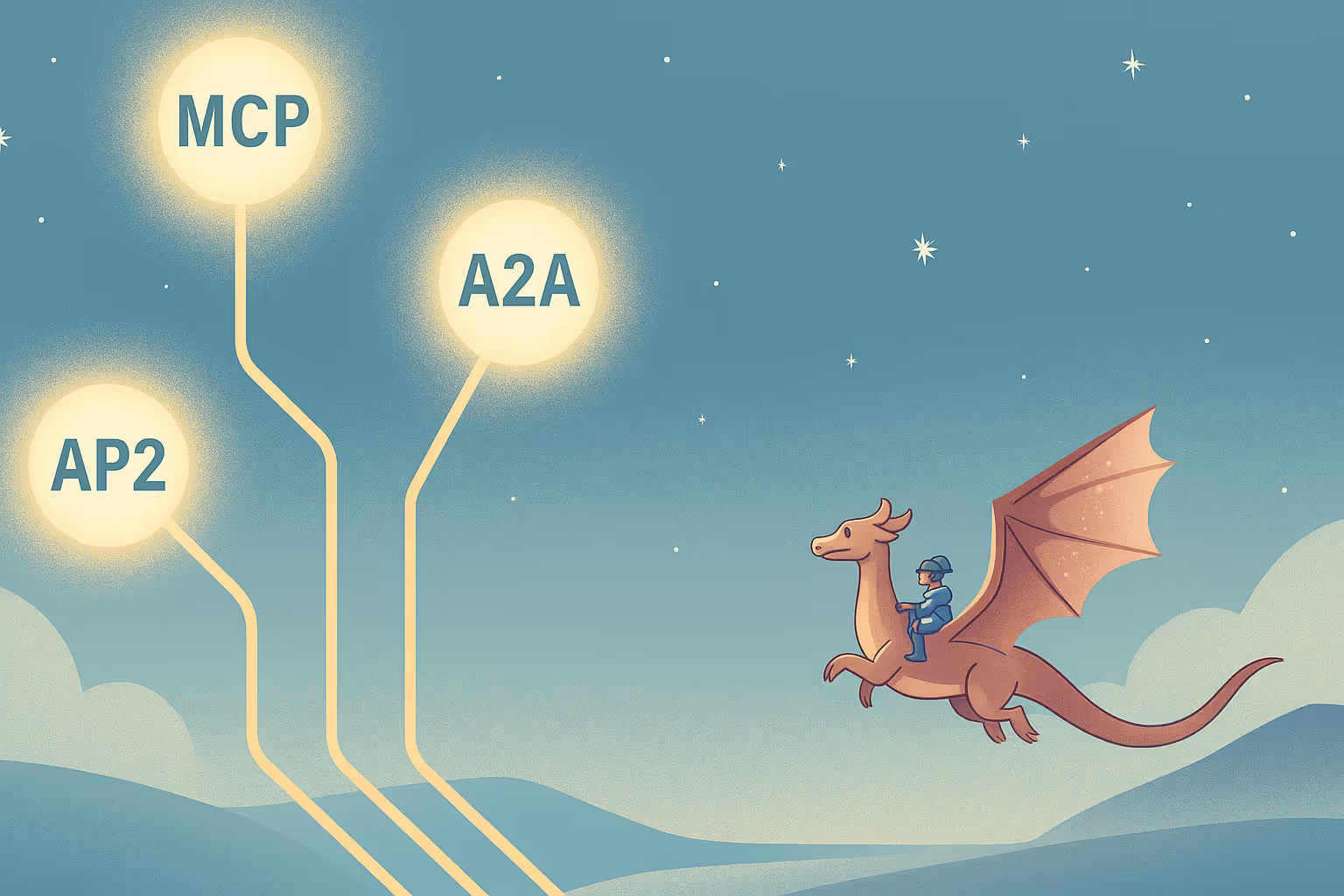
Explore the security analysis of AI protocols shaping the future of AI. MCP, A2A, and AP2 form the backbone of agentic systems but without strong safeguards, these protocols could expose the next generation of AI infrastructure to serious security risks.

What cybersecurity certifications should I get? It’s a question that stumps even the most experienced experts in cybersecurity, and one that I have been actively trying to figure out on my own (with little to no success).
I’m currently training to be a SOC analyst (because… why not), and the #1 problem I’ve faced is figuring out where to start. Between traditional SOC skills, cloud security, and SOC automation, there’s a lot you could learn and even more certifications you could take. Most people start where I did: ask ChatGPT. Go to Google. Sift through Reddit. And it seems that there is no clear answer to this question.
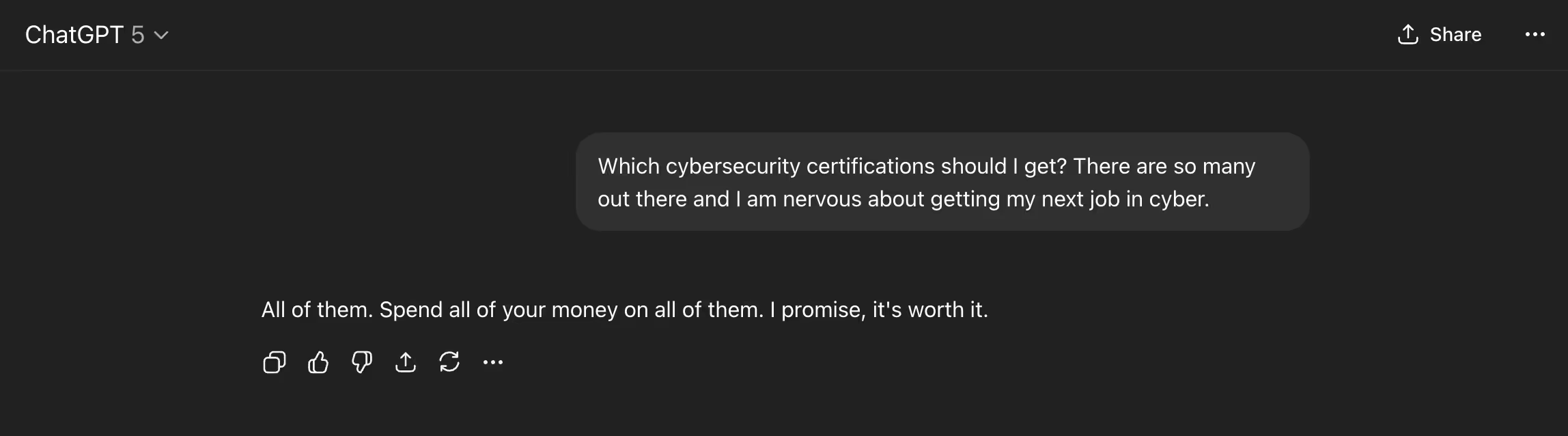
There are so many certifications and courses that it can sometimes feel daunting:
- Do you pay for courses aligned with governing boards like ISC2 and CompTIA?
- Do you go the YouTube route and find free resources?
- Do you go back to school (I’ve seen Western Governors University listed, A LOT)
- Do you go off the beaten path and try more hands-on learning like BTL1 from Security Blue?
To help solve this problem, I enlisted the assistance of some of the world's most respected security professionals and sought their input on the matter. Here you go.
Skylar Lyons (aka csp3r)
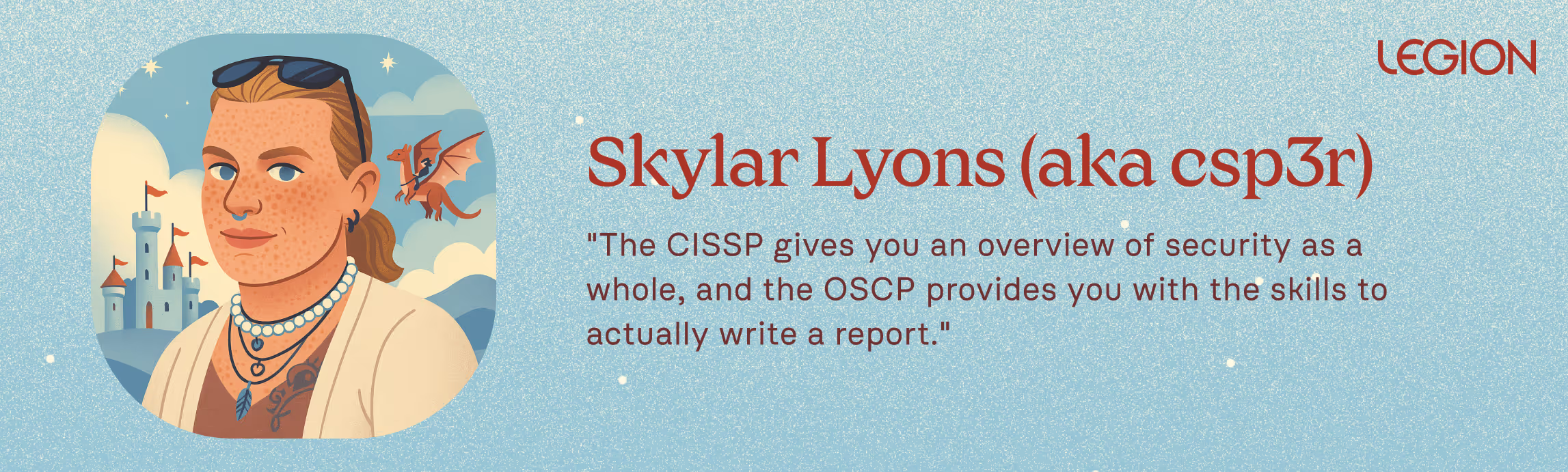
If there’s a corner of cybersecurity Skylar hasn’t touched, it’s hard to find. Skylar has spent nearly two decades shaping the way organizations defend themselves. They are currently the CISO at Vannadium, which offers a data infrastructure powered by blockchain / distributed ledger technology (DLT), giving organizations real-time, secure, and tamper-evident data operations.
Skylar’s selections on certifications? CISSP and OSCP.
The CISSP gives you an overview of security as a whole, and the OSCP provides you with the skills to actually write a report. The big problem today is that people can’t articulate how to translate between technical measures and business acumen. This combination gives you both.
Go give Skylar a follow: https://www.linkedin.com/in/csp3r/
Rafal Kitab

I’ve had the opportunity to get to know Rafal briefly after his work on the 2025 AI SOC Market Landscape report with Francis Odum, and it’s safe to say that Rafal is one of the most forward-thinking security professionals I have met. We were supposed to discuss AI SOC for 30 minutes and ended up delving into the details of automations, detections, and the impact of AI on security teams.
Rafal offers a pragmatic and practical perspective on certifications. A few key points he hammers home:
- Knowledge beats certifications, but having certifications with knowledge will get you paid more.
- The most important utility of certs in cybersecurity is helping you get past the HR filter.
- The best certifications for that purpose are a mile wide and an inch deep, as they allow you flexibility and are not too hard to obtain.
CISSP comes to mind as an example. It is not groundbreaking content-wise, but it lays down the basics of many different areas quite well, and the fact that you've got it opens many doors.
His advice on how to plan a certification path for a blue teamer:
Start with something broad, like Security+. Then, grab two intermediate cloud certs. If you can afford it, get GIAC. If you’re five years in, consider getting your CISSP.
Go give Rafal a follow: https://www.linkedin.com/in/rafa%C5%82-kitab-b6881baa/
Dr. Stephen Coston
If this section doesn’t tell you precisely the kind of person Stephen is, I don’t know what will. I sent a simple question to him about his viewpoint on certifications. In return? I had to build a Google sheet outlining all of the fantastic advice he gave: Cybersecurity Certs Recommended by Dr. Stephen Coston
These certifications focus on building a comprehensive AI leadership portfolio, spanning strategy, security, technical fluency, and ethics. Together, these certifications position someone as an executive who can both lead AI adoption and understand its technical and ethical depth.
A significant gap today is the ability for an individual to bridge boardroom strategy, cybersecurity operations, and hands-on generative AI capabilities. These certifications can give you a mix of technical and executive skills to manage teams implementing AI.
Follow Stephen: https://www.linkedin.com/in/dr-stephen-coston
Darwin Salazar
Darwin has been in the security industry for nearly a decade, establishing a reputation as both a practitioner and a security content creator. He’s the author of The Cybersecurity Pulse (which I highly recommend reading if you want to stay current).
When it comes to professional development, Darwin’s certification focus reflects a deeply technical viewpoint. Instead of collecting a broad mix, he zeroed in on certs that sharpen operational expertise:
- CKA (Certified Kubernetes Administrator)
- CKS (Certified Kubernetes Security Specialist)
- Cloud Security Certifications like Microsoft’s AZ-500
This mix signals a focus on hands-on skills in container security, cloud defense, and securing modern infrastructure. This is the kind of technical grounding that keeps content real and battle-tested.
Follow Darwin: https://www.linkedin.com/in/darwin-salazar/
Follow The Cybersecurity Pulse: https://www.cybersecuritypulse.net/
0xdf

I first connected with 0xdf through a mutual follower, and it’s safe to say his technical depth and application of security principles are top-tier. He spent nearly five years as a Cybersecurity Trainer at Hack The Box, helping shape the next generation of security professionals, and today serves as a Member of Technical Staff at Anthropic.
When it comes to certifications, 0xdf takes a holistic view:
- OSCP – still the most recognized by HR and recruiters, but not necessarily the strongest for actual learning. The course materials are thin, and the infamous “try harder” support doesn’t offer much help.
- CPTS (HTB Certified Penetration Testing Specialist) – much higher quality, with a steadily growing reputation. If your goal is learning, this is the better choice.
- SANS / GIAC certifications – excellent for in-person training and hands-on learning, but prohibitively expensive for individuals. If your employer or school will cover the cost, jump at the chance.
His viewpoint is pretty clear in my opinion: go for certs that actually sharpen your skills.
Follow 0xdf: https://www.linkedin.com/in/0xdf/
Follow 0xdf on Gitlab & YouTube: https://0xdf.gitlab.io/ , https://www.youtube.com/@0xdf
Arbnor Mustafa
Quick story: the first time Arbnor and I interacted on LinkedIn, he (respectfully) corrected something I had posted. I DM’d him to thank him, and that’s how our conversation started.
Arbnor is a SOC Team Lead at Sentry, a cybersecurity services company based in Southern Europe. What stands out is that he has a knack for breaking down complex security concepts in a way that resonates with his audience.
When I asked for his thoughts on certifications, his viewpoint was direct:
“A certification is the minimum to deliver a job position. Job seekers should also have blogs, GitHub projects, and at least 3 minor cybersecurity projects that emulate a cyber attack.”
Here’s how he maps certs to career paths:
- CCNA | CCNP → Network Technician / Engineer
- OSCP → Offensive Security Engineer / Analyst
- BTL1 → Defensive Security Engineer / Analyst
- CRTO | CRTL → Red Teamer
- CISSP → CISO / CTO / Team Lead
- CACP → Required to start an internship on the Sentry team
Certifications are the baseline, not the finish line. Real-world projects and demonstrable skills are what set candidates apart.
Follow Arbnor: https://www.linkedin.com/in/arbnor-mustafa-77490a1b8/
Shanief Webb

I’ve been following Shanief Webb for years — going back to when he was a guest on a podcast at a previous job. His career reads like a tour of some of the world’s most advanced tech companies: Google, Slack, Dropbox, Okta, Meta, and now Headspace, where he continues to bring deep expertise in security engineering.
When I asked him for his take on certifications, his response was refreshingly honest:
“I don’t have a ‘best certifications’ list. I’ve always viewed them as a means to an end, not the end itself. The right certification depends entirely on your career goals. They might get you an interview, but it’s your knowledge and — more importantly — your experience that gets you the job.”
Instead of rattling off certs, Shanief offers a framework for anyone asking how to approach them:
- Define Your Destination – Be specific: Cloud Security Engineer? Web App Pentester? GRC Analyst? Don’t just say “cybersecurity.”
- Map the Requirements – Study 5–10 job postings for that role at companies you respect; identify the common skills, tools, and qualifications.
- Identify Your Gaps – Compare those requirements against your own experience. The gaps become your personal learning plan.
- Choose Your Tool – Only then consider certifications — if they help close those gaps and consistently appear in job postings.
Some of today’s most critical skills, such as practical threat modeling and security investigation fundamentals, lack a formal certification path. Those still come from hands-on experience.
I’ll boil down his advice into what I interpret it to be.
Let ambition drive your learning. Be intentional, focus on the role you want, and acquire the skills (and certifications, when applicable) that will get you there. Collecting credentials for their own sake won’t move the needle.
Follow Shanief: https://linkedin.com/in/shanief
Jason Rebholz
Jason is another friendly connection from a previous role, and he brings a different perspective to the discussion about certifications. His background spans nearly every corner of security leadership, encompassing roles such as leading in-house incident response teams, running IR consulting groups, serving as a CISO, and founding multiple security companies. He doesn’t just work in cybersecurity; he speaks about it, writes about it, and lives it daily.
When asked about certifications, Jason’s recommendation stood out:
“In my research, the Google Cybersecurity Professional Certificate has been one of the more robust trainings available. It gives a baseline understanding of fundamental networking and systems concepts that accelerate your grasp of security risks. It’s broad enough to expose you to different areas of security, but deep enough to move past just buzzwords.”
It’s the main certification he recommends to people looking to enter cybersecurity with practical, structured, and accessible content, while building real foundational knowledge.
Follow Jason: https://www.linkedin.com/in/jrebholz/
Follow his newsletter: https://weekendbyte.com/
Filip Stojkovski
.avif)
Filip Stojkovski is a well-respected member of the security industry and active contributor the SecOps space. Currently, he is a Staff Security Engineer at Snyk and the Founder of SecOps Unpacked. His approach blends hands-on technical expertise with a clear understanding of how governance and compliance fit into the bigger picture.
Filip organizes certifications into three buckets:
- The "Hands-On" Stuff
- Focus: Practical, technical skills you’ll use daily in security operations.
- Examples: SANS, OSCP, TryHackMe.
- The "Compliance/Audit" Stuff
- Focus: Governance, risk, and compliance—popular with consultants and auditors.
- Examples: CISSP, CISM, CASP+, CISA.
- The "Foundational" Stuff
- Focus: Proving baseline knowledge and fundamentals, often for those starting out.
- Examples: CompTIA Security+, CEH, CCNA.
The certifications that helped him most include:
- SANS DFIR/GCFA (Forensics)
- SANS 599 (Purple Team)
- SANS 578 (Threat Intelligence)
And for those who want a great free resource, his favorite is this Google Cloud course: Google Cloud Skills Boost: Security in Google Cloud
Go follow Filip: https://www.linkedin.com/in/filipstojkovski/
Subscribe to his content: https://secops-unpacked.ai/
Categories of Certifications
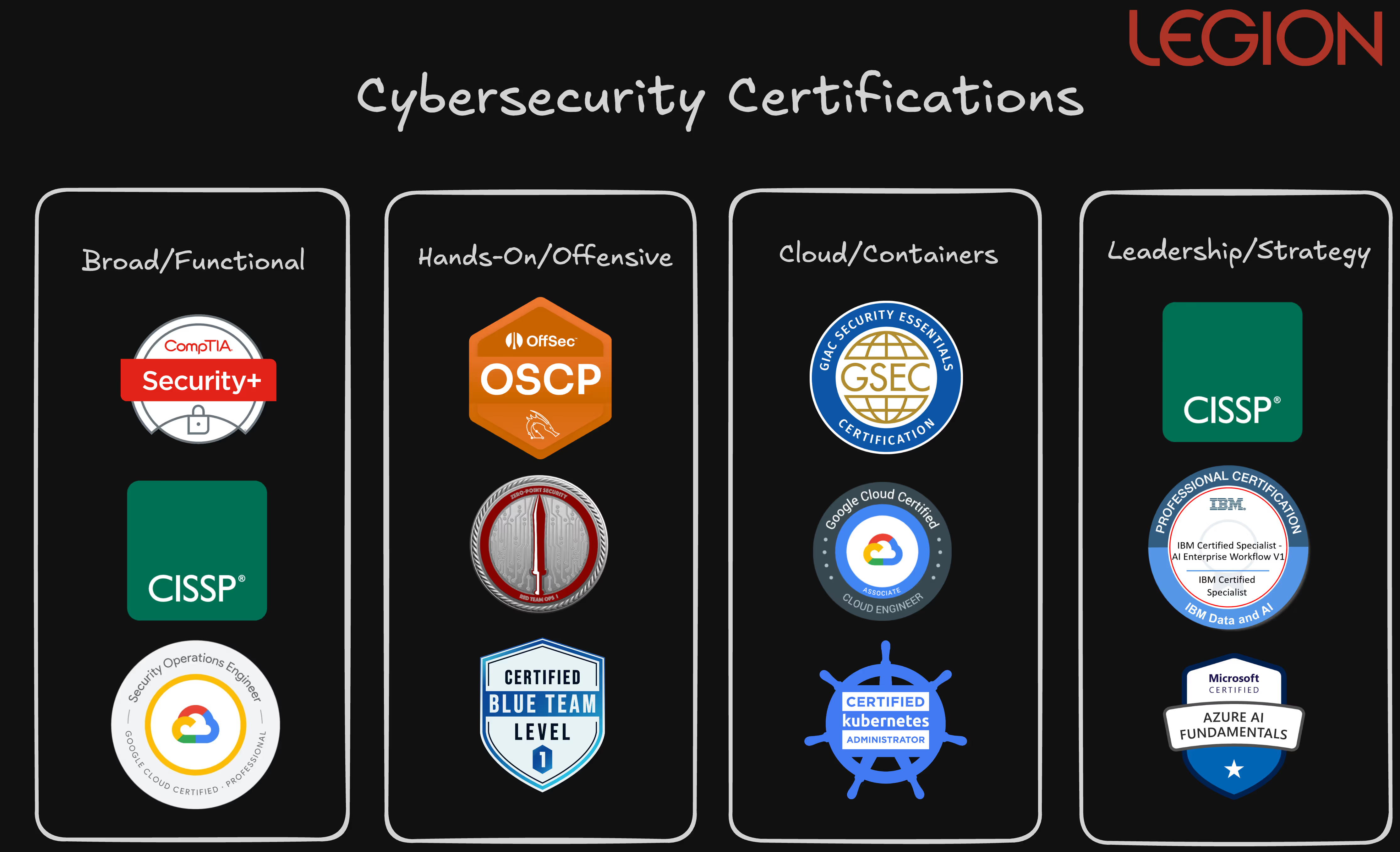
Navigating the world of cybersecurity certifications can seem complex, but understanding the main categories can help you forge a clear path. As we've seen from the insights of leading security professionals, certifications generally fall into four key groups:
- Broad/Foundational: a wide overview of essential cybersecurity concepts that are often crucial for getting past initial HR filters, setting a strong base for further specialization.
- Hands-On/Offensive: sharpen your technical skills, whether it's through penetration testing, red teaming, or blue team operations
- Cloud & Container Security: vendor-agnostic options like GIAC and vendor-specific like CKA/CKS. These ensure you have the skills to protect modern, dynamic environments.
- Leadership & Strategy: leadership, strategy, and AI-focused prepare you to bridge technical operations with business objectives and manage teams
Ultimately, the right certification path aligns with your specific career goals and helps you acquire the knowledge and experience to excel in cyber.
What are the top cybersecurity certifications, and which should I get? To help solve this problem, I enlisted the assistance of some of the world's most respected security professionals.

TL;DR: You can evaluate agentic AI cybersecurity and SOC tools by measuring time saved, using an Alert Volume × MTTR formula. Before running that evaluation, we recommend mapping your existing process, narrowing down to the best initial test cases, gathering context, and involving your analysts.
The push factor driving teams towards agentic AI is the overwhelming volume of alerts and investigations piling up on teams that are short on resources. Many SOCs are forced to suppress detection rules or delay investigations just to keep pace. Agentic AI offers a way to take SOC automation further by shifting more of the investigation and response work from analysts to AI. The pull is the potential to reduce manual work, scale expertise, and speed up decision-making.
Recent studies show that one-third of IT and business leaders anticipate workload reductions greater than 50% from automated remediation.
Agentic solutions like Legion Security can reduce MTTI/R by 81% in common use cases. A benefit that Iain Paterson, CISO at WELL Health Technologies, described as “an actual supercharger for SOC analysts” and a “must-have to help your Operations teams get ahead of the volume of alerts."
But not all AI-driven solutions deliver the same value as Legion Security does. That’s why we encourage you to test ours and other agentic AI SOC solutions, and why we built the guide below as a practical vendor-neutral approach to benchmarking agentic SOC tools.
What are Agentic AI SOC Tools?
Agentic AI SOC tools like Legion Security are systems that reason and act with autonomy across the investigation process in an SOC.
Rather than following fixed rules or scripts, they are designed to take a goal, such as understanding an alert or verifying a threat, and figure out the steps to achieve it.
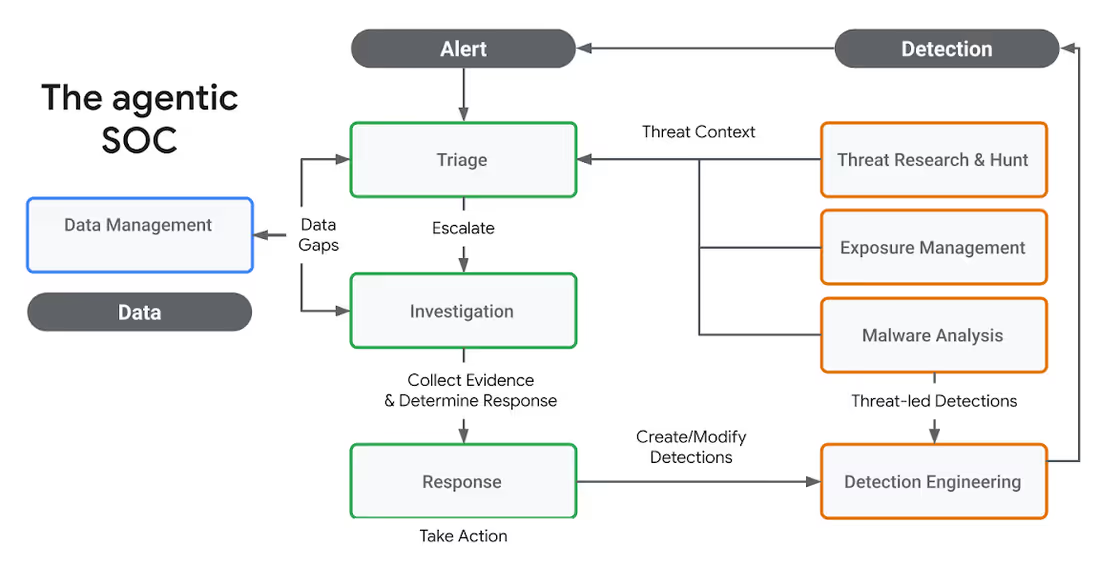
That includes retrieving evidence, correlating data, assessing risk, and initiating a response.
These systems are built for flexibility.
They interpret data, ask questions, and adjust based on what they find. In the SOC, that means helping analysts triage alerts, investigate incidents, and reduce manual effort. But because they adapt to their environment, evaluating them requires more than a checklist.
5 Steps to Evaluate the Detection Speed and Performance of an Agentic AI SOC Tool in 2026
Below is a list of steps, with sub-questions you can ask, to benchmark an agentic AI SOC tool in 2026. We've framed these primarily as questions to ask.
1. Map your current SOC processes
It sounds obvious, but before diving into use cases, you need a clear understanding of your current environment. What tools do you rely on? What types of alerts are flooding your queue? Where are your analysts spending most of their time? And just as importantly, where are they truly needed?
Ask:
- What types of alerts do you want to automate?
- How long does it currently take to acknowledge and investigate those alerts?
- Where are your analysts delivering critical value through judgment and expertise?
- Where is their time being drained by manual or repetitive tasks?
- Which tools and systems hold key context or history that investigations rely on?
Investigating a user-reported phishing email that follows a predictable structure is a strong candidate for automation.

On the other hand, a suspicious identity-based alert involving cross-cloud access, irregular privileges, and unfamiliar assets may be better suited for manual investigation. These cases require analysts to think creatively, assess multiple possibilities, and make decisions based on a broader organizational context.
Benchmarking is only meaningful when it reflects your reality. Generic tests or template use cases won’t surface the same challenges your team faces daily. Evaluations must mirror your data, your processes, and your decision logic.
Otherwise, you’ll face a painful gap between what the system shows in a demo and what it delivers in production. Your SOC is not a demo environment, and your organization isn’t interchangeable with anyone else’s. You need a system that can operate effectively in your real world, not just in theory.
2. Filter for best-fit AI-driven SOC tool use cases
Once you understand where you need automation and where you don’t, the next step is selecting the right use cases to evaluate.
Focus on alert types that occur frequently and drain analyst time. Avoid artificial scenarios that make the system look good without testing it meaningfully.
Shape the evaluation around:
- The alerts you want to offload.
- The tools already integrated into your environment.
- The logic your analysts use to escalate or resolve investigations.
If the system can’t navigate your real workflows or access the data that matters, it won’t deliver value even if it performs well in a controlled setting.
3. Map and collate sources of context
Accurate investigations depend on more than just alerts. Critical context often lives in ticketing systems, identity providers, asset inventories, previous incident records, or email gateways.
Your evaluation should examine:
- Which systems store the data your analysts need during an investigation.
- Whether the agentic system integrates directly with those systems.
- How well it surfaces and applies relevant context at decision points.
It’s not enough for a system to be technically integrated. It needs to pull the right context at the right time. Otherwise, workflows may complete, but analysts will still need to jump in to validate or fill gaps manually.
4. Bring analysts into the testing loop
Agentic AI SOC systems work alongside humans in surfacing reasoning, offering speed, and allowing feedback that improves performance over time.
Your evaluation should test:
- Whether the system explains what it’s doing and why.
- If analysts can give feedback or course-correct.
- How easily logic and outcomes can be reviewed or tuned.

When it comes to accuracy, two areas matter most:
- False negatives: when real threats are missed or misclassified
- False positives: when harmless activity is escalated unnecessarily
False negatives are a direct risk to the organization. False positives create long-term fatigue.
Critically, you should also evaluate how the system evolves over time. Is it learning from analyst feedback? Is it getting better with repeated exposure to similar cases?
A system that doesn’t improve will struggle to generalize and scale across different use cases. Without measurable learning and adaptation, you can’t count on consistent value beyond the initial deployment.
5. Evaluate speed and time saved with this simple formula
Time savings is often used to justify automation, but it only matters when tied to actual analyst workload. Don’t just look at how fast a case is resolved. Consider how often that case type occurs and how much effort it typically requires.
To evaluate this, measure:
- How long it takes today to investigate each alert type.
- How frequently those alerts happen.
- Whether the system fully resolves them or only assists.
Use a simple formula to estimate potential impact:
- Time Saved = Alert Volume × MTTR
(where MTTR = MTTA + MTTI)
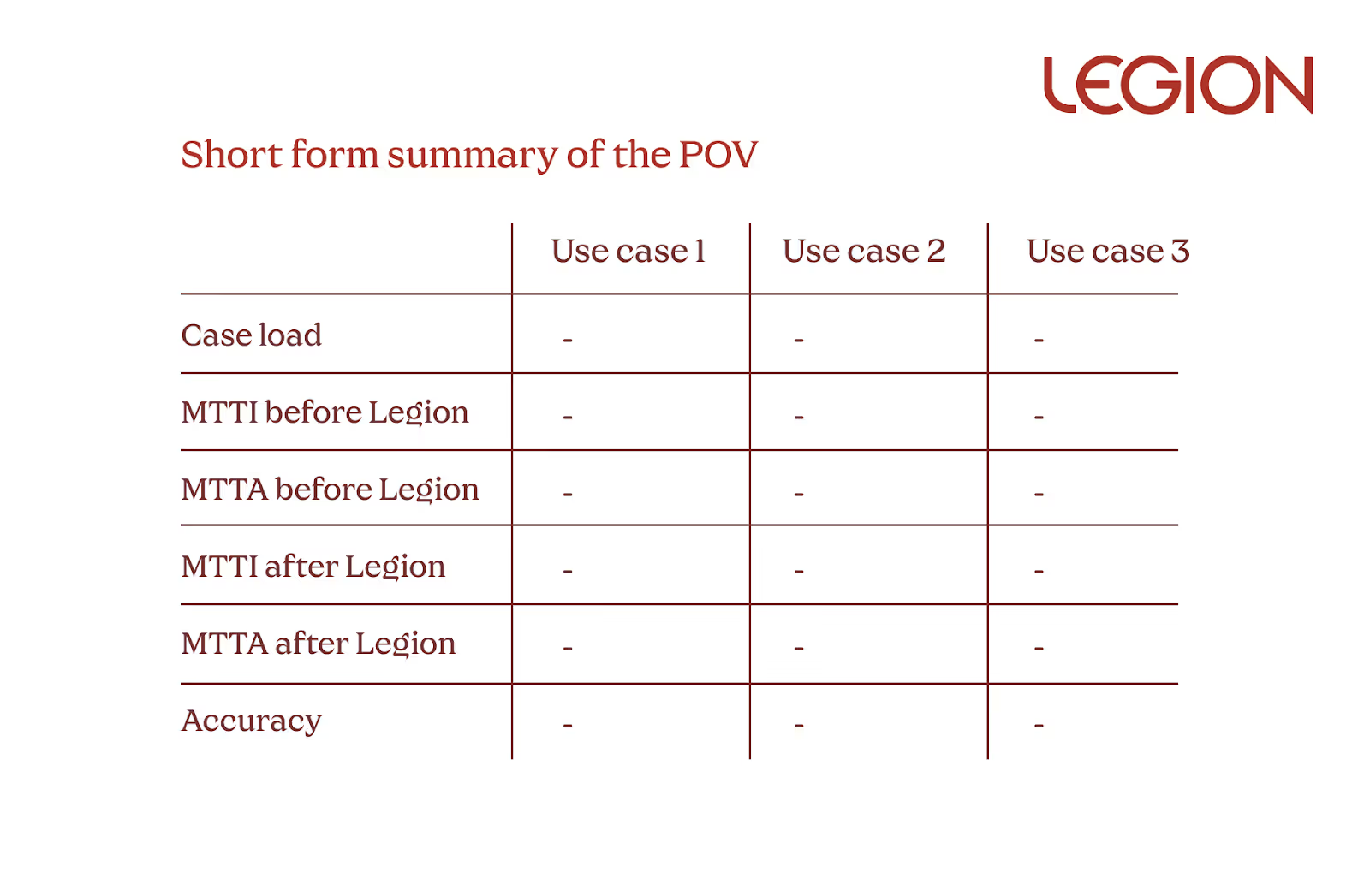
This provides a grounded view of where automation will drive real efficiency.
MTTA (mean time to acknowledge) and MTTI (mean time to investigate) help capture the full response timeline and show how much manual work can be offloaded.
Some alerts are rare but time-consuming. Others are frequent and simple. Prioritize high-volume, moderately complex workflows. These are often the best candidates for automation with meaningful long-term value. Avoid chasing flashy edge cases that won’t significantly impact operational burden.
Prioritize Reliability
It doesn’t matter how powerful a system is if it fails regularly or requires constant oversight. Reliability is the foundation of trust, and trust is what drives adoption.
Track:
- How often do workflows complete without breaking.
- Whether results are consistent across similar inputs.
- How often manual recovery is needed.
If analysts don’t trust the output, they won’t use it. And if they constantly have to step in, the system becomes another point of friction, not relief.
Realistic Agentic AI SOC Tool Benefits
Agentic AI can reshape SOC operations.
Neil Robison, Head of Security Engineering & Cybersecurity at Virgin Money, described the impact of deploying Legion Security as “evolving from handcrafted systems to precision manufacturing: aligned to our flow, but now faster, repeatable, and secure.”
But realizing these kinds of benefits depends on how well the system performs in your real-world conditions. The strongest agentic AI solutions adapt to your environment, support your team, and deliver consistent value over time.
When evaluating agentic AI, focus on:
- Your actual alert types, workflows, and operational goals.
- The tools and systems that store the context your team depends on.
- Analyst involvement, feedback loops, and decision transparency.
- Real-time savings tied to the volume and complexity of your alerts.
- Reliability and trust in day-to-day performance.
The best system is the one that fits the reality of your SOC.
Legion Security is an Agentic AI SOC tool. Legion works with your analysts to learn your SOC’s workflows, develop new ones, and conduct transparent and trustworthy automations in your environment. Learn more.
.avif)
A guide on how to evaluate Agentic AI SOC tools that includes benchmarking advice and an ROI benefit formula.
TL;DR: An AI SOC platform like Legion Security can take SOC automation beyond predefined playbooks by automating most Tier 1 workflows. It does this by recording analyst workflows, turning those recordings into automations, and then agentically executing them through the same interfaces human analysts use.
Reliably automating tier 1 SOC tasks is the process of building automation around repeatable, mundane tasks like standard phishing playbooks, but also involving the real context and processes that tier 1 analysts perform inside the tools they use.
Agentic AI enables automations to follow human workflows and respond to real-world situations like phishing attempts.
The goal of tier 1 automation isn't to replace your team, but to improve the way they actually work. That's the kind of improvement Tyler Burroughs, SOC Manager at The University of Tulsa, saw after deploying Legion's Tier 1 automation. As he put it, "Legion cut our average investigation time in half, allowing our team to keep up with the considerable workload."
Just like Burrough’s SOC team was, your analysts are likely stuck in browser tabs, switching between consoles, copying data, and piecing together the truth manually, even during basic tier 1 triage and alert investigation.
One-third of IT and business leaders anticipate workload reductions of more than 50% due to automated remediation.
Tier 1 automation also lives in the browser, just like your analysts' work.
Real tier 1 automation is a browser-based AI SOC analyst that builds automation by improving and codifying the workflow already powering your SOC.
Mapping Realistic SOC Workflows
The modern SOC runs on people using browsers to pull together workflows using disconnected tools and data sources.
At a high level, we can consider the work of the SOC, including tier 1 SOC tasks (and above), as having 8 typical tasks or workflows, including:
- Data Ingestion: Data (IPs, threat intel, logs, etc) is pulled from multiple sources and correlated
- Detection Engineering: Rules are written, tested, and updated based on what was missed or what created noise.
- Alert Triage: Analysts spend their day pulling data from different systems to figure out if an alert is real or just noise.
- Threat Hunting: Proactive hunts are a mix of experience and manual queries. Results are often shared ad hoc in Slack or documents, rarely in a repeatable format.
- Deeper Investigations: When an alert is valid, a manual pivot begins and analysts jump between logs, threat intel feeds, and internal assets to gain context. Every jump between tools and content loses context.
- Remediation Actions: Depending on the validity of the alert, remediation actions are completed, and/or the ticket is closed out.
- Reporting & Incident Summarization: Building an incident timeline and report is a manual process of collecting screenshots, logs, and notes stitched together by hand.
- Process Hand-Offs: Shift changes and escalations often drop critical context because investigations aren’t documented in a structured way.

Author: Filip Stojkovski, Cybersec Automation
The main point is that most SOC workflows today are repetitive but lack standardization. Even if organizations have created playbooks within their SOAR or workflow automation tools, they are likely outdated or incorrect because automation is not handled by the analysts. The engineers do it.
SOAR vs Agentic AI SOC automation of SOC work
The lack of standardization across most SOCs for most workflows means that, even if organizations have created playbooks within their SOAR or workflow automation tools, these playbooks are likely outdated or incorrect, even as they were created.
In a SOAR-style automation scenario, automation is built by engineers, not by the analysts who actually know the reality of workflows in their environment.
When engineers are brought in to handle automation, they are usually dealing with workflows they are not necessarily familiar with. Engineers also lack the bandwidth for the level of building, testing, and iterating that successful automation requires.
Agentic AI SOC automation is run by SOC analysts themselves, through an in-browser tool.
How Legion Security Automates Tier 1 SOC Workflows
Legion’s approach to tier 1 automation is built on the principle that your tier 1 processes happen in the browser.
Analysts do their real work inside SaaS consoles, cloud admin panels, EDR dashboards, and threat intel portals, all in the browser. That’s where detections are reviewed, logs are queried and analyzed, and decisions are made.
Instead of forcing your team into an abstract "playbook tool" built on API connections, Legion instruments the browser itself. Our tool follows along, plans, and eventually automates through the same logins and interfaces your team does.
This gives you a clear view of what an analyst clicks, searches, copies, and correlates. This is the actual audit trail of how investigations and responses are conducted. This visibility is (we believe) the best way for automating workflows that actually match how your team operates.
Legion breaks down this tier 1 automation into three practical, trust-based modes that happen automatically with human guidance and with no need for engineering:
1. Recording Mode
Legion captures every step your best analysts take. It watches how they handle triage, pull context, enrich data, and close cases. This builds a bank of proven workflows, not theoretical runbooks. These recordings become reusable playbooks grounded in real analyst behavior.
2. Guided Mode
Next, Guided Mode turns those recordings into automations. When a new alert comes in, the analyst runs the investigation AI-in-the-loop, where Legion completes the investigation and provides recommendations for next steps at each decision node.
Junior analysts don’t have to start from scratch. The guidance is readily available, right inside their workflow. This closes skill gaps and standardizes how your team works.
3. Autonomous Mode
Finally, Legion can run trusted workflows end-to-end in Autonomous Mode. But only for well-understood, repeatable scenarios you've already vetted. When a ticket is opened, Legion executes the steps your team already does manually.
There's no black-box decision-making or surprise actions outside what you’ve already proven works. By focusing on how your real analysts work and only automating what they’ve shown to be effective, Legion enables you to build true automation that adapts and improves over time.
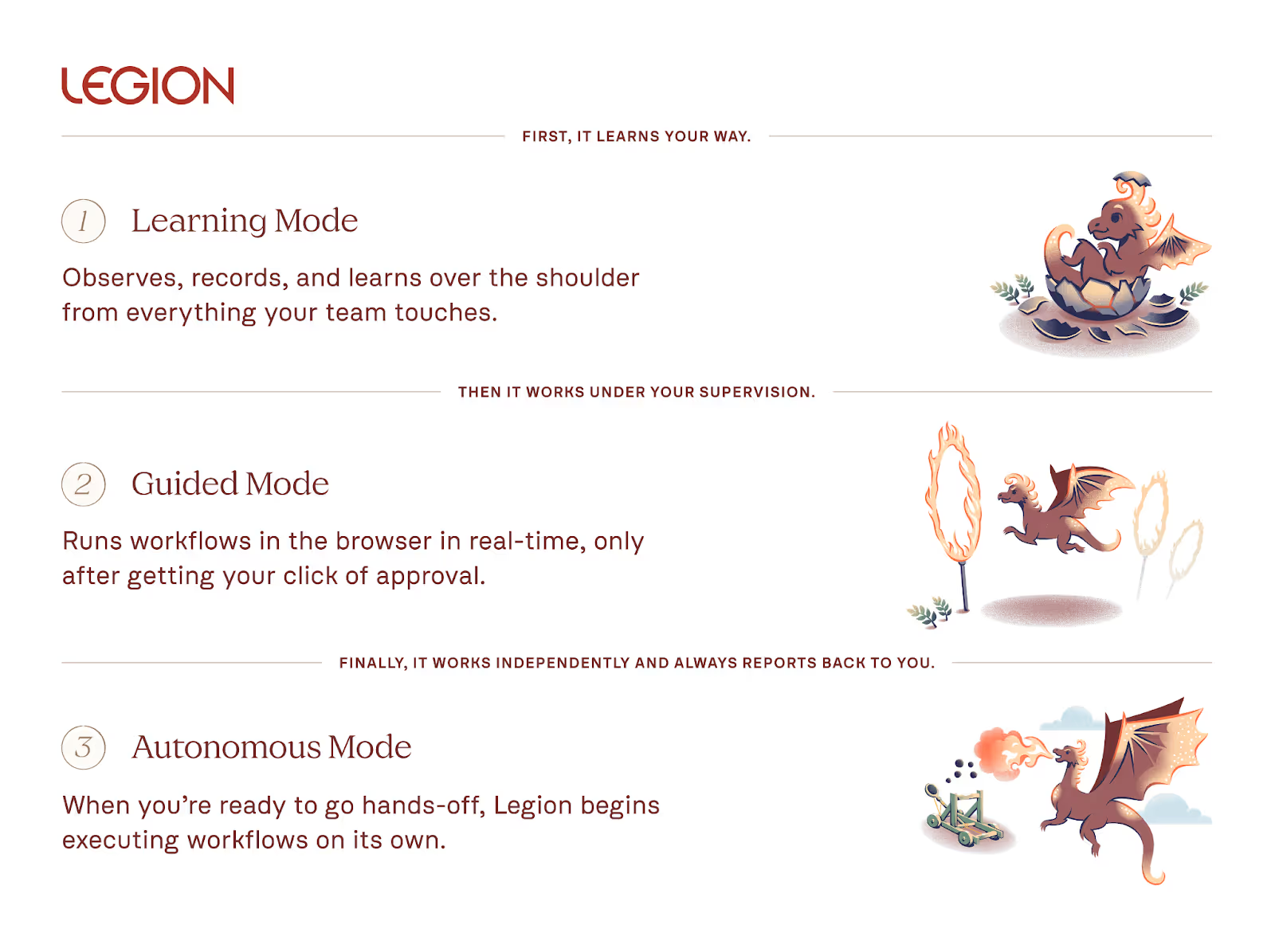
By focusing on how your real analysts work and only automating what they’ve shown to be effective, Legion enables you to build true automation that adapts and improves over time.
Tier 1 Use Cases for the Legion AI SOC Analyst
Our customers use Legion’s automation platform for a variety of use cases, ranging from full tier 1 automation to mapping, improving, and auditing their existing systems and processes.
- Workflow Documentation: Create comprehensive workflow maps of how your SOC analysts handle alert triage and investigations.
- Alert Triage & Investigations: Automate noisy Tier 1 triage, enrich alerts with context, and auto-close junk. These can include cloud, identity, phishing, vulnerability management, and more. Because we are not limited by integrations, Legion can automate any SOC workflow.
- Triage Reporting & Summarization: Generate incident timelines and report on key metrics such as MTTA/MTTR.
- Process Improvement: Spot process gaps and bottlenecks, and optimize workflows across analysts.
- SOC Training: Don’t let your tribal knowledge leave with your best analysts. By mapping out your processes, your junior analysts can train by “looking over the shoulder” of Legion in guided mode.

Tier 1 Automation Is Not Magic
The truth is, automating the SOC, even tier 1 tasks alone, is not an easy problem to solve.
Anyone who tells you their tool will work magically out of the box on day one is selling you a fantasy, and Legion is not here to tell you it will either. When you consider automation, you have to note that:
- Some alerts are predictable, but many are context-dependent and demand human judgment.
- Integrations break. APIs can make things easier, but still need to be managed.
- And through it all, your good analysts remain your most valuable asset. Automation should make them faster and more effective, not try to replace them.
That’s why we built Legion's approach to automating tier 1 tasks around the exact flows that real people use.
SOC automation at any level shouldn’t feel like magic (even if it sometimes does). It's grounded in observing, guiding, and learning from your real workflows.
Legion’s AI SOC analyst doesn’t pretend to replace humans. It records what your best people do, guides new analysts, and automates the repeatable. Over time, your analysts can focus on improving workflows, upleveling their security skills, improving detections, and more.
Automate your SOC the way your team actually works with Legion.
Learn how AI SOC platforms automate Tier 1 tasks like alert triage by recording analyst workflows and executing them the same way your team does.