
Resources


DragonClaw is Legion's agent orchestration layer for the SOC; grounded in your org's own context, not a generic chatbot bolted onto security tools.

TL:DR: Ask any security team what would give them back the most time, and the answers tend to converge on the same theme: less time spent stitching things together, more time spent actually deciding. That’s where SOC automation is heading with DragonClaw, the orchestration layer that deploys Legion’s trusted AI agents into any security task.
Automated workflows have already gotten teams part of the way there, triggering playbooks and kicking off investigations the moment an alert fires. DragonClaw is built upon the foundation of Legion’s platform, in that we require zero integrations in exchange for the ability to operate any tool, and goes further: it leverages the business context (past cases, runbooks, recordings, etc.) to orchestrate the agents needed to respond to an alert or escalation, to tell you why the last three cases like this one got closed the way they did, and to surface the exact query that finds the right evidence in your specific environment. That's the difference between automation that runs a process and intelligence that understands one.
Instead of an analyst hunting across five tools to reconstruct context that already exists somewhere in the organization's own history, DragonClaw brings that context directly to them and performs a task, in their own way, the moment they need it. Ask a question, get a grounded answer or a completed action, drawn from how your organization actually operates, not a generic playbook applied from outside.
The result is analysts can spend more of their time on the judgment calls only a person can make while orchestrating the agentic layer, where DragonClaw handles the reconstruction, the pattern-matching, and the acceleration and scale that used to eat the hours in between.
From Analyst to CISO: Closing the Context Gap in Security Operations
For security analysts, think of real-world threat hunting. Today, it means pulling and reading vast amounts of data across a bunch of different tools before you can even form an opinion or a lead on where to go. DragonClaw runs that process, end-to-end, with agents. DragonClaw consumes data across all of your tools, correlates it, and comes back with a thesis for the analyst to either approve or disapprove.
If you're a CISO or security leader, quickly investigating what the risk or impact is for a CVE requires organizational context not contained in a single tool. DragonClaw assembles all of that data and surfaces the answers, with recommendations, and where appropriate, autonomous actions that can put the findings to work.
Add it up across a team, and the opportunity is real: practitioners who spend their time on judgment instead of relearning tools, leaders with a straight answer whenever they need one, and a security program built to scale with the threat landscape instead of falling further behind it.
Introducing DragonClaw
DragonClaw is Legion Security's agent orchestration layer for the SOC. It gives security teams the ability to invoke Legion's agents in plain conversational language, enabling security teams to seamlessly get work done, or to answer questions about how their processes, tools, and people are actually making decisions.
One thing to be clear is that this is not (yet another) bolt-on chat interface. DragonClaw is the next step in the Legion platform, built on everything Legion has already learned across the tools, knowledge, and decision logic for your team’s security workflows. DragonClaw takes that further, putting that context and institutional knowledge to work answering questions and completing tasks the moment someone asks.
Under the hood, DragonClaw interprets intent, figures out which agents a request actually requires, and orchestrates them; across all tools in the stack, including agents that take real action, like API calls or web interactions, without any integrations required. All of it runs inside configurable guardrails: explicit permission before any response action, only approved tools, and credentials pulled from secure vaults. Nothing about “conversational” means “unsupervised.”
What Changes For Each of You
Threats are scaling with AI. Automation and agents close a large part of that gap, and they'll take a SOC further than headcount ever could… but not all the way. Security teams need humans to stay in the loop, not to keep pace with volume (which they can’t), but to supervise the work, evaluate outcomes, test and challenge what the agents conclude, and make sure security stays something that enables the business rather than something that slows it down or breaks it. Security analysts and leaders serve essentially as the maestros of the agentic orchestra. That's the same place the sharpest thinking on AI lands more broadly: the machine executes and reasons whereas the human owns judgment where needed and accountability.
DragonClaw is what supercharges the security workers. It's what lets a security team orchestrate its agents instead of losing control over what they do. For security practitioners and SOC analysts, that shows up as a partner inside the investigation itself: context and enrichment on demand, memory across past cases, guidance on what to do next, and the ability to generate the right query for your environment instead of learning a new query language from scratch.
For managers and security leadership, it's one place to ask about real-time SLA risk, process improvement opportunities, MTTR and false-positive trends, bottlenecks, coverage gaps, and team workload — instead of stitching the answer together from five dashboards.
For CISOs, DragonClaw provides direct answers on risk posture, SLA exposure, MTTR trends, exposure to a new CVE, audit evidence, automation ROI, and board-ready reporting, available the moment you need them instead of on the next reporting cycle.
Not Another Chatbot, An Orchestrator
Chat interfaces are becoming table stakes across the industry, and we're not going to pretend otherwise; it’s been proven that chat alone isn't a durable differentiator. What makes DragonClaw different is what's underneath it: every answer and every action is grounded in the workflows, case history, and coverage data Legion has already built for your specific security team and your specific organization.
A generic assistant sitting outside your platform can talk about security in general. DragonClaw can talk about your security workflows, because it already has the record of how your security team works.
That's the same principle behind everything Legion builds: AI for defenders should understand how a specific business operates, across its tools, its workflows, its people, before it's trusted to answer questions or take action with real business impact. DragonClaw is where that understanding becomes something every person in your organization can talk to directly, whether that's the analyst mid-investigation, the manager reviewing the week, or the CISO prepping for the board.
DragonClaw will be showcased at Black Hat USA 2026, visit us at Booth #5150 to see it in action!
Introduction
TL;DR: Using LLMs to automate security alert correlation won’t work when they’re fed unmanaged IOCs including emails, URLs, IPs, domains, and hostnames. These inflate token costs, produce inconsistent references, and break structured output and automation reliability. Legion Security’s IOC indexing system replaces raw indicators with compact symbolic references that the model reuses throughout its reasoning. Across 100 evaluation runs, this took JSON validity from ~80% to 100% and IOC reference compliance to 100%, resulting in the ability to reliably automate security alert correlation.
Automating security alert correlation and other modern security investigations with LLM-based agents means using an agentic LLM to power a multi-step security investigation.
A typical workflow begins with an alert - say, a reported phishing email - and the agent iteratively queries tools such as Microsoft Defender Threat Explorer, Splunk, or CrowdStrike to gather evidence, assess scope, and recommend containment actions.
At each step, the agent receives query results containing raw IOCs: sender addresses, embedded URLs, source IPs, recipient domains, and device hostnames. It must reason about these indicators, decide whether to refine its search or conclude the investigation, and return its findings as structured output.
Without any re-engineering of indicators of compromise (IOCs) an agentic LLM can work well for short investigations.
But as the number of steps in an investigation grows, an issue with alert automation emerges.
The agent's context window fills with repeated, verbose indicator values, the model begins echoing raw IOCs inconsistently, and the structured outputs it produces become increasingly fragile.
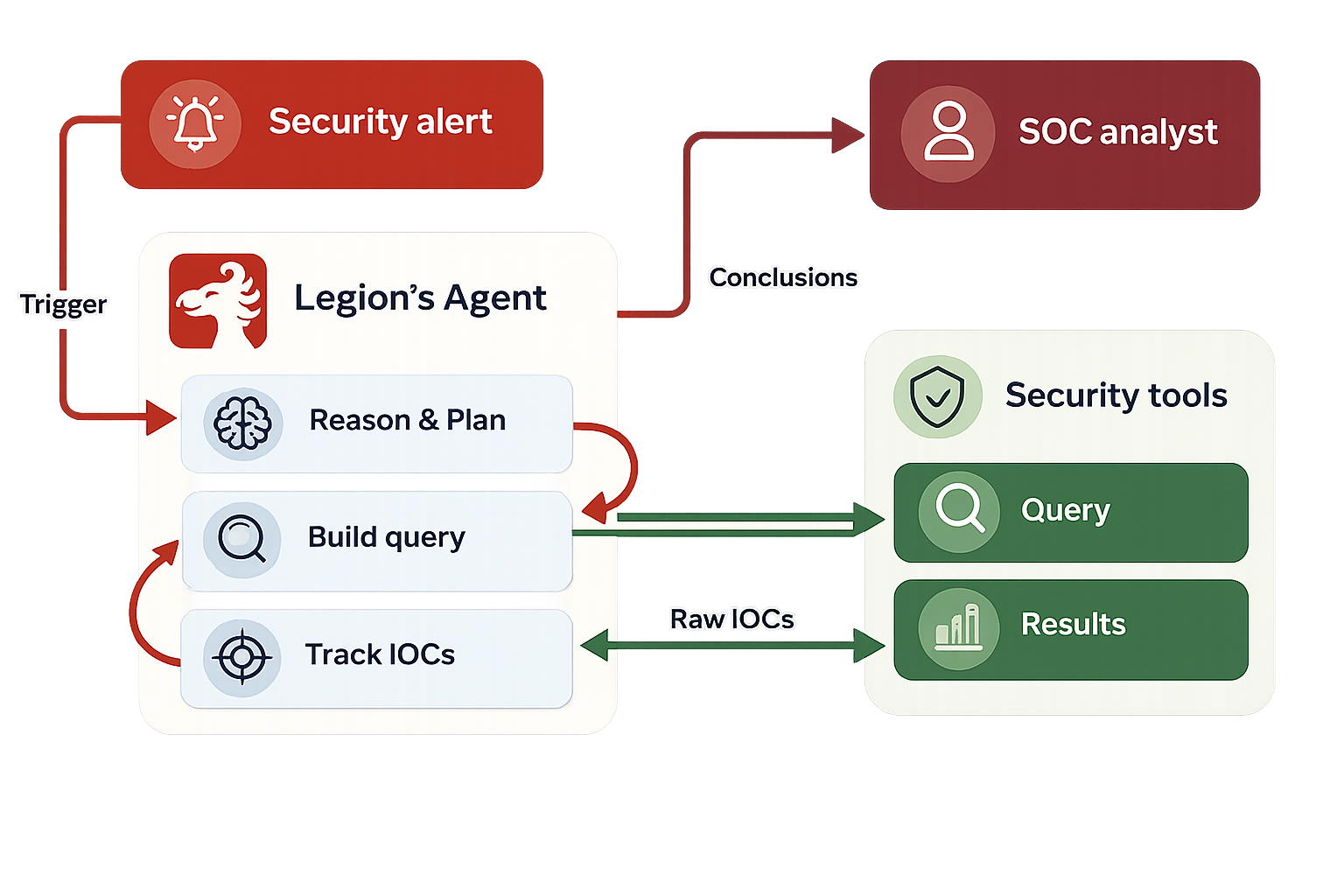
[Figure 1: High-level architecture of an AI-driven investigation agent.]
Consider a phishing investigation that proceeds through four steps:
- Initial query: Search for emails from a reported sender to a specific recipient. The results contain the sender's email address and a handful of URLs.
- Scope expansion: Search for all emails from the same sender across the organization. The results return 22 emails with SharePoint URLs, tracking links, and font-file references.
- URL analysis: Search by specific URLs found in step 2. Additional domains and redirects surface.
- Conclusion: The agent summarizes its findings and lists all relevant IOCs.
By step 4, the agent's prompt contains the full history of steps 1 through 3 - including every raw URL, email address, and domain mentioned in each step's results and the agent's own reasoning. Some of these URLs are long tracking links with base64-encoded parameters, easily exceeding 200 characters each.
This accumulation creates three concrete problems.
- Token bloat. Raw IOC values, particularly URLs with tracking parameters and encoded payloads, consumed a disproportionate share of the context window. A single newsletter email might contain 30+ URLs, each repeated in the query results, the agent's reasoning, and the indicators list, tripling the token cost per IOC, per step.
- Over-reporting. When asked to list relevant indicators, the model would frequently dump every IOC it had ever seen into the response - even when the current step involved only one or two. In one case, an agent listed all 145 email addresses from its registry when the current query concerned a single sender.
- Structural fragility. Query results from security tools sometimes contained comma-separated URL lists embedded in strings. When the model attempted to reproduce these in its JSON output, it produced malformed structures - unescaped commas, broken string boundaries, and invalid nesting. In our baseline evaluation, only approximately 80% of model responses parsed as valid JSON.
Legion AI’s Approach To Building Better AI Security Alert Correlation
We address the AI security workflow problems that emerge from complex invesigations with a three-part system:
- A unified IOC manager that extracts and indexes indicators.
- An IOC prompt adjustment that instructs the model on how to use indexed references.
- A preprocessing step that cleans malformed tool output before it reaches the model.
IOC Extraction and Indexing
The core of the system is an IOC manager that maintains a registry of all indicators encountered during an investigation. When new text enters the pipeline - whether from tool query results or from the agent's own prior reasoning - the manager scans it using a set of type-specific patterns covering URLs, email addresses, IPv4 addresses, file hashes, hostnames, and domains.
Each newly discovered IOC is assigned a compact symbolic reference following a consistent naming convention: the first email becomes EMAIL01, the first URL becomes URL01, the second domain becomes DOMAIN02, and so on. The original value is stored in the registry, and all occurrences in the text are replaced with the corresponding reference.
Extraction order matters. URLs are processed first because a URL contains both a domain and potentially an IP address. By extracting URLs before domains and IPs, we prevent the system from fragmenting a single indicator into multiple overlapping entries.
The manager also performs selective extraction. In a typical prompt, the first section contains static task instructions - tool descriptions, output format specifications, and investigation guidelines. IOC extraction is applied only to the dynamic sections (step history and query results), leaving instruction text unchanged. This prevents false positives from example IOCs embedded in the prompt template.
Deduplication is handled through a value-to-reference mapping. If the same IOC appears in step 1 and again in step 3, it receives the same reference both times, ensuring consistent tracking across the entire investigation.
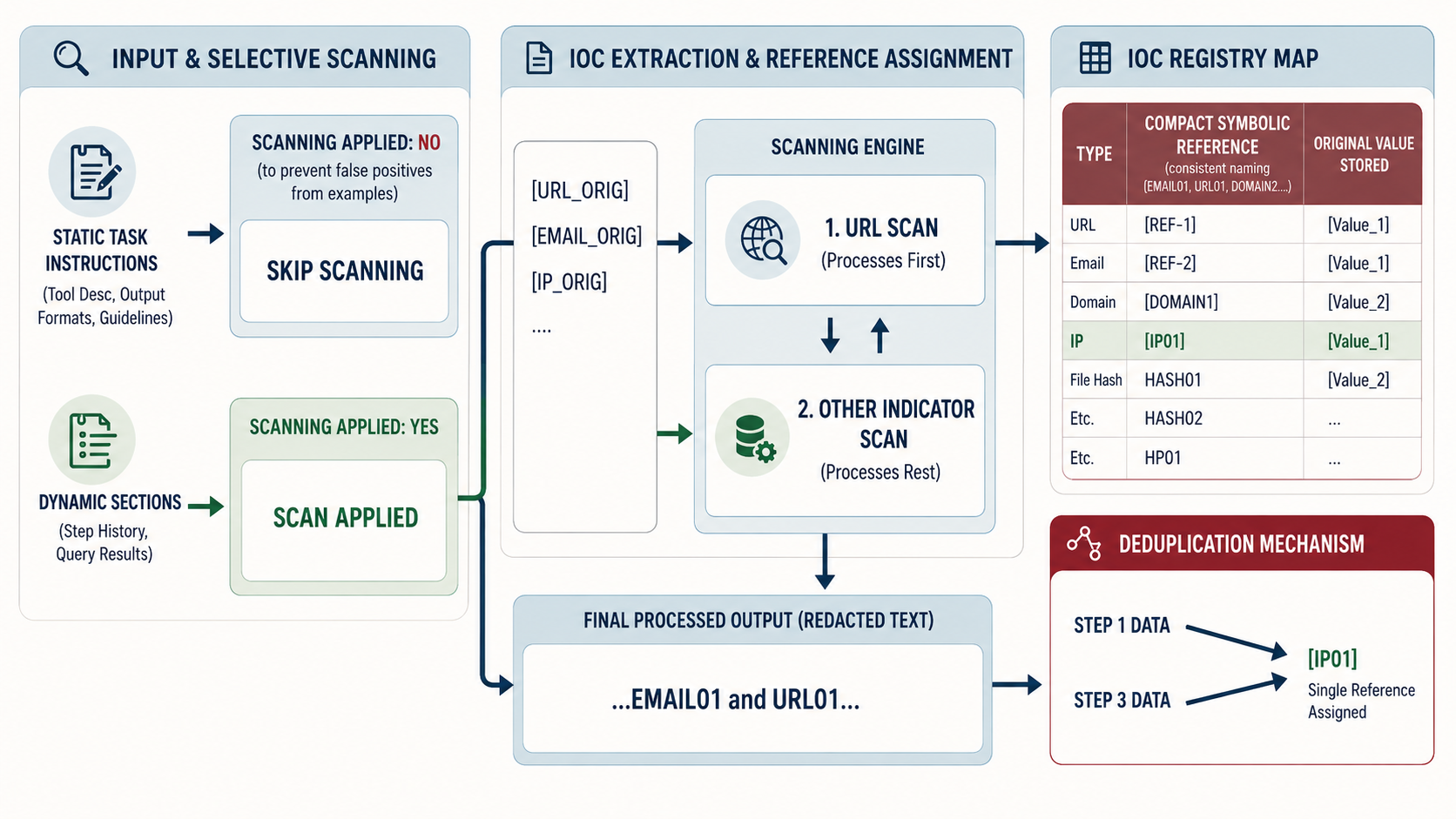
[Figure 3: The IOC extraction pipeline.]
IOC Prompt Adjustment
Extraction alone is not sufficient. Even when the input prompt uses symbolic references, the model may revert to generating raw IOC values in its output, particularly if the system prompt or prior conversation history contains raw values, or if the model has seen the actual value during context processing.
To address this, we developed an IOC prompt adjustment, a compact, structured appendix appended to the user prompt that explicitly instructs the model on how to handle IOCs. The adjustment establishes three rules:
In reasoning
Always use symbolic references. Never write raw email addresses, URLs, IP addresses, or domains. Instead of writing a raw sender address followed by a description of the campaign, use the corresponding reference identifier throughout.
In the indicators field
Distinguish between known and new IOCs.
For indicators already present in the registry, use the symbolic reference. For indicators being reported for the first time, newly discovered in the current step's results, use the actual value, so it can be added to the registry for subsequent steps.
Relevance filtering
Only include IOCs that are directly relevant to the current investigation step. Do not copy all registry entries into every response.
The IOC prompt adjustment includes a populated copy of the current IOC registry, mapping each reference to its actual value, so the model can look up identifiers when constructing its reasoning. It also provides correct and incorrect examples, a validation checklist, and explicit rejection criteria.
We tested two versions of the IOC prompt adjustment:
- A comprehensive version with extensive examples and redundant emphasis
- An optimized version that distills the same rules more concisely.
Both achieved equivalent compliance rates, suggesting that clarity of instruction matters more than volume of repetition.
Input Preprocessing
The second component addresses a problem upstream of the model: malformed tool output.
Security tool APIs sometimes return URL lists as comma-separated values within a single string field, rather than as properly structured arrays. When passed through to the model as-is, these malformed strings caused structured output generation failures.
Our preprocessing step detects comma-separated URL patterns in query results and reformats them into clean, numbered lists before the text reaches the model. This small transformation, applied before IOC extraction, resolved the structured output validity issue independently of the other components.
Security Alert Correlation Evaluation
Setup
We evaluated the system using 10 real-world investigation traces captured from production. Each trace represents a complete phishing investigation conducted through several security tools, containing the system prompt, user prompt with step history, and the raw query results that the model must reason about.
For each trace, we ran 10 iterations with the same prompt configuration, measuring two metrics:
- JSON validity: Whether the model's response parsed as valid a structured output.
- IOC reference compliance: Whether the response used symbolic references exclusively in its reasoning field (no raw IOC values) and correctly distinguished between known references and new actual values in its indicators field.
We tested four configurations to isolate the contribution of each component.
Results
JSON validity
The baseline configuration produced valid JSON in approximately 80% of responses. Adding URL preprocessing alone brought this to nearly 100%, confirming that malformed tool output - not model capability - was the root cause of parsing failures. All configurations that included the enforcer achieved 100% validity.
IOC compliance
Without the IOC prompt adjustment, the model never spontaneously adopted symbolic references, compliance was 0% regardless of whether the input text had been processed by the IOC manager. With the prompt adjustment, compliance jumped to 100% across all traces and iterations. This held for both the comprehensive and optimized prompt adjustment variants.
Component independence
The results reveal a clean separation of concerns: URL preprocessing fixes JSON validity, the IOC manager fixes IOC compliance, and provides the underlying registry and extraction infrastructure that makes both possible.
Qualitative Observations
Beyond the quantitative metrics, we observed several qualitative improvements:
- Reduced prompt size. Replacing verbose URLs (some exceeding 200 characters) with compact references, meaningfully reduced token consumption in the step history, particularly for investigations involving newsletter or marketing emails with numerous tracking links.
- Consistent cross-step tracking. The registry ensured that the same IOC received the same reference throughout the investigation, this is particularly helpful with IOCs referenced throughout multiple steps in the investigation.
- Focused indicator reporting. With the IOC manager's relevance-filtering instruction, the model stopped dumping entire registries into its responses. Indicator lists became proportional to the current step's scope rather than the investigation's total history.
AI Security Alert Correlation Discussion
Why extraction without the IOC prompt adjustment fails
A natural question is why input-side extraction alone does not work. If the prompt already contains a symbolic reference instead of a raw email address, why does the model still generate raw values in its output?
The answer lies in how LLMs process context.
The model has access to the full prompt, including sections where the actual IOC value may still appear, task-specific inputs, quoted alert descriptions, or the registry itself.
More fundamentally, the model's training distribution contains overwhelmingly more examples of raw IOC values than of symbolic reference systems. Without explicit instruction, the model defaults to the more familiar pattern.
This finding has a broader implication for LLM-based agent design: transforming the input is necessary but not sufficient when you need the model to adopt a non-default output convention. Explicit behavioral instruction, the IOC prompt adjustment, bridges the gap.
Limitations
Our evaluation has several limitations worth noting. All traces were drawn from a single investigation type (phishing via specific security tools). While the IOC types encountered are representative of broader security operations, there are additional evaluations to be done.
The evaluation was conducted with a single model (chatGPT4.1). Different models may exhibit different compliance characteristics, and the prompt mechanism may need tuning for models with different instruction-following tendencies.
Finally, our compliance metric is binary - a response either uses references correctly or it does not. A more granular metric could capture partial compliance and might reveal subtler performance trends across model versions or investigation complexities.
Conclusion
We presented an IOC indexing system for AI-driven security investigations that addresses three interrelated problems: token bloat from repeated raw indicator values, inconsistent IOC tracking across investigation steps, and structural fragility in model-generated structured outputs.
The system combines automated IOC extraction with symbolic reference assignment, explicit behavioral guidance through prompt engineering, and input preprocessing to handle malformed tool output. Across 100 evaluation runs on 10 production investigation traces, the full system achieved 100% JSON validity and 100% IOC reference compliance, up from approximately 80% and 0%, respectively, at baseline.
The key insight is that managing IOCs in the context of LLM-based agents requires intervention at both the input and output stages. Extraction and indexing normalize the input, but only explicit prompt-level guidance ensures the model adopts the reference convention in its generated output. Neither component alone is sufficient; together, they eliminate the problem entirely.
As SOC automation platforms handle increasingly complex, multi-step investigations, structured approaches to managing the information that flows through the agent's context window become essential. IOC indexing is one instance of a more general pattern: giving the agent a well-organized working memory that scales with investigation complexity rather than against it.
.png)
Automation of security alert correlation with AI (LLMs) depends on replacing raw indicators with compact symbolic references.

Abstract & Data Summary
We gathered and manually annotated a dataset of 196 hard triage decisions from real-world security investigations to understand how different LLMs perform when making the kinds of decisions required for SOC automation. The dataset covered a wide range of outcomes, including benign, malicious, and false positives.
After cleaning the dataset by removing mock runs and cases with missing information or incorrect workflow execution, the remaining 163 examples were grouped into use case categories to form a high-quality cohort. We then evaluated LLMs on the dataset overall and per use-case category and found that Gemini 3 Pro performs best overall, though the best LLM varies by use case category.
Model performance by use case category:
If you’d like to understand our full research methodology, read on.
*Note: since this blog was authored, several new model families have been released. While the results have remained broadly stable, particularly among the best and worst performers, updated research may be required for a nuanced understanding of the performance differences amongst the rest.
Data Collection
The dataset was constructed from security investigations from eight US-based customers.The evaluation is conducted in a secure, federated way, without mixing customer data, only reporting summary statistics from each customer tenant.
To create a challenging evaluation, we over-weighted cases in which the analyst dis-agreed with the model - so the error rate is inflated here.
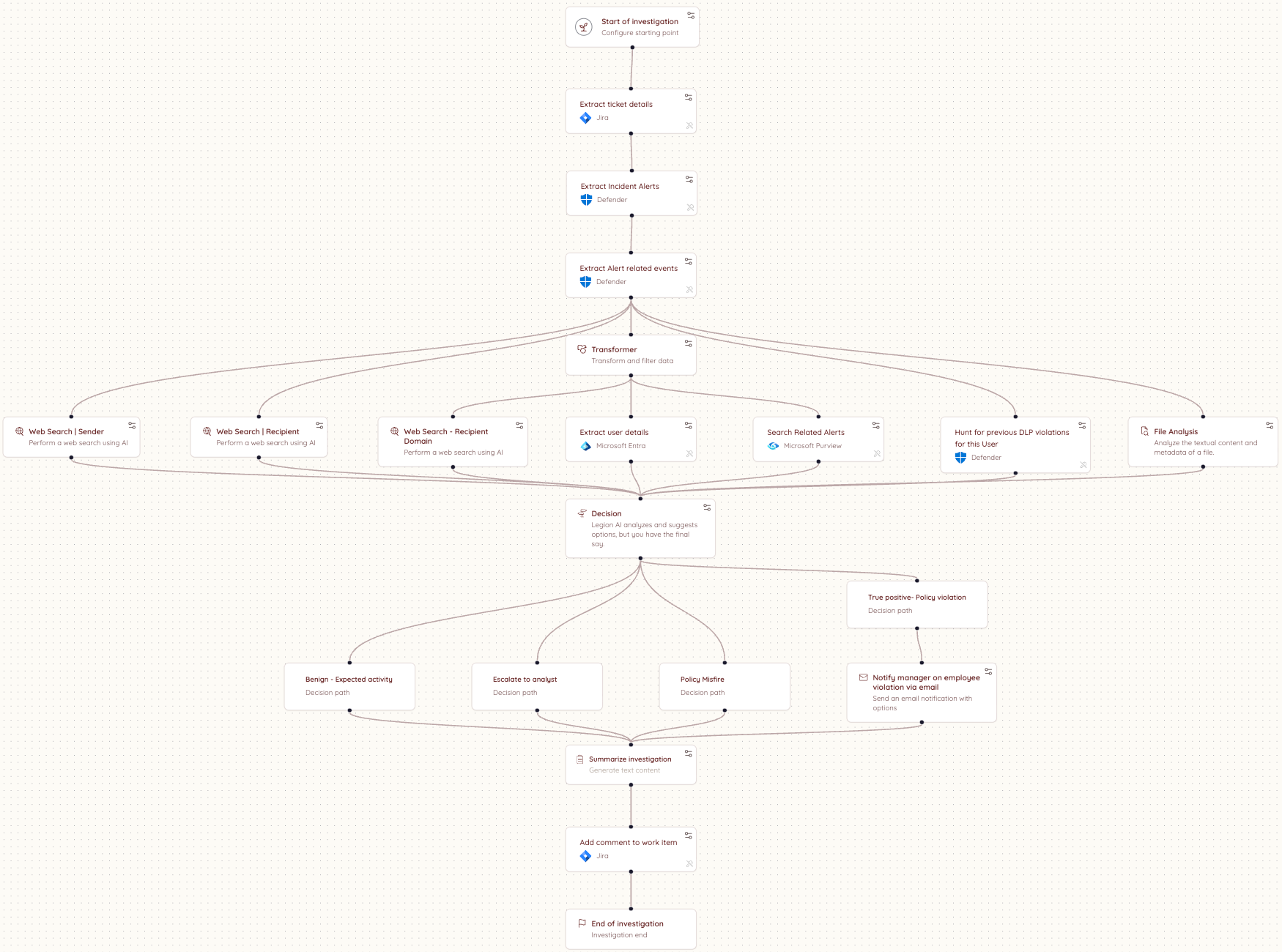
The investigations were conducted automatically according to predefined, customer-specific workflows, each of which contained at least one triage decision node. A triage decision node is a decision point within a workflow, where an LLM chooses a decision from among a list of provided decision options, given the information that was gathered in the workflow up until that point.
At each decision node, the LLM used in production selected a classification decision from a list of workflow-specific decision options and provided the reasoning for its decision, based on a summary of the steps completed until that point in the investigation.
For each investigation containing at least one decision node, we collected the following information from production session logs:
- A summary of the workflow steps up until the decision node, including tool name, step description, and step outputs
- Organization-specific knowledge, written by the customer and containing a title, description, and data
- The set of available decision options at the decision node
- The model's selected decision in production, as well as the reasoning and detailed reasoning for the decision
- The decision option selected by the customer
- Feedback text written by the customer for the decision
Here is an example workflow diagram:
Quality Control
An expert cybersecurity analyst annotated the 196 decision examples with reasoning tags to explain the production and customer decisions, and label whether disagreements are explained by an analyst-error, mistaken reasoning by the AI or missing data / steps in the workflow.
Examples tagged with "Workflow ran correctly but missing information" or "Workflow ran incorrectly" were removed from the dataset. Two additional examples with the use case titled "Workshop" were removed, as these were mock runs. For the remaining examples, the workflow ran correctly and was not missing information.
Triage Decision Distribution
By Label
Across the filtered dataset, the workflows contained 27 distinct normalized decision labels, which we grouped into the following buckets: False Positive, True Positive, Requires Review, and Other. The distribution of the labels is shown below:
The final evaluation dataset contains data from eight customers. The table below shows the number of annotated decision examples per customer and the tools used in each environment.
Use Case Distribution
We consolidated the use cases into 3 categories to consolidate our findings. Below is the map from the consolidated categories to the original use cases, as well as the distribution of the dataset over the consolidated categories.
Confusion Matrix
Below is a confusion matrix between the expert analyst annotations and the recommendations our system makes. We prompt the models to be careful and escalate when they are not sure.
Results
Over all use cases (including those without a use case name), Gemini 3 Pro had the highest performance at 74.8%, with GPT-4.1 and Opus 4.5 tied for second.
Phishing Results:
On the phishing use cases, Gemini 3 Pro performed the best, followed by Opus 4.5.
Account Takeover Results:
Sonnet 4 and GPT-4.1 were tied for best on the account takeover use cases.
Network Results:
Opus 4.5 and GPT-4.1 were tied for best on the network use cases.
Conclusion & Recommendation
We gathered and annotated 163 triage decisions from real-world security investigations. We characterized the use case distribution, and grouped the use cases according to common categories. We then benchmarked large language models across each use case category and the full dataset. We found that Gemini 3 Pro performs best overall. Per use case category, Gemini 3 Pro gives the best performance on phishing, Sonnet 4 and GPT-4.1 are tied for best on account takeover, and Opus 4.5 and GPT-4.1 are tied for best on network. Based on our results, we recommend that security teams test models for different scenarios to find the solution that works best for their use case, different models are good at different things and the only way to know which model works best for your use-cases it to run formal evaluation - or, you can trust us! Our research team in Legion is constantly evaluating new models and improvements to our triage pipelines.

We benchmarked leading LLMs on 163 real-world security triage decisions across phishing, account takeover, and network use cases. See which models performed best and why the answer depends on your use case

TL;DR: Implementing AI in the SOC is essential, but it only works if an AI automation platform accesses the same evolving organizational context as human SOC analysts do and works within that context in the same tools as your SOC already uses.
In April 2026, news of Anthropic’s Mythos model (and its ability to find and exploit zero days in formally secure software) ended the debate on whether AI belongs in your SOC. Mythos proved that AI has extreme capabilities as an offensive (red team) agent in cybersecurity. Every organization must deploy in a defensive (blue team) role in response.
The next question about AI in the SOC is therefore how to implement it? Not when or if.
Mythos changed the AI SOC implementation question. It was never acceptable to deploy AI badly in the SOC. Now, after Mythos, it's not acceptable to deploy it slowly, either. The organizations that will come out on top in the next 12 months are the ones that move fast and get it right, and most of the industry is about to discover that those aren't the same thing.
By the time Anthropic announced it, Mythos had already found thousands of high-severity vulnerabilities across every major operating system and browser in use today, without being told where to look, including decades-old bugs in secure OSs.
Here's a high-level guide you can use to respond. Below, we've pulled together AI SOC implementation learnings from our team and Legion Security customers to show what to do and what to avoid right now when implementing AI into your SOC.
What Most AI SOC Implementations Get Wrong
Security teams know they need AI. Most are already moving. But most implementations are failing because they are not able to work within the individual realities of a particular organization.
Avoid: Integration without context
Integration is important. An AI SOC tool can integrate with your SIEM, your EDR, your threat intel platforms, and everything else. But that is not enough.
But context is more important. Can an AI SOC tool capture your organizational context?
For example, to tell a false positive, a real alert, a compliance breach, and an insider threat apart, an AI-SOC implementation needs to know:
- How is your organization structured?
- Where does data actually live versus where it is supposed to live?
- Who owns what, and how does that map to investigation and response when something goes wrong?
- How do escalation paths work in practice, not on paper?
- And critically, how do you enable the business without interrupting it?
A heavily regulated enterprise running investigations across proprietary internal platforms looks nothing like a technology company from the SOC’s point of view. An AI SOC tool needs a way to know what's unique and how to turn that into an appropriate, provable action.
AI needs to capture how analysts work in your SOC and build on that work.
Avoid: Stale snapshots of how things work
Organizational context is not a configuration you complete on day one and then revisit periodically.
Your organization is a living thing. Teams change, tools get added, processes evolve, new subsidiaries appear, and in many of the companies we work with, risk posture constantly shifts as a result.
Acquisitions, regulatory updates, and even product lines can totally shift the situation facing the SOC.
An AI system that ingested your context six months ago and stopped learning is already drifting from your reality. It is making decisions based on an organization that no longer exists.
The right model is not a one-off ingestion. It is a continuous learning system that stays embedded in how your organization actually operates, tracks how investigations unfold, incorporates analyst feedback, and updates its understanding as your environment changes.
- Snapshot? No.
- Persistent model of your specific organization that evolves with it? Yes.
3 Features of a Good AI SOC Implementation
AI SOC platforms and systems built around these three features behave differently from the start. They do not ask organizations to adapt to them, but adapt to the organization instead.
We recommend that companies evaluate AI SOC platforms and implementation plans for the following three capabilities:
- An understanding of how your organization actually operates. How investigations really unfold, where data actually lives, and how decisions get made under pressure.
- Continuous understanding. The AI working in your environment needs to keep learning. This is a function that Legion Security user Neil Robinson (Head of Security Engineering & Cybersecurity at Virgin Money) described as “learn(ing) our operating rhythm and scale it”.
- Operations that work within context and not around it. The system needs to produce outcomes that are actionable within your organization as it exists today. That means working within your existing workflows, tools, and constraints without asking you to change how you operate to accommodate it.
AI SOC Implementation Done Right
The organizations getting AI right in the SOC aren't the ones with the longest integration lists or the biggest models. They're the ones that treated organizational context as the foundation rather than the afterthought, and built systems that keep learning their environment rather than freezing it in place on day one.
Legion Security is built for this challenge and this moment.
.png)
Implement AI in your SOC by avoiding integration without context and finding solutions that capture how analysts work in your SOC.
Anthropic was right (and responsible) to release Mythos first to cybersecurity researchers and a select group of organizations through Project Glasswing. It is a genuinely remarkable model. And the security community should take it seriously. What is available to defenders today will be in the hands of attackers in a few months. That window is closing fast.
Mythos raises the ceiling on what AI can do in cybersecurity tasks. It discovers zero-day vulnerabilities in codebases that previous models could not find. It reverse-engineers complex systems. It constructs sophisticated, multi-path exploits at scale. The capabilities that were previously accessible only to well-funded nation-state actors can now be replicated by a far broader set of threat actors. No longer do you need teams of expert reverse engineers and months of reconnaissance.
The threat landscape is structurally shifting. We will be determined by our ability to shift our defense in kind. Quickly.
Where AI in defense needs to go first
The industry is converging, rightly, on vulnerability research and remediation as the priority. Scanning your own codebase with the same class of models that attackers are using is a clear first step. In many cases, defenders actually have an asymmetric advantage here, as we have better access to our own code than attackers do.
The harder problem is remediation. We already carry significant backlogs of unresolved, sometimes exploitable, vulnerabilities. Unlike an attacker who has nothing to lose, defenders cannot afford mistakes. Our systems are in production. Downtime has real costs. The asymmetry of attacker agility versus defender accountability is where the gap widens.
AI-assisted vulnerability remediation at scale is necessary. But it is not a solved problem, and any honest assessment of the landscape has to acknowledge that.
What this means for security operations
The idea of static detections designed to discover dynamic adversaries is fundamentally misguided. The future is better trip wires and an assume-breach mentality.
For SOC teams, the implications are direct. The scale and complexity of attacks is accelerating. We should expect a higher volume of sophisticated attacks that actively evade detection, that do not conform to known signatures or behavioral patterns, and that are designed from the ground up to stay invisible.
This breaks the model that most SOC programs are built on. The idea of maintaining a library of static detections to catch dynamic adversaries has always had limits. Those limits are now being exposed in real time.
What we need instead is the ability to detect a high volume of low-fidelity signals, such as anomalies in endpoint behavior, data access patterns, email activity, network flows, and identity. This requires teams to investigate each one as if it were the leading edge of a sophisticated breach. Not because every alert is a nation-state intrusion, but rather, we should expect that a higher percentage now may be.
The question is no longer whether to adopt AI in security operations. This is clearly needed. We cannot scale defenses solely on human labor.
The question is how to do it in a way that actually works inside the operational reality that security teams live in.
The real challenge is operational reality
Enterprises have legacy and custom tools, established processes, compliance and audit requirements, escalation paths, and oversight obligations that are not optional. AI cannot simply replace this infrastructure. It has to work within it.
You cannot properly scale your defenses without giving AI access to your organizational context, including your tools, your processes, your detection logic, and your escalation criteria. AI agents need to be able to investigate with the consistency and rigor of an incredible IR analyst, operate transparently, and support human oversight at the points where it matters.
This is precisely what we built Legion to do: meet organizations where they are. Our platform learns your existing tools, processes and context and makes them accessible to the latest frontier models (now Mythos, and every model in the future). From that we create structured, repeatable workflows where consistency is required or fully agentic investigations that require depth and judgment. Every action is auditable. Human-in-the-loop controls are configurable. And the system integrates across your entire stack.
My conclusion - Assume breach, investigate everything, build for the attacker that has already found the vulnerability you have not patched yet, and is using Mythos-level models to stay ahead of your detections.

In the wake of Mythos and Project Glasswing, security operations teams need AI that meets them where they are.

TL;DR: How can you trust that an AI SOC analyst is doing its job the way it's supposed to? As SOC automation takes on more investigation work, being able to verify what the AI actually did becomes increasingly important. The answer is the same as it would be if you asked how you can trust any SOC analyst, AI or human. If you can see proof of work via screenshots from tools, you can trust and audit the work an AI analyst does.
Picture a senior analyst mid-investigation. Eight browser tabs open across CrowdStrike, VirusTotal, Defender, and Microsoft Entra. She's running a hunting query in one window, checking an IP reputation score in another. And somewhere in between, she's documenting. Taking screenshots, copying log entries into a case note, capturing context before it slips away.
The job she's doing is moving across tools, pulling together evidence from a dozen different sources, and building a record that another analyst, or an auditor, or a manager, can actually follow. During her work, this SOC analyst uses and produces documentation.
To be trustworthy in the SOC, AI agents must do the same thing and work to the same standard.
Real Screenshots Are the Most Trustworthy AI SOC Evidence
The reason SOC analysts document their work is that an investigation has always meant showing your work. The summary an analyst writes is the insight they've drawn from what they saw.
Screenshots taken during the work create indisputable evidence, i.e., here is what I found, and here is the proof.
.png)
Evidence gathering has always been a core part of the SOC analyst's job and is how you hand off a case without losing context.
How to Trust Your AI SOC
We should hold AI SOC agents to the same standard as we do human analysts.
When a human analyst closes a case, we expect to see their work. The exact screen they reviewed, the exact query they ran, the exact result that informed their decision. A summary of what they found is a claim. The screenshot is the proof.
Most AI SOCs give you API logs and structured JSON responses. However, this is a verdict and a reason rather than trustworthy evidence. The agent processed the alert, evaluated the indicators, and concluded it was malicious.
That's not evidence. A summary can sound confident and still be wrong. Without visual evidence captured at the moment of the decision, you have no way to know what the system actually encountered.
Legion gives you a trustworthy AI SOC by operating differently.
Instead of calling APIs, Legion navigates your source systems directly through the browser, the same way a human analyst would. It opens the actual system, reads the actual screen, and captures a screenshot of exactly what it sees at every step. The summary is the claim. The screenshot is the fact.
That's the standard we believe AI investigations should meet. And it's the only architecture that meets it.
Legion Builds A Trustworthy AI-SOC By Automating Evidence Gathering
Legion Evidence Gathering captures visual proof of every action Legion takes as it navigates your source systems, automatically, in real time.
.png)
Take a malware investigation spanning CrowdStrike, VirusTotal, and Defender. Legion opens the originating ticket, reads the case, and begins investigating. As it moves through each tool, it takes a screenshot at every step. The CrowdStrike detection page as it appeared. The VirusTotal result in context. The Defender hunting query and its output. Every interface, exactly as Legion saw it.
By the time an analyst opens the case, the full evidence gallery is already there. Screenshots organized sequentially, labeled by tool, timestamped, and ready to review. Not just a summary. Not just a log. The complete picture: the analysis and the visual evidence behind every conclusion.
And it stays there. Every investigation Legion runs is stored and searchable. When an auditor asks a question, when a peer analyst picks up a handoff, when someone needs to understand why a decision was made, you go back to the session, and everything is right there. Every step. Every screen. Nothing reconstructed. Nothing missing.
Different alert types. Different toolchains. The same complete evidence gallery, every time.
See What Accountable, SOC-Ready AI Looks Like
We've always known what a good investigation looks like. You show your work. You back your conclusions with evidence. You leave a record that someone else can follow. Legion applies that same standard to every automated investigation it runs, without exception and without manual effort. The bar doesn't move because the analyst is an AI. It stays exactly where it's always been.
See Legion Evidence Gathering in action. Request a Demo
.png)
You can trust Legion’s AI SOC solution because it shows live evidence of decision-making and actions taken with real screenshots.

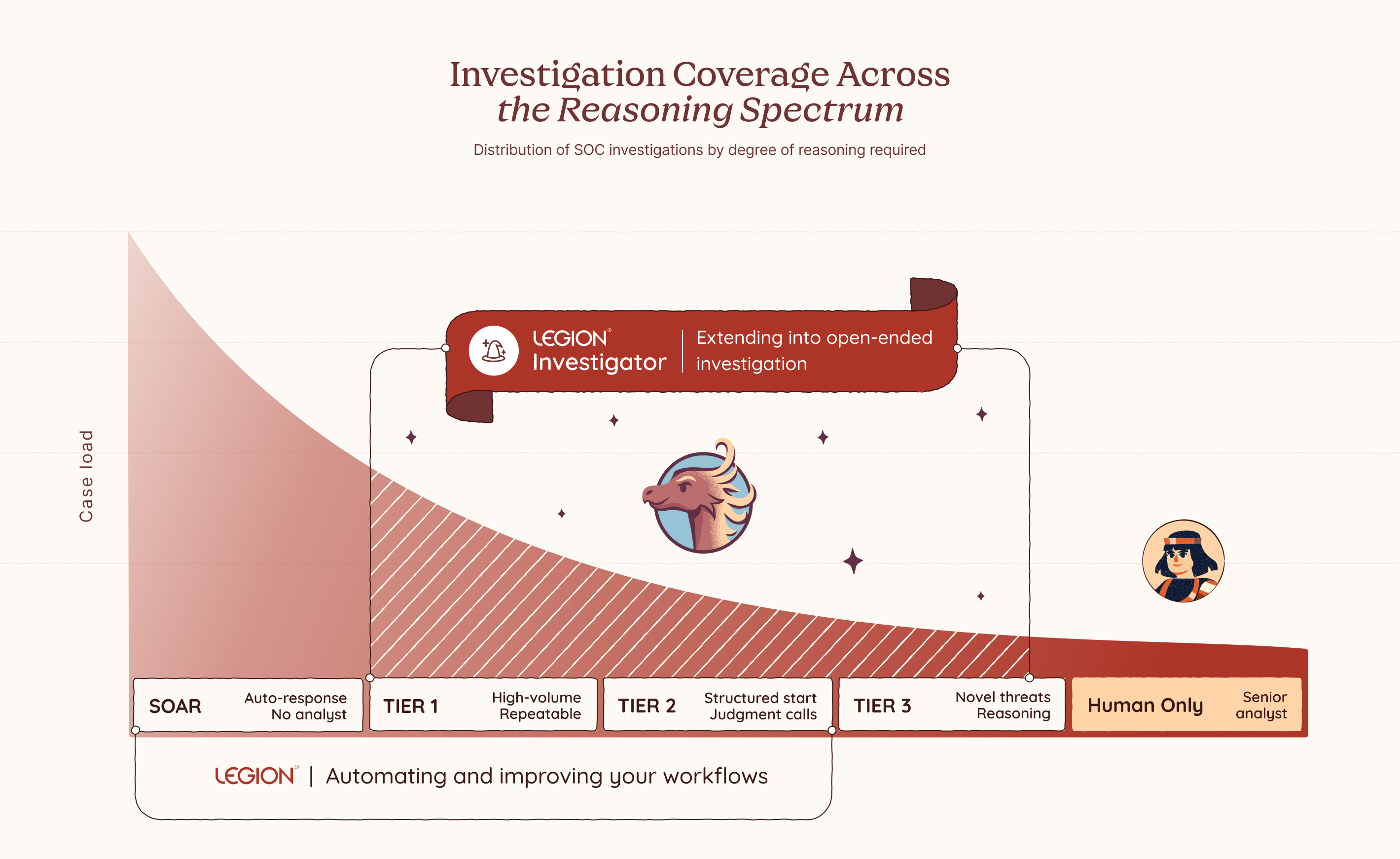
SOC investigations range widely. Some are highly repeatable: every step defined, every decision documented. These are where traditional SOC automation works well, because the process can be captured and fully automated. But some investigations eventually reach a point where that breaks down: where the next step depends on what you just found, and the judgment and intuition to know what it means.
You can see it clearly the moment you try to write it down. Some processes flow neatly from start to finish. But as soon as you move into more complex investigations, the cracks appear. You find yourself pulled into a spiral of edge cases, tool variations, and fallback paths. You add branches. Then branches on branches. And after all that effort, you almost always end up in the same place: where no rule applies, and only judgment, reasoning and intuition can take you further.
The Part You Can Never Quite Capture
SOC investigations don't all look the same. Some are fully deterministic: a user notification when an outgoing email gets blocked, no reasoning required. For these, consistency matters. The same steps, the same outcome, every time. Others are the opposite: novel threats with no fixed path, no known pattern, where only experience, intuition, and judgment can tell you what to do next. And many fall somewhere in between, where you start with structure and hit a point where judgment has to take over.
But even those flows have a ceiling. Take a phishing investigation. You can document the triage steps pretty cleanly: check the sender, analyze the headers, detonate the attachment, check the URLs. That part is routine and capturable. But the moment you find something suspicious, the investigation shifts. Now you need to reason about scope: is this part of a campaign, and who else was hit? That question has no fixed answer. You might search for other emails with the same subject, but any decent campaign will vary the lures across targets, changing subjects, sender names, and payload links to evade detection. You cannot match on a single field and call it done. You need to iterate: follow one thread, see what it reveals, adjust your search, go again. You are reading the environment in real time, making judgment calls at every step based on what the last one uncovered.
Those judgment points show up on every shift, on every alert that goes beyond the routine. Someone has to reason through them in the moment, with whatever context they have, under whatever pressure exists right now. Until 3am. Until a less experienced analyst picks it up. Until alert volume means there simply isn't time to think it through properly.
That reasoning is not pre-programmed. It emerges from the finding itself. It is what a senior analyst does instinctively, and until now there has been no way to replicate it at scale. Legion Investigator is built for that moment.
Your Environment. Your Logic. Your Investigator.
Legion Investigator is a goal-oriented AI agent that sits inside your investigation workflow at exactly the moments where reasoning takes over from execution, extending Legion's coverage across the full spectrum of SOC investigations, from fully deterministic workflows to complex open-ended investigations. You define its goal, you choose which tools and actions it is permitted to use, and you decide where it acts autonomously and where it checks in first.
Which category a given investigation falls into is sometimes obvious. But often it is a deliberate choice, one that should be yours to make based on your team's needs, your risk tolerance, and how much consistency versus flexibility the situation calls for. Where on that spectrum each investigation runs is yours to decide. Every boundary is one you set in advance and can trust will be respected. This is what makes Investigator the kind of AI enterprises can actually adopt: not just powerful, but designed from the ground up to operate within your constraints, your processes, and your level of trust.
Most AI SOC tools bring their own model of how investigations should work. Legion Investigator learns from how yours actually do. It builds its understanding from your team's recorded investigation sessions, the decisions they make, the paths they take, and the patterns that emerge across real cases in your environment. Over time, Legion builds a structured knowledge base specific to your organization, capturing your processes, your tooling, and your team's accumulated expertise. That knowledge is not just stored. It is actively used to improve your captured workflows and feeds directly into how Investigator reasons, prioritizes, and investigates.
And when we say your tools, we mean all of them. Legion Investigator works the way your analysts work, through the browser, with no integrations and no APIs required. Your SIEM, your EDR, your threat intelligence platforms, your homegrown applications, your legacy dashboards, your on-prem and cloud environments. You don’t rebuild your stack to fit the tool. The tool fits your stack.
The way it works reflects how investigations actually flow. An investigation might start in your SIEM with a set of routine queries, structured, reliable, repeatable. But when it reaches one of those decision points, you hand off to an Investigator with a goal: find the scope of breach, enrich the full context of what we have so far, identify what else was impacted across endpoints and cloud assets.
The Investigator takes that goal and works toward achieving it. It invokes the relevant tools, interprets what comes back, recalculates what to do next, and invokes again. It keeps going, step by step, until the goal is met. Not a single tool call with a result handed back to you. A full reasoning loop that runs until the work is done, across your security tools, your homegrown applications, and any AI agents already running in your environment. Investigator acts as the orchestrator, pulling in whatever is needed to get there.
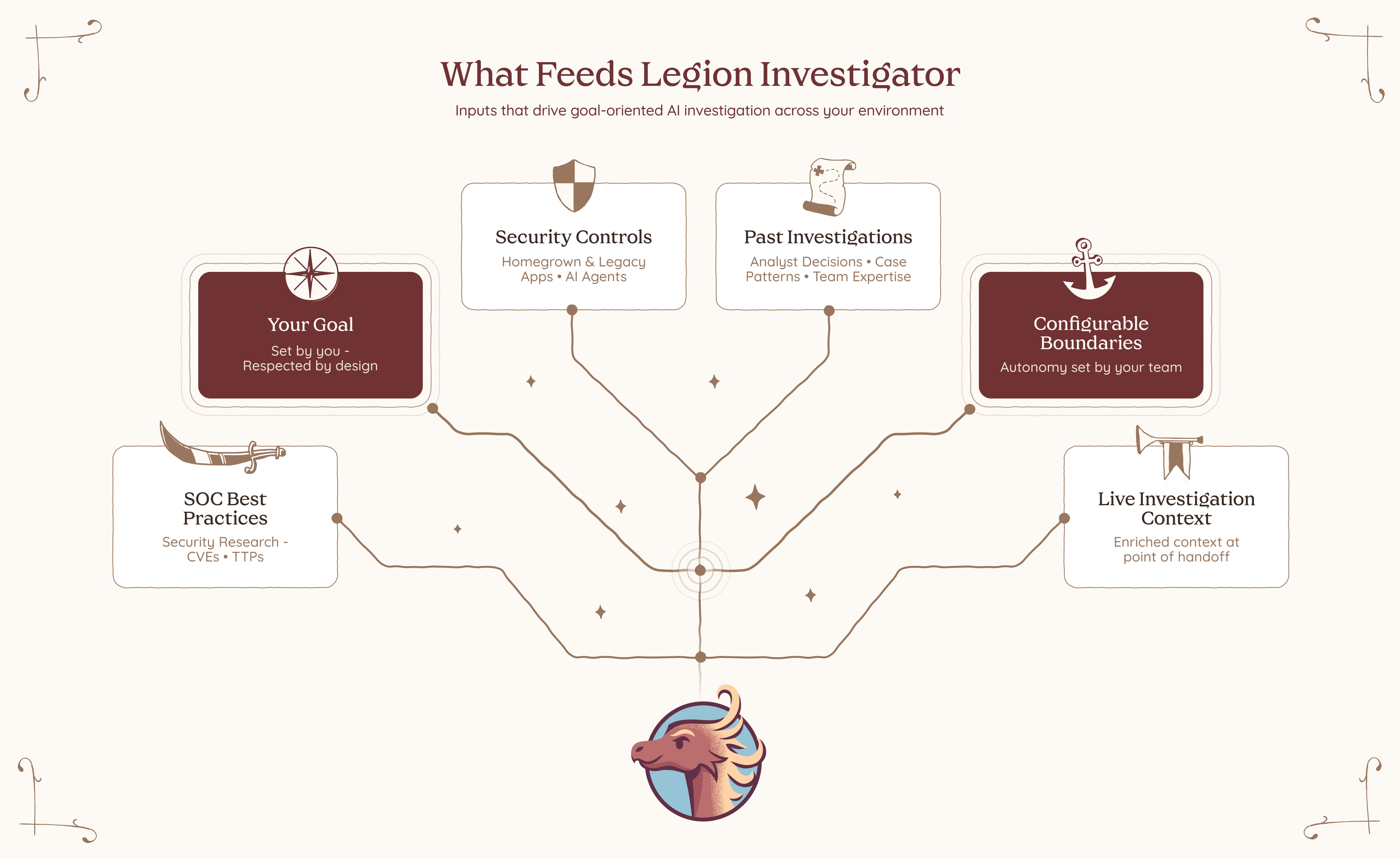
Multiple Investigators can work together across a single investigation. One handles enrichment. Another determines scope of breach. A third drives containment based on what was actually found, not what was anticipated when the playbook was written.
And because trust matters, Investigator operates within guardrails. It works only with the tools and actions it’s been given permission to use. For anything higher risk, it asks before acting. You stay in control by setting the boundaries in advance and knowing they’ll be respected.
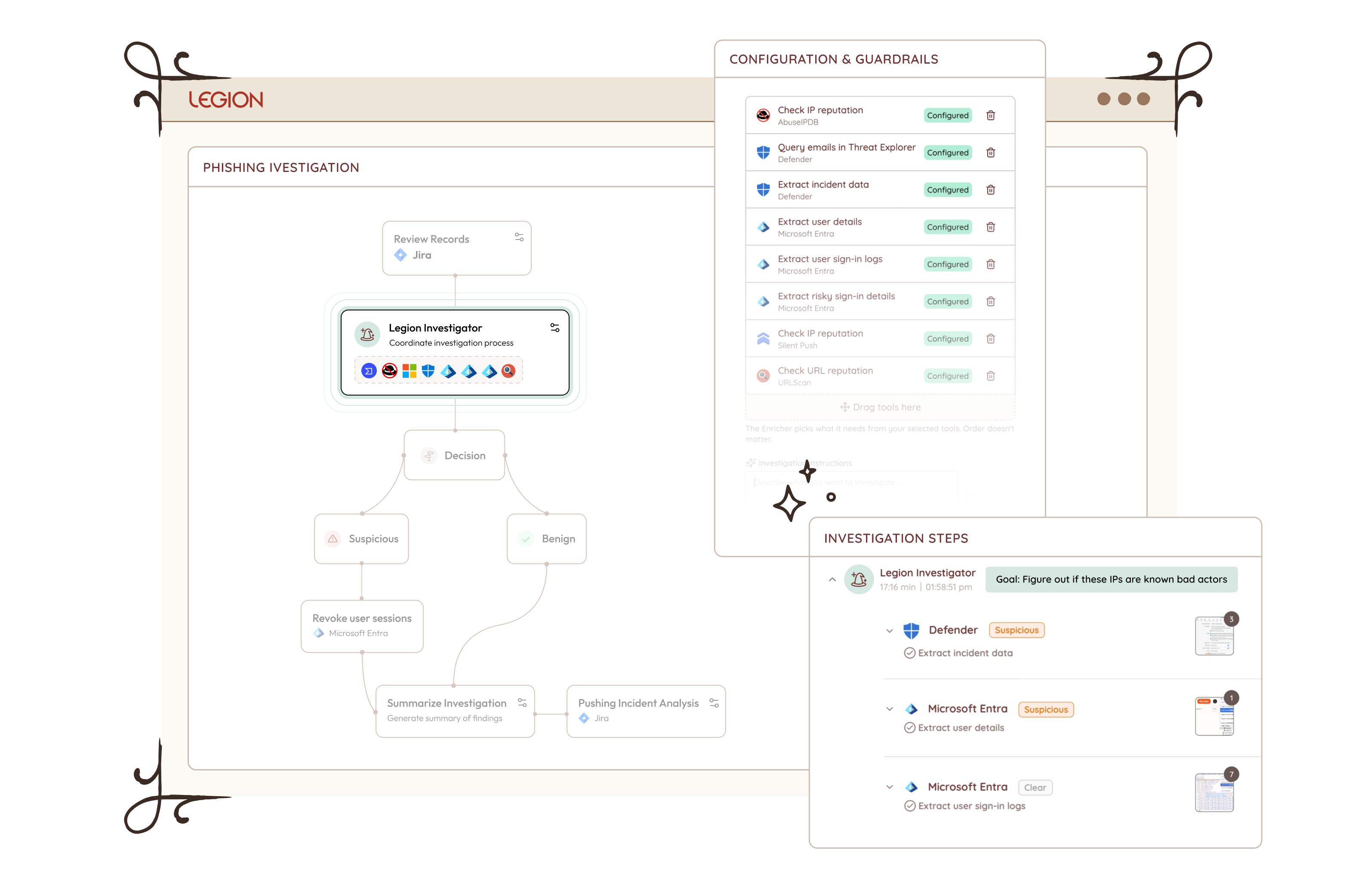
What This Changes
Legion Investigator opens up three things that weren't possible before.
Pick up where deterministic processes end
For investigations where you have structured steps, you can now embed an Investigator at exactly the points where structure runs out. The routine parts stay routine.The investigator reasons further, and by the time you step in, the groundwork is already done.
Handle your long tail of alerts
For the long tail of investigations where you never had a well-defined flow to begin with, you can now hand them off end to end. The Investigator handles enrichment before you even open the case, drives containment the moment scope is confirmed, and picks up every judgment point in between. Give the Investigator the goal, set the guardrails, and let it run. No playbook required.
Every investigation, regardless of how well-defined it is, can now be handled with the depth of your best analyst, on every alert, on every shift. And for the first time, you control where on that spectrum each investigation runs. More structure where consistency matters. More autonomy where judgment, experience, and intuition are required. The balance is yours to set, and yours to change.
This is not about replacing analysts. It never was. There will always be moments that require human judgment, experience, and instinct, and no AI should pretend otherwise. What changes is everything around those moments. The analyst becomes the commander: setting goals, defining boundaries, sending investigators out into the environment to gather, reason, and report back. The calls that matter stay with you. The work that surrounds them no longer has to. Not because we built a smarter AI. Because we built one that learned from you.

Introducing Legion AI Investigator: AI that reasons where playbooks can't. Define the goal, set the guardrails, and let it investigate across your tools — no integrations required.
I spent a long time staring at screens that couldn't keep up. Not because the analysts weren't good, but because the volume, the speed, the sheer relentlessness of what we were defending against had already outpaced the model. Tier 1 is working a queue. Tier 2 is doing the same thing, slower with more context. Tier 3 is getting pulled into fires before they finish the last one. Humans are trying to move at machine speed. It never worked. We just found ways to cope with it not working.
On March 6th, the White House said it out loud. It states directly that the administration will "rapidly adopt and promote agentic AI in ways that securely scale network defense." It calls for AI-powered cybersecurity solutions to defend federal networks and deter intrusions at scale. It frames the cyber workforce not as the primary defense mechanism, but as the strategic asset that designs and deploys the systems that do the actual defending.
That is not subtle. That is a pivot.
I've seen a lot of strategy documents come and go. Most of them describe the problem correctly and then propose solutions that require the same broken model to execute them. More analysts. More tools. More compliance frameworks that generate reports nobody reads. This one is different in a specific way. It acknowledges that human-speed defense has a ceiling, and the adversary has already blown past it.
This matters operationally. Not because government mandates translate directly to enterprise practice, but because the logic behind the mandate is undeniable and most organizations are about two or three incidents away from being forced to confront it themselves.
Here is what I actually read in that document when I strip away the political framing:
Threat actors are using AI to accelerate attack timelines and broaden their operational surface area. The gap between when something happens and when a human analyst understands what happened is widening. That gap is where organizations get compromised. The strategy is essentially acknowledging that the only viable response to AI-accelerated offense is AI-accelerated defense. Not AI-assisted. Not AI-augmented. AI that acts.
That is exactly what we built Legion to do.
Not because we read the strategy. Because we lived through the alternative. I've watched skilled analysts spend the first forty minutes of an investigation just gathering context. Pulling logs from one tool, cross-referencing with another, chasing an IP through three different platforms before they can even form a hypothesis. That is not a people problem. That is a workflow problem. And it compounds at scale until your senior analysts are doing glorified data retrieval and your tier 1 analysts are drowning in volume they were never equipped to handle alone.
Legion treats that problem directly. It captures how experienced analysts actually investigate, the sequences, the correlations, the judgment calls, and runs those workflows autonomously at the speed the threat environment requires. Not replacing the analyst, but removing the friction that slows the analyst. Campaign hunting, alert triage, IOC blocking, CVE impact assessment across your entire environment, running while your team focuses on what actually requires human judgment.
The strategy also makes a point worth taking seriously. Deploying autonomous AI in your environment without understanding what it's doing is not security. It's a different kind of exposure. The document calls for securing the entire AI technology stack, and that is not bureaucratic language. That is operational reality. Any organization rushing to adopt agentic capabilities without visibility into how those agents operate and what they can access has traded one risk for another.
The teams I respect are the ones asking both questions at the same time. How do we move at machine speed? And how do we maintain accountability over the systems doing it?
The strategy just told you where the industry is going. The question is whether your operations are positioned to keep pace with it, or whether you're still trying to scale a model that was already failing before the AI arms race began.
I know which answer I kept seeing at 3 am.

The White House just pivoted: human-speed cybersecurity has reached its ceiling. Discover why the shift to agentic AI is no longer optional and how Legion is bridging the gap between machine-speed threats and human-scale defense.

Most SOCs are not just struggling with a talent shortage but also the burnout that results when skilled people spend too much time on work that is beneath their capabilities and thus not engaging.
AI platforms like Legion Security can help solve this burnout problem by automating repetitive tasks and giving SOC teams time back to improve their capabilities and spend time on engaging and satisfying work.
5 Steps to Using AI to Cut CyberSecurity Burnout
Most SOCs can begin reducing the risk of burnout immediately by focusing on a few straightforward steps.
1. Identify high-frequency workflows: Look for anything repetitive, especially tasks that happen dozens of times per day.
2. Ask analysts to document their steps: This becomes the foundation for automation and reveals inconsistencies. We do this at Legion through a simple recording process.
3. Build automation for the repetitive use cases: Let analysts automate on their own without developers. This creates speed and value for repetitive work.
4. Track real metrics: MTTI/MTTR, MTTA (Acknowledgment), onboarding time (a time-to-value metric), and workflow usage.
5. Encourage a culture of sharing: When people share workflows, the entire team improves faster. There are almost always steps that differ between analysts.
The rest of this article explains why this works.
Repetitive, Boring Work Creates Predictable Cybersecurity Burnout
Tier 1 and Tier 2 analysts often do not quit because the mission is uninspiring. They quit because the tasks are. Every SOC leader knows this, but very few have solved it. The daily flood of low complexity alerts, routine enrichment steps, and copy-and-paste investigations grinds people down.
Burnout is not a mystery. It is the predictable result of asking talented people to repeat the same low-value tasks.
When people leave, you lose more than a seat. You lose context, intuition, and the fundamental knowledge that comes from long-term exposure to your environment. Hiring someone new does not replace that.
In many SOCs, highly skilled analysts spend their time on tasks that could have been automated five years ago. This is the least visible and most expensive form of waste. It does not show up as a line item in the budget. It shows up in everything the team is not doing.
A customer of ours captured the thinking many teams share:
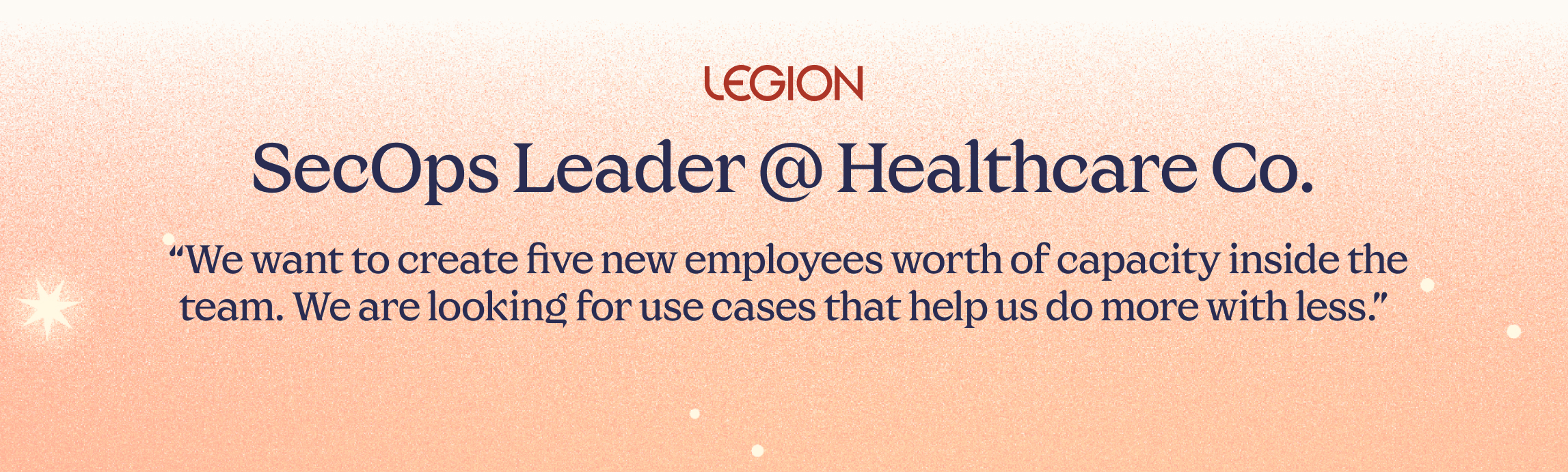
When analysts are busy with manual steps, they are not threat hunting, tuning detection rules, studying new adversary behaviors, or improving processes.
This is how SOCs fall behind. Not because the analysts are incapable, but because their time is misallocated. Attackers innovate faster than teams can adjust. That gap widens when analysts are stuck doing repetitive tasks rather than strategic work.
Fight Cybersecurity Burnout By Giving Analysts the Power to Automate Their Own Work
Many SOCs have tried to fix these problems by hiring more people. That has not worked. They have tried building automation through security engineering teams. That added new bottlenecks. They have tried to hire outsourced help, but it created inconsistency while decreasing visibility.
What works, and what the most forward-thinking SOCs are now adopting, is to make sure that automation belongs with the analysts, not with developers or specialized engineers.
One analyst put it simply: “We are bringing the ability to automate to the analyst. It is about self-empowerment.”
When analysts can automate the steps they repeat every day, they stop depending on engineering cycles. They stop waiting for API integrations. They no longer need someone with Python skills to script the basics.
This shift changes the entire rhythm of the SOC.
The Role of AI SOC In Quality and Consistency
For years, automation required an engineering mindset. Tools demanded scripting, manual API work, and knowledge of multiple integrations. Analysts were forced to rely on others. As a result, automation never became widespread.
That reality is changing. Browser-based tools like Legion can now capture workflows directly from the analyst’s actions. No API configuration. No scripts. No custom requests. Analysts can drag and drop steps, adjust logic, or describe edits in natural language.
A Legion Security customer said it plainly:
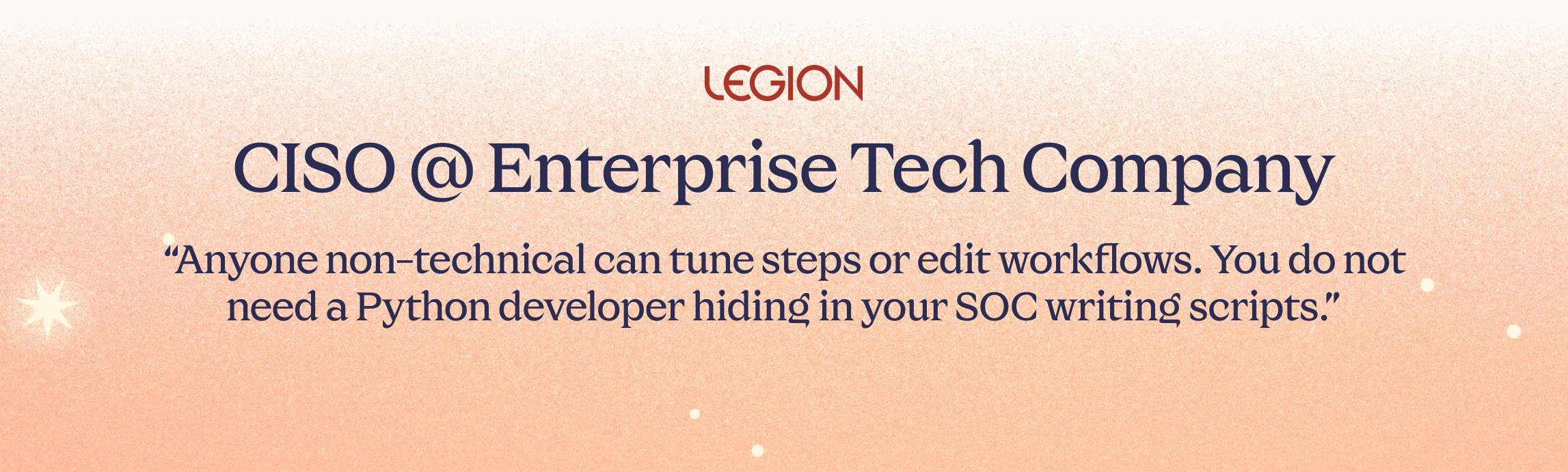
This matters because it removes the old automation bottleneck. It lets analysts fix their own inefficiencies as soon as they see them.
Turning senior expertise into a force multiplier
A SOC gets stronger when its best analysts teach others how they think. Historically, that kind of knowledge transfer has been slow and informal: new hires learning by watching over shoulders, senior staff fielding endless questions, training quality depending on who happened to be free that day.
Now teams can record their own best work and turn it into reusable, repeatable workflows.
One analyst described the shift: “Senior people record their workflows and junior people run them. You share expertise and bring everyone to the level of your top people.”
Another added: “It is a useful training tool because junior folks can see what the investigation looks like and understand the decision-making in each step.”
This approach does more than speed up onboarding. It locks valuable expertise into the system so it can be reused at any time.
More output with the team you already have
When repetitive work is automated, analysts suddenly have time. This is where the economic impact becomes impossible to ignore.
One organization measured the difference:
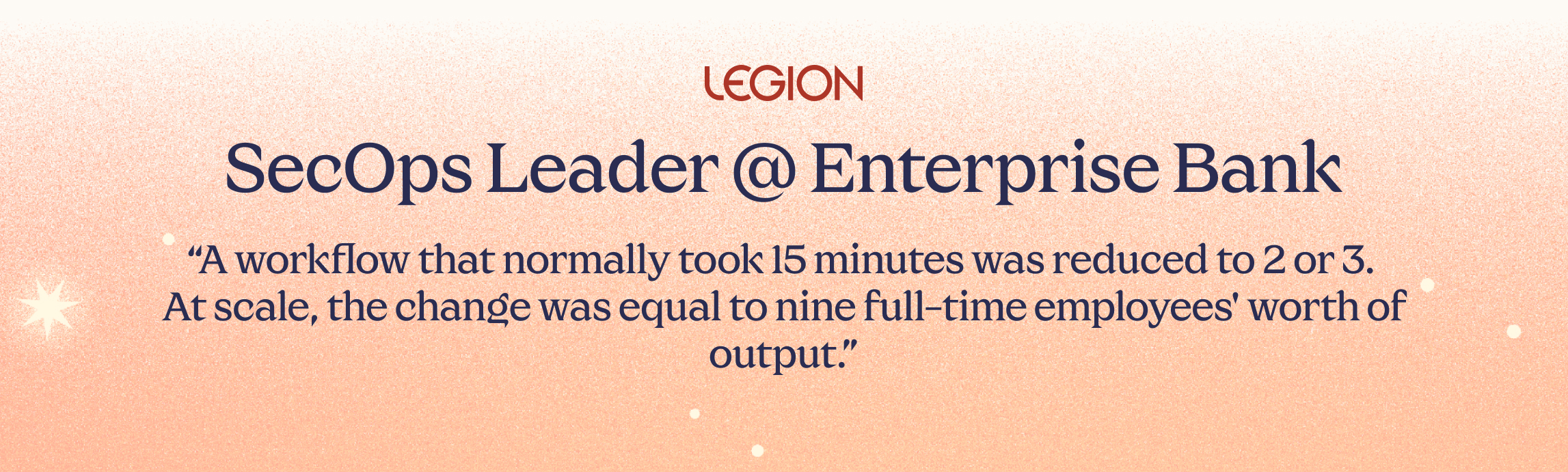
Another organization brought an entire outsourced SOC back in-house. Their automation results gave them enough capacity and quality improvements to cancel a seven-figure managed services contract. The CISO wanted consistent quality. The SOC manager wanted efficiency. Legion delivered both.
The manager became the hero of the story because he did not ask for more people. He made better use of the ones he already had.
The Best SOCs Use AI Alongside Engaged Humans
The SOCs that attract and retain talent over the next decade will not be the ones that hire the most people. They will be the ones who make the smartest use of the people they already have.
When you eliminate the hidden costs, you unlock the real value of your team. Human judgment, intuition, and creativity become the focus again. That is the work analysts want to do. And it is the work that actually strengthens your defenses.

Most SOCs are struggling with cybersecurity burnout because of talent waste. Learn how Legion is helping enterprises solve the SOC talent management crisis.

At Legion, we spend as much time thinking about how we build as we do about what we build. Our engineering culture shapes every decision, every feature, and every customer interaction.
This isn’t a manifesto or a slide in a company deck. It’s a candid look at how our team actually works today, what we care about, and the kind of engineers who tend to thrive here.
We build around four core ideas: Trust, Speed, Customer Obsession, and Curiosity. The rest flows from there.
1. High Ownership, Zero Silos
The foundation of engineering at Legion is simple: we trust you, and you own what you build.
We don’t treat engineering like an assembly line. Every engineer here runs the full loop:
- Shaping the problem and the solution
- Designing and implementing backend, frontend, and AI pieces
- Getting features into production
- Watching how customers actually use what you shipped
That level of ownership creates accountability, but it also creates pride. You see the full impact of your work.
However, ownership doesn’t mean you’re on your own. We don’t build in silos. We are a team that constantly supports each other, whether that’s brainstorming a solution, helping a teammate get unblocked, or just acting as a sounding board.
Part of owning your work is bringing the team along with you. It means communicating your plan and ensuring everyone is aligned on how your work fits into the bigger picture. Collaboration isn't just a process here; it's how we succeed. You own the outcome, but you have the whole team behind you.
Trust is what makes this possible. We don’t track hours or measure success by time spent at a desk. People have kids, partners, lives, good days, and off days. What matters is that we deliver great work and move the product forward. How you organize your time to do that is up to you.
2. Speed Wins (And Responsiveness Matters)
We care a lot about speed, but not the chaotic, “everything is a fire drill” version.
Speed for us means short feedback loops, small and frequent releases, and fixing issues quickly when they appear.
When a customer hits a bug or something breaks, that becomes our priority. We stop, understand the problem, fix it, and close the loop. A quick, thoughtful fix often does more to build trust than a big new feature.
On the feature side, we favor progress over perfection. We’d rather ship a smaller version this week, watch how customers react, and iterate, rather than spend months polishing something in isolation.
Speed doesn’t mean cutting corners. It means learning fast and moving forward with intention. If you like seeing your work in production quickly, and you’re comfortable with the responsibility that comes with that, you’ll fit in well.
3. Customer-Obsessed: Building What They Actually Need
It’s easy for engineering teams to get lost in the code and forget the human on the other side of the screen. We fight hard against that.
We are obsessed with building features that genuinely help our customers, not just features that are fun to code. To do that, we stay close to them. We make a point of hearing directly from users, not just to fix bugs, but to understand the reality of their work and what they truly need to make it easier.
That direct connection builds empathy. It helps us understand why we are building a feature, not just how to implement it. This ensures we don’t waste cycles building things nobody wants. When you understand the core problem, you build a better product, one that delivers real value from day one.
4. Curiosity: We Build for What’s Next
AI is at the center of everything we do at Legion, and that means working in a landscape that changes every week.
We can’t afford to be comfortable with the tools we used last year. We look for engineers who are genuinely curious, the kind of people who play with new models just to see what they can do.
We proactively invest time in emerging technology, knowing that early experimentation is how we define the next industry standard. If you prefer a job where the tech stack never changes, and the roadmap is set in stone for 18 months, you probably won’t enjoy it here. But if you love the chaos of innovation and figuring out how to apply new tech to real security problems, you’ll fit right in.
So, is this for you?
Ultimately, we are trying to build the kind of team we’d want to work in ourselves.
It’s an environment that tries to balance the energy of collaboration in our Tel Aviv office with the quiet focus needed for deep work at home. We try to keep things simple: we are candid with each other, and we value getting our hands dirty over managing processes.
If you want to be part of a team where you are trusted to own your work and move fast, come talk to us. Let’s build something great together.

VP of R&D Michael Gladishev breaks down how the team works, why curiosity drives everything, and what kind of engineers thrive in a zero-ego, high-ownership environment.