
How Legion Brings Your Team's Investigation Context into Claude and ChatGPT
Connect Claude and ChatGPT to Legion via MCP and ask about your investigations in plain language, with read-only access scoped to each user’s role

Legion’s agentic security platform is built on a simple idea: your team knows how to investigate, but it is knowledge that is one of the most valuable and unique things your SOC has. Legion captures how your analysts work, all the way from an alert, to the steps they take to the evidence they gather and the reasoning behind each verdict, and turns it into agentic investigations that run the same way every time.
But that context should not stay locked inside a single console for knowing analysts. Security teams increasingly do their thinking in AI assistants like Claude and ChatGPT, whether they're drafting an incident summary, preparing for a leadership update or trying to remember whether they've seen an indicator before. That's why we offer our customers the Legion MCP server, which connects those assistants directly to your Legion data through the Model Context Protocol. With this, security teams can ask questions about their investigations in plain language, from the tools they already use every day, and get answers grounded in what Legion actually did.
What your team can ask
Once Legion is connected, an analyst or security leader can pull up the full story of an investigation without leaving their conversation. They can find sessions by title, summary or entity, filter them by status, decision, workflow, analyst or date, and walk through each step along with the verdict it reached. They can also see which workflows and use cases are running, check how much of their monthly action allowance has gone to guided versus autonomous runs, and get answers about Legion itself from our documentation, with links back to the source pages.
In practice, that means questions like these:
- "Summarize our Legion sessions from the last 24 hours: what failed, what's still active, and which were decided true positive."
- "Open our most recent phishing investigation and walk me through each step, the entities it found, and why it reached its verdict."
- "Have we investigated 203.0.113.42 before? List every session that mentions it, with dates and outcomes."
- "Which workflows ran most last month, and what use case does each belong to?"
- "How close are we to our action limit this month? Split it by guided and autonomous runs."
- "How do I set up a Jira poller so new tickets trigger a workflow? Cite the docs."
Because the answers come from your own investigations, the assistant isn't guessing at how your SOC handles an alert. It's reporting what your team's process actually found, which makes it far more useful for shift handoffs, executive briefings and the everyday question of "have we seen this before?"
Built with security teams in mind
We know that connecting security data to an AI assistant raises fair questions, which is why our MCP server starts by being conservative, gaining your trust as it goes. It's read-only, which means it can't create, change or delete anything in Legion, and it can't run workflows, skills or agents. Each person connects from their own assistant and signs in with their own Legion account, so every request runs as that user and is checked against their Legion role. Nobody sees more through Claude or ChatGPT than they could already see in Legion.
Admins stay in as much control as they want, throughout deployments. MCP access is turned off until an admin enables it for the organization, and it can be switched off again at any time. Individual users can disconnect Legion from their assistant whenever they like, and admins can revoke a specific user's sessions, which ends that person's MCP access within about a minute.
Getting started
Setup takes just a few minutes. Legion has always been about capturing the way your team investigates so that expertise can scale. With MCP, that expertise travels with your team, into the assistants where more and more of their work already happens. If you’d like help in configuring this or to learn more, please reach out to [email protected].
TL;DR: In an agentic SOC, AI agents investigate alerts, decide what to check next, and can take action. Unlike SOAR playbooks or AI assistants, agents run the investigation themselves. They’re already handling phishing, triage and DLP alerts for teams like Virgin Money. The risks are real, but most come down to how much you let the agent do without checking, and that’s something you can control.
If you work in or manage a SOC, the appeal of AI agents helping your team is clear. They’re already being put to work too with 58% of cybersecurity leaders reporting that AI agents are taking actions within organizational workflows.
Broader SOC automation challenges haven’t disappeared, though and 52.6% of organizations cite skills gaps and a lack of expertise as barriers to SOC automation.
Below, we help you clear away some of those barriers and explain what an agentic SOC is and how agents work in the modern SOC, as well as limitations of their use.
What An “Agentic SOC” Is
Before we define what an agentic SOC is, there are three points that we think are worth clarifying:
- “Agentic” isn't a universally precise technical category.
- Not every product marketed as an “AI agent” has the same degree of autonomy.
- Agentic behavior exists on a spectrum.
However, it's reasonable to fundamentally say that an agentic SOC is a security operations environment in which AI agents can autonomously perform security tasks.
The tasks done by an agentic SOC (which in practice involves the deployment of an agentic layer like Legion) can include investigating alerts, gathering context, forming hypotheses, querying security systems, coordinating workflows, and executing approved response actions within defined human and technical controls.
We share practical examples of an agentic SOC in action further on in this article.
An agentic SOC solution or workflow involves an agent connected or logged into SOC tools and workflows gathering security data, autonomously investigating threats, reasoning through evidence, and taking action, all the while using organizational context and feedback to guide its decisions.
“Automation” vs “AI-assisted SOC” vs “agentic AI” tools
The three approaches below are often confused, but they differ in how independently they can work within the SOC.
Automation tools like SOAR follow predefined rules and workflows, whether that’s enriching an alert, opening a ticket or blocking an IP. If a case doesn’t fit the playbook, it can’t work out what to do.
AI-assisted SOC are mostly legacy security products with AI bolted on. You get alert summaries or a chat assistant inside one tool. The AI does some of the analysis, but you still run the investigation.
Agentic AI SOC is when AI agents independently plan and execute multi-step investigations, gathering evidence, developing and testing hypotheses, selecting tools, and adapting their approach as new information emerges. They work across multiple security tools, coordinating how those tools are used throughout an investigation.
Levels of AI SOC Agent Autonomy
The last of the approaches above (agentic AI SOC) effectively describes a human-like worker in your SOC. However, AI in the SOC operates at different levels of autonomy, from assisting analysts to independently managing security workflows.
We’ve adapted the levels below from Google Cloud’s Well-Architected Framework, which sets out four levels of security autonomy. Though Google wrote them with cloud security in mind, we think they work well for showing how a SOC moves from manual work to mostly running on its own.
Level 1: Manual (No AI autonomy)
People run every investigation. There may be a few scripts or SOAR playbooks for repetitive jobs, but a human analyst decides what happens next.
Level 2: Assisted (Low autonomy)
AI summarizes alerts and suggests what to look at. It might write queries for you too, but you’re still the one running the investigation.
Level 3: Semi-autonomous (Medium autonomy)
Here the agent does most of the investigating itself. If it gets stuck, isn’t sure, or wants to take a risky action, it asks an analyst.
Level 4: Autonomous (High autonomy)
Agents work through whole cases on their own, from investigation through response. Your team sets the rules and permissions up front and only gets involved in the big decisions.
Agentic SOC Example Use Cases
To show you what agentic AI SOC can look like in practice in 2026, here are four examples, with anonymized customer results where available.
1. Phishing investigation
When a suspicious email is reported, an AI SOC agent can examine the sender, inspect URLs and attachments, check reputation data, identify other recipients, and search for evidence that users interacted with the message.
The agent can then assess whether the email is malicious, document its findings, and recommend or execute approved containment actions.
Legion learns this workflow from how your analysts already investigate phishing, and once your team trusts it, Legion can run the workflow without an analyst directing each step.
A customer of ours uses this approach to handle phishing investigations overnight, reducing the volume of cases waiting for analysts.
2. Threat hunting and complex investigations
An analyst can give an AI SOC agent an objective, such as investigating whether a compromised account is part of a wider attack. The agent can then formulate queries, examine results, investigate related identities and endpoints, and change direction as new evidence emerges.
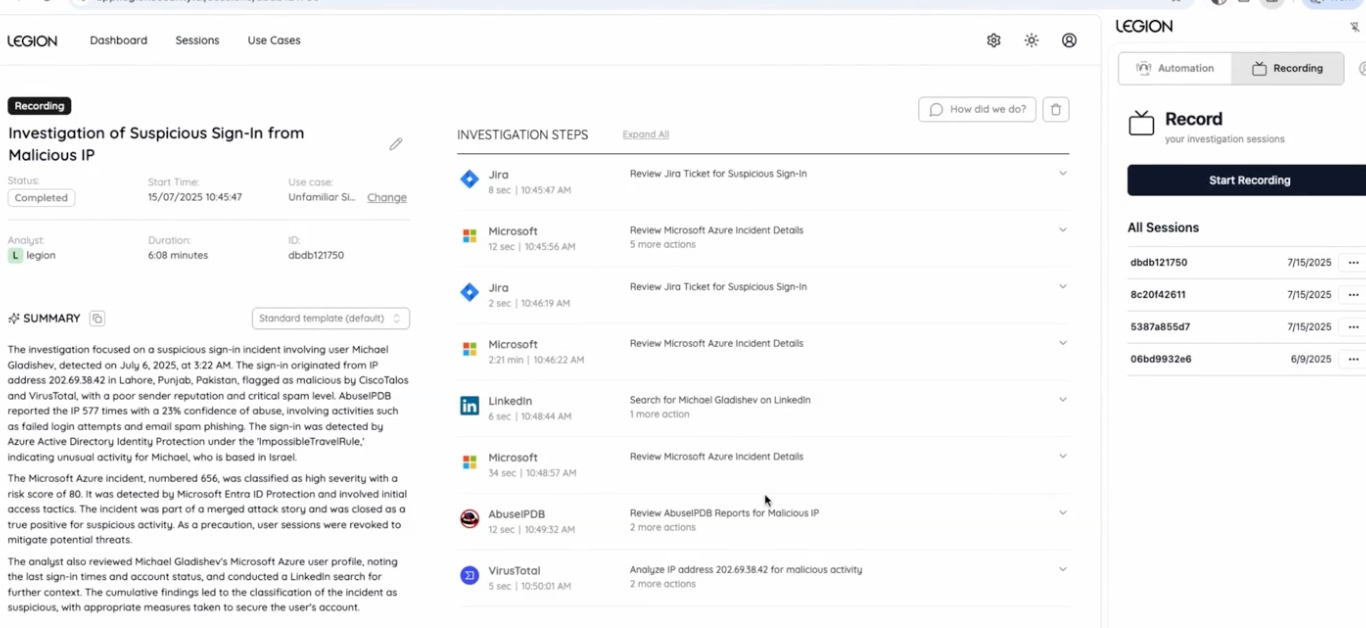
The agent can assemble its findings into a report for the analyst.
Legion AI Investigator supports these goal-driven investigations where analysts define the objective and permissions, then the agent selects tools and investigates iteratively.
3. High-volume alert triage
An AI SOC agent can collect evidence, check organizational context, determine whether an alert requires escalation, and document the outcome. This means agents can execute established workflows across thousands of alerts.
In our Virgin Money case study, the major bank used Legion to learn and automate its existing investigative processes. Legion processed 30,000 backlogged alerts in under two months, reducing the bank's alert backlog by more than 60%.
Another Legion customer, WELL Health Technologies, reported an 81% reduction in investigation and response time for its most common use case. Similarly, the University of Tulsa used Legion to cut average investigation time in half.
4. Data Loss Prevention (DLP) investigations
DLP alerts are often spurious and can be a big driver of SOC alert fatigue. For example, a file upload might trigger an alert, but investigating it requires checking who uploaded the file, where it went, who has access, and whether the activity was authorized.
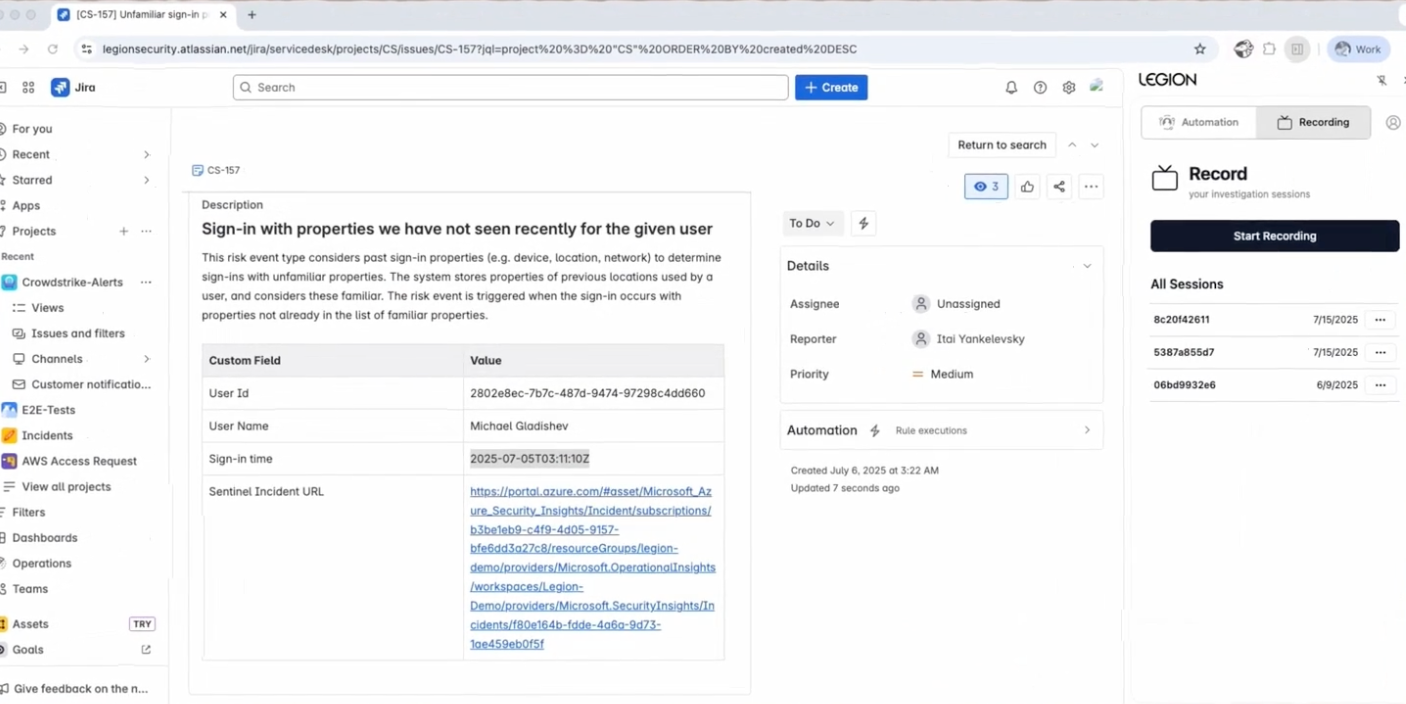
An agent can gather this information across identity, cloud, and DLP tools, compare it with past investigations, and identify cases that require human review.
AI SOC agents can check whether the activity is legitimate by verifying the uploader, destination, and access permissions automatically. Legion customer IQ-EQ has reported faster investigations and reduced manual work using the platform, with particular praise for its accuracy in handling DLP alerts.
Agentic SOC Risks and Mitigations
AI agents can independently interpret evidence, make decisions, and execute actions across security tools. These responsibilities carry risks, whether they’re handled by a human analyst or an AI agent.
Fortunately, agentic SOC risks are predictable, and you can reduce most of them with the right controls.
Below, we explain five core risks we think organizations should know about before green-lighting any agentic AI deployment in the SOC, along with how Legion approaches them.
1. Incorrect decisions and hallucinations
A confident explanation does not necessarily mean an investigation is correct. AI agents can misinterpret evidence, miss genuine threats, or classify legitimate activity as malicious.
Mitigation
Require verifiable evidence for investigative conclusions. At Legion, we believe agents should meet the same documentation standards as human analysts. Our platform captures screenshots of the systems agents interact with, allowing analysts to review the evidence behind each conclusion.
2. Missing or outdated organizational context
An AI agent may reach the wrong conclusion if it lacks information about the organization. For example, it might classify a legitimate financial document upload as data theft, or dismiss a suspicious transfer based on a previously approved workflow that is no longer safe.
Mitigation
Give agents access to organizational knowledge, previous investigations, asset information, and current access permissions. This knowledge must be regularly validated, i.e., you must be able to distinguish between how strongly evidence supports a conclusion and how recently that evidence was verified. Legion tracks these separately, as confidence and freshness, so teams can see when knowledge needs re-verifying before an agent relies on it.
3. Unauthorized or disruptive actions
Agents with broad permissions could mistakenly isolate production systems, disable legitimate accounts, or modify security configurations.
Mitigation
Apply least-privilege permissions, restrict access to approved tools, and require approval for high-impact actions. Legion’s AI Investigator allows organizations to define which tools and actions an agent can use and when it must request human approval.
4. Lack of visibility and accountability
One of the biggest risks in agentic SOCs is that security teams may struggle to understand why an agent made a decision or what actions it performed. Lack of visibility makes errors harder to investigate and can create problems for auditing and compliance.
Mitigation
Maintain an auditable record of investigations, including evidence, tool interactions, decisions, approvals, and response actions. Legion takes a white-box approach. Each automated investigation appears as a workflow analysts can inspect and edit, and corrections apply to future investigations.
5. Unreliable automation at scale
An agent that performs well in a demonstration can struggle with real-world workflows due to missing data, unfamiliar tools, and unusual cases. Automating unreliable decisions at scale can create more work for analysts or allow threats to go undetected.
Mitigation
Benchmark agents against actual SOC workflows before expanding their responsibilities. Measure false positives, false negatives, investigation accuracy, workflow completion, and the frequency of human intervention.
We highly recommend involving analysts in testing and starting with well-understood, repeatable use cases before expanding agentic AI SOC workflows. This also has the positive side effect of improving analysts’ performance and keeping your team sharp and engaged.
Safely Make Your SOC Agentic with Legion
Ready to bring agentic capabilities into your SOC? Get a demo of Legion today.

An agentic SOC uses AI agents to investigate alerts and take action. See how it compares to SOAR, real customer results, and the risks to plan for.

Agentic swarm attacks are changing what security teams are up against. Instead of a single attacker working step by step, a coordinated group of AI agents probes, adapts, and spreads across an environment at once, generating thousands of small signals that each look routine on their own.
For security operations teams, this creates a problem that has nothing to do with skill or effort. The tools and processes most SOC teams rely on were designed for a different kind of threat.
What are Agentic Swarm Attacks?
An agentic swarm attack uses multiple AI agents working in parallel, each handling a different part of an intrusion. One agent might map the environment, another test stolen credentials, another move laterally between systems, and another quietly collect data. The agents share what they learn and adjust their approach as they go.
We’ve seen attacks (that aren’t even really attacks, but accidents) in which AI agents carried out most of the work on their own, at a pace no human team could match, with 10s of thousands of uncorrelated alerts adding up. As frontier AI models become more capable and more widely available, the techniques once limited to well-funded nation-state groups are now being used by mom-and-pop type attackers.
Why Agentic Swarm Attacks are so Hard to Stop
Several characteristics combine to make agentic swarm attacks uniquely difficult for security teams to detect and respond to.
They operate at massive scale. This has been covered ad nauseum. Agents move fast and do a ton of stuff.
Their activity is disconnected. Nothing obviously links a help desk password reset to a file share access to a burst of unusual API calls. Each alert or event lands in a different queue, often with a different analyst.
They leave no reusable indicators. Traditional detection depends on recognizing something seen before: a known file hash, a malicious domain, a familiar sequence of steps. Agents can generate new scripts and tooling on the fly, so indicators rarely repeat and there's often no pattern to write a rule for.
They mutate in real time. When one attempt is blocked, the swarm tries a variation, oftentimes in very short order.
They blend in with normal activity. Agents often use valid credentials and legitimate administrative tools, so their actions look like ordinary IT work. Activity is also spread across enough accounts and systems that no single one crosses an alerting threshold.
They cross team boundaries. An agentic swarm attack doesn't respect the lines between the SOC, identity, data loss prevention, and IT, in fact they are built to fall between the cracks of how the enterprise carves up its teams. The pieces of the attack show up in different teams' tools, which means no single team sees the full picture.
Why SOC Teams Aren't to Blame
When an attack slips through, it's tempting to ask what the analysts missed, but the smarter things to investigate are the conditions they're working in.
There's already too much noise
Long before agentic attacks, SOC teams were overwhelmed with alerts. This is not a new thing that cybersecurity marketers yell about (I’ll plead the fifth on this). Most alerts turn out to be false positives, so analysts learn to move quickly, trust severity scores and their intuition, and save their deepest attention for the alerts that look most dangerous.
The tools were built for yesterday's problems
Most security operations run as a funnel: collect data, write rules that match known attack patterns and indicators, rank alerts by severity, and have people work the top of the queue. SIEM correlation rules, signature-based detection, and SOAR playbooks all assume attacks are loud, patterned, and repeatable. Black hat agents are not like this.
Context is scattered across tools and teams
Deciding whether an alert matters depends on context from identity systems, endpoint tools, HR records, past cases, etc., and usually are spread across a half-dozen consoles. When the pieces of an attack land in different teams' queues, nobody has a chance to connect dots.
What it Takes to Defend Against Agentic Swarm Attacks
If the attack is a swarm, the defense has to work like one. That requires changes to both the technology and the role of the people running it.
Investigate every signal, not just the top of the queue. The evidence of an agentic swarm attack lives in the low-severity alerts and sensor anomalies most SOCs filter out. Defenders need to evaluate every one of them, which is only possible with AI.
Use fast triage agents that touch everything. A first layer of agents has to review every signal as it arrives, close the obvious noise, and recognize when a signal is related to something already under investigation. To run on everything, these agents need to be fast and thorough (but somehow affordable).
Send deeper investigations to specialized agents. When a signal needs a closer look, it should go to an expert (human or agentic) that knows exactly how to manage that kind of problem.
Share context across every team. Agents and people need one shared memory of every user, system, case, and decision, so activity in different departments can be recognized as one attack.
Earn trust instead of assuming it. Disabling an account or isolating a host on a wrong call is its own incident. Agents should be tested against your own past cases and given authority to act only as their record supports it.
The role of analysts changes too. Instead of working alerts one at a time, they shift their roles into ones that see them provisioning agents and teaching them how investigations should run, governing what agents are allowed to do, and orchestrating the response when human judgment is needed.
The Bottom Line
Agentic swarm attacks don't win because security teams fall short. They win because they're built to hide in the gaps between the noise, the tools, and the teams that today's security operations were designed around. Closing those gaps takes a defense that works like a swarm too: agents that know your organization, share what they find across every team, and earn trust one decision at a time, with your analysts in control.
To see how Legion Security helps enterprises defend against agentic swarm attacks, visit legionsecurity.ai.

Agentic swarm attacks use coordinated AI agents to hide in the noise. Learn why they overwhelm today's SOCs and how to defend against them.

TL;DR: An AI SOC is a Security Operations Center (SOC) that uses AI agents to do some (or most, or all) of the security work that human analysts would otherwise do manually, including alert triage, investigation, threat hunting, and response. Legion works across phishing, malware, identity, cloud and network alerts, at the level of autonomy your team sets.
Though the term “AI SOC’ is used loosely in the cybersecurity industry right now, here at Legion we see an AI SOC as a SOC where agents learn the workflows your analysts already run, show them back to you, help improve them, and then execute them at a level of autonomy your team sets.
>>Short on time and want to see what an AI SOC looks like in practice? Watch a 3-minute demo of Legion in action.
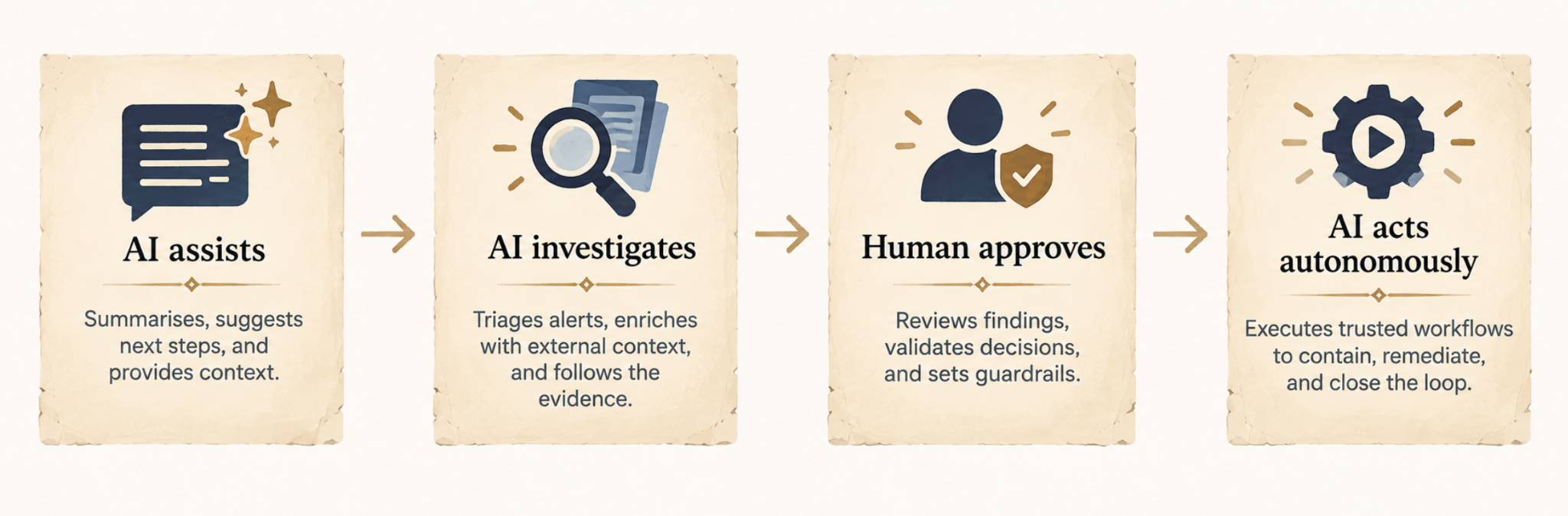
Agents are designed to work across the security tools and data the SOC already has.
For example, if an alert related to identity misuse fires, the agent looks at the account, checks authentication activity, pulls endpoint and network evidence, queries threat intelligence, correlates it, and decides whether the activity looks malicious or not, rather than requiring a human to investigate each alert like this one-by-one, agents are designed to scale, handling many of the noisy, voluminous alert types.
How Does an AI SOC Work?
There isn’t one standard way an AI SOC works, as the AI workflow used will depend on the task, the platform, and how much autonomy the AI has been given.
To help make the idea more concrete, we use Legion, an AI SOC tool, as an example:
1. Something triggers an investigation
An investigation starts when something happens that needs looking into. That might be a phishing, malware, identity, network, or cloud alert, or a custom detection you’ve configured Legion to investigate.
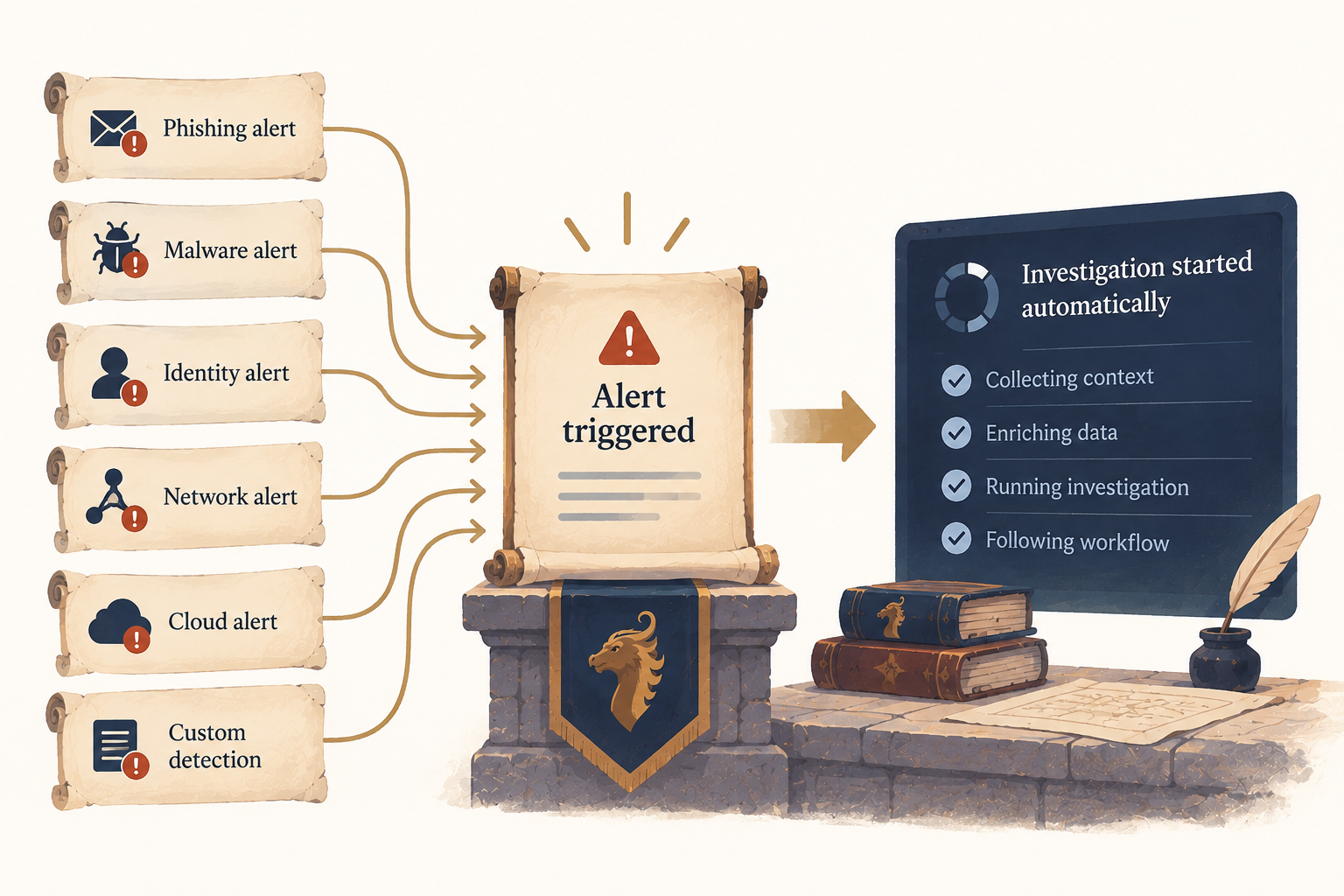
From there, an AI SOC tool like Legion can start the relevant investigation automatically, without waiting for an analyst to assign it.
2. An AI SOC platform like Legion gathers the necessary context
An alert rarely contains everything that’s needed to determine what happened, particularly in the moment it’s being triaged and investigated by a human.
For example, an identity investigation might require authentication data, information about the user and their permissions, and previous access patterns. A cloud investigation might need API activity, resource information, permission changes, and information about the identity responsible.
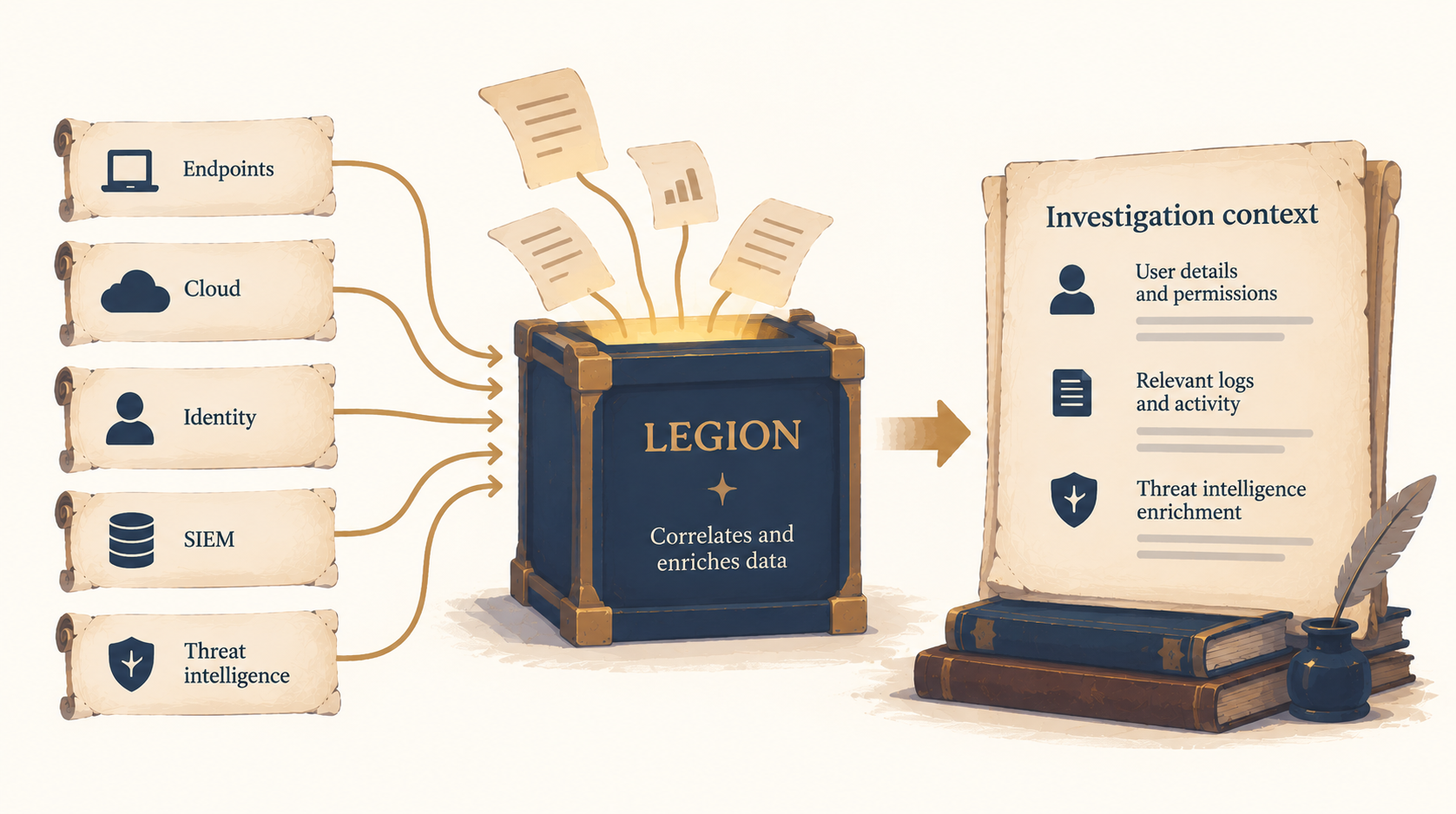
Legion’s alert investigations correlate evidence across security tools and enrich it with threat intelligence, bringing the information required for the investigation into the workflow.
3. Legion investigates what the evidence means
Next, Legion determines what the information means in context.
Take an unusual login. On its own, it doesn’t tell you whether an account has been compromised.
Legion’s identity workflows can investigate anomalous sign-ins, impossible travel, MFA bypass attempts, account takeover indicators, and RBAC drift. They correlate authentication signals with user behavior and assess patterns to determine whether activity is legitimate or represents compromise.
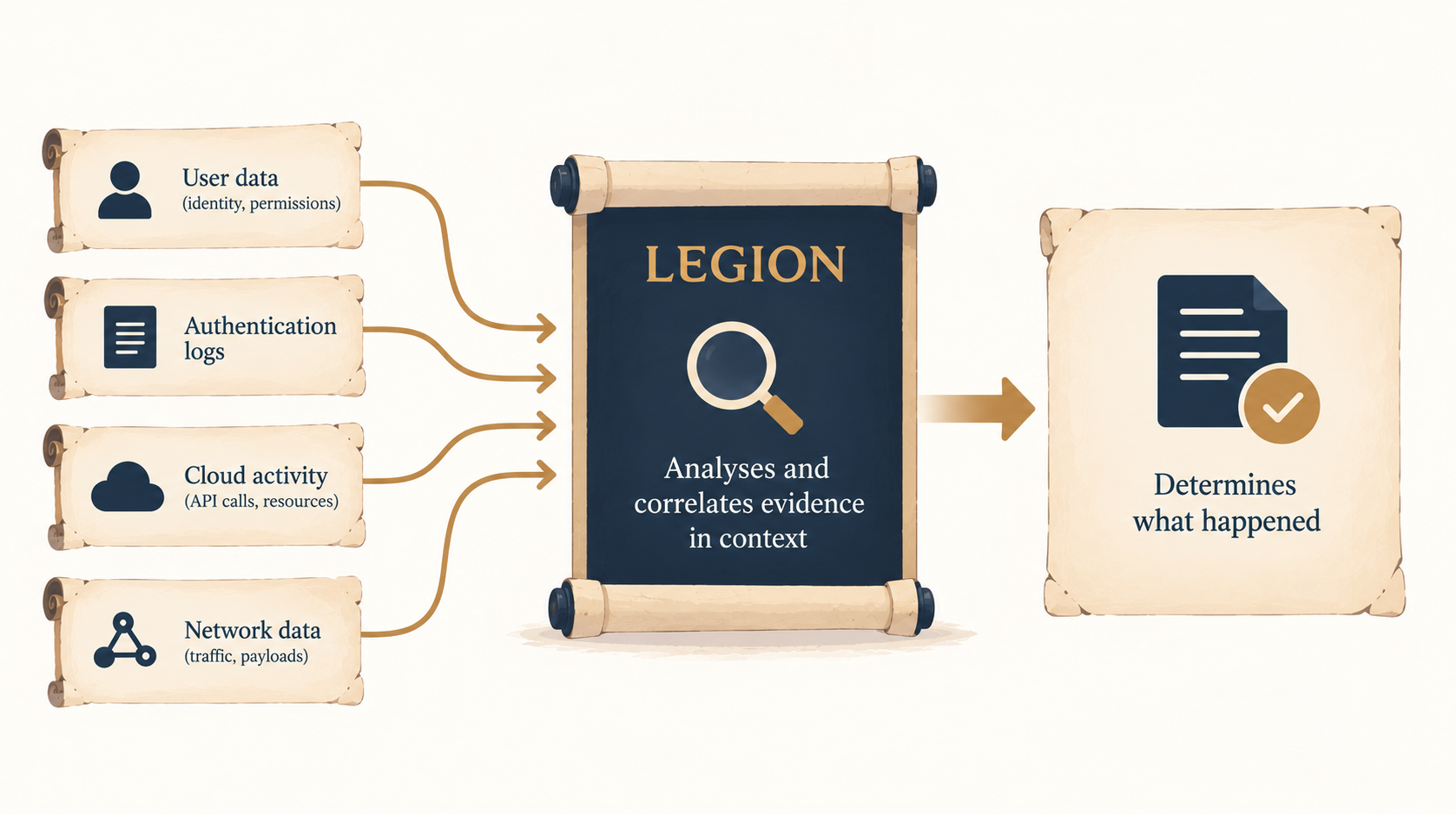
The same principle applies to other workflows. In cloud security investigations, Legion can trace unusual API calls to their source, review the context around resource creation, and assess permission changes for legitimacy.
For network security alerts, Legion can analyze attack patterns and payloads, identify their source, assess whether an attack succeeded, and evaluate its impact.
4. More than just triage, agentic SOC solutions should move into response
Once the investigation establishes what happened, the workflow can continue into containment or remediation where necessary.
Legion’s agentic or deterministic workflows can take an alert or custom detection from evidence correlation and threat intelligence enrichment through validation, containment, and remediation.
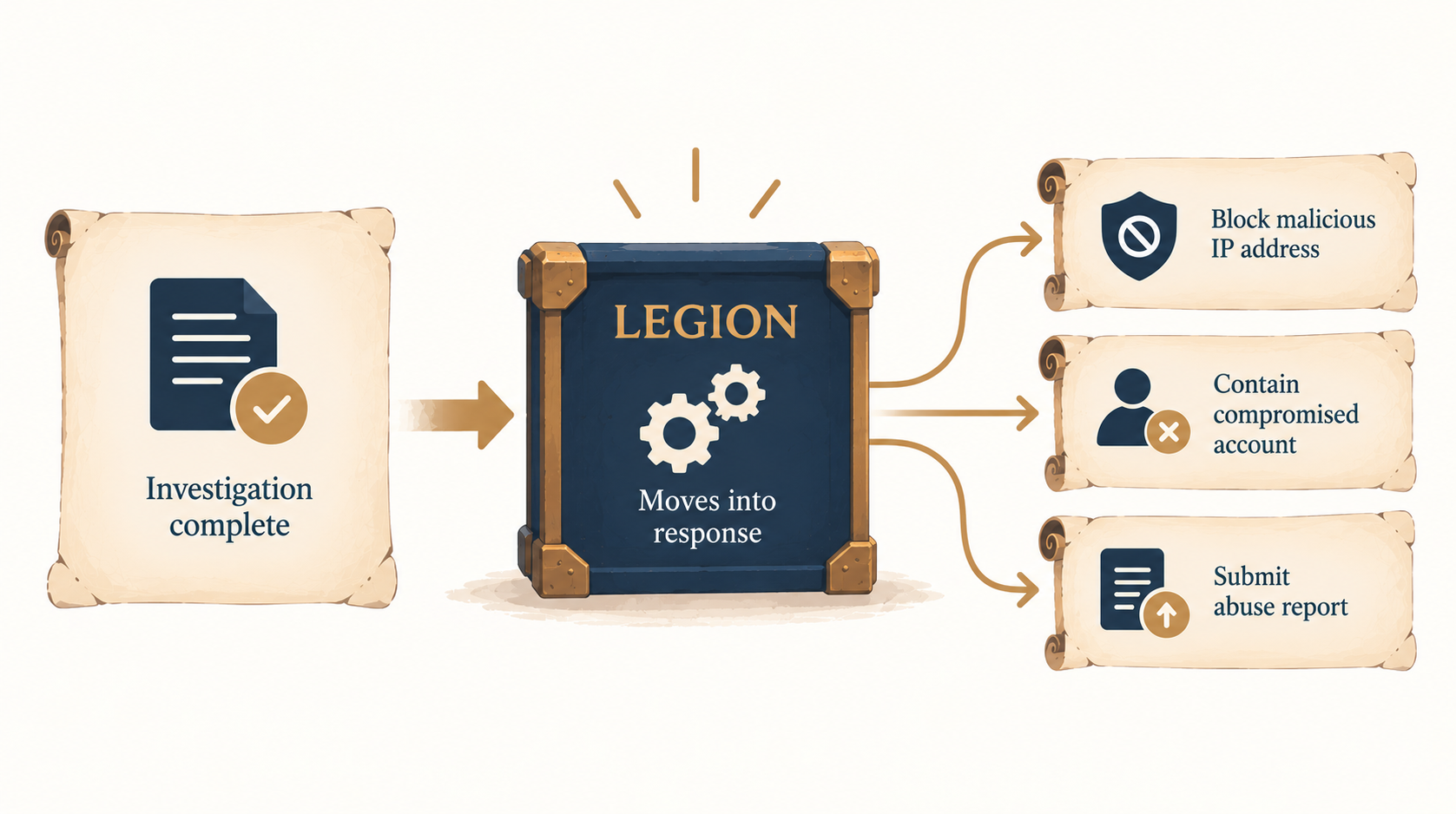
Depending on the incident, response actions might include blocking a malicious IP address or submitting an abuse report.
Alert investigation is a useful example because it’s high-volume, time-critical work, making it a common start for organizations implementing an AI SOC.
However, an AI SOC isn’t limited to investigating alerts only. AI-driven workflows can also support other security operations tasks, including detection rule tuning and threat hunting.
How those workflows operate depends on the work being done, i.e., a threat hunt will follow a different process from an alert investigation, while rule tuning has a different objective again.
AI SOC Use Cases
Alert investigation
Legion triages and investigates alerts across phishing, malware, identity, network, and cloud. It correlates evidence across your tools and enriches each investigation with threat intelligence, so analysts get a complete picture instead of piecing it together by hand. The result is far less manual investigation work for your team.
Custom detection investigation
Most teams have detections built for their own environment, and those alerts rarely come with a ready-made playbook. Legion investigates custom detections and carries each one through the full workflow, from enrichment and validation to containment and remediation. That means faster investigation and response, even for alerts no vendor anticipated.
Threat hunting
Legion runs your team's hunting hypotheses and queries across the environment, looking for threats that existing detections may have missed. Hunts that once competed with the alert queue for analysts' time can now run regularly, leading to broader threat discovery.
Detection tuning and engineering
Legion analyzes alert patterns to spot where detections are generating unnecessary noise, then helps refine detection logic to cut false positives without sacrificing coverage. Over time, your team deals with less alert noise and more of the signals that matter.
AI SOC vs SOAR
AI SOC and SOAR do have some overlap, but the main difference between the two is that with SOAR, humans generally define the investigation logic beforehand.
For example: Alert -> Query EDR -> Check IP reputation -> If malicious, check affected hosts -> If X, do Y -> Escalate to analyst.
The SOAR then executes that predefined playbook. SOAR is particularly good at repeatable processes where the conditions and appropriate actions can be encoded ahead of time.
With an agentic AI SOC, the investigation can be more adaptive.
For example: Alert -> Examine available evidence -> Decide what information is needed next -> Query the appropriate tool -> Interpret the result -> Decide what to investigate next -> Reach a conclusion.
You don’t need to specify every investigative branch beforehand because the agent is able to select its next steps based on what it has learned so far, within whatever tools, permissions, and guardrails you’ve given it.
Why Deploy AI SOC?
The most surprising reason to modernize your SOC with an AI SOC is that it actually makes your human analysts enjoy their jobs more. 75% of analysts say AI tools are already improving their job satisfaction by reducing alert fatigue and automating repetitive triage.
Most analysts still spend their days on the same handful of jobs, such as pulling evidence out of one tool, enriching an alert in another, correlating what they find, documenting findings, and coordinating a response.
Traditional automation helped with some of this workload, but AI makes it possible to automate more of the investigation itself.
Whereas in the past, every alert became another task for an analyst to work through manually, AI can now gather and correlate the necessary context, work through the investigation, and either handle the response or hand the case over to a human with the groundwork done.
97% of companies that use automated security control validation and measure their cyber effectiveness reported a positive impact.
Challenges of an AI SOC
AI can automate SOC work, but organizations still need to decide what it can do independently, what requires human approval, and where to set boundaries.
Workflow quality
Before you automate a workflow, it’s a good idea to make sure it’s actually a good one. If an investigation has unnecessary steps, outdated processes, or poor decision-making, automating it just means that those problems happen faster and at scale.
>> Legion starts by learning how your analysts already investigate and showing those workflows back to your team. That gives you a chance to review and improve the process before Legion starts taking on more of the work itself.
Access to security tools
An AI investigation can only use information it can access. If analysts normally need the SIEM, EDR, identity platform, cloud environment, and threat intelligence systems, AI needs appropriate access to those systems as well.
AI SOC platforms that connect to your existing security tools through APIs work well with supported (traditional) tools, but it usually takes some setup and leaves out anything there isn’t a connector for (like homegrown applications, legacy systems, et al).
>> In contrast, Legion works through the browser instead, using the same interfaces your analysts do. If an analyst can open a tool in a browser, Legion can work in it, with no API integrations to configure and no persistent API keys giving the platform ongoing access to the rest of your security stack.
Permissions, autonomy and trust
Autonomy doesn’t have to mean total permission for AI to do everything, especially not from day one. In fact, only 8% of security professionals would trust AI to make security decisions without human approval.
A more practical approach is to start with human oversight and increase autonomy as you become more confident in how reliably the AI performs a particular workflow.
>> Legion can be given different levels of autonomy depending on the workflow. An organization might allow an investigation to run autonomously, for example, while requiring human approval before a response action is taken.
Auditability
The more independently AI operates, the more important it is that analysts can see what it did and why.
>> Legion keeps a record of its investigations, including the actions it takes, the evidence it examines, and the reasoning behind its decisions. Because Legion works through the browser, it can also capture screenshots of what it sees at each step. Investigations are stored and searchable, giving analysts a record they can review afterward or use for audit and compliance purposes.
How to Introduce AI Into an SOC
An AI SOC can be introduced gradually, with organizations deciding which workflows AI can investigate independently, where humans still need to approve actions, and where greater autonomy makes sense. Here’s how you can go from a mostly human-run SOC to an AI SOC in a phased approach.
1. Find repetitive work
Start with investigations analysts perform frequently and where much of the work follows a repeatable process.
2. Understand the workflow
Identify the tools involved, information required, what/how/why decisions are made, and the ensuing actions that you’re looking for.
3. Automate investigation
Reduce the work analysts spend gathering, enriching, and correlating information.
4. Keep approval where you need it
Allow the AI to perform more of the investigation while keeping humans responsible for actions where the organization isn’t yet comfortable with autonomy.
5. Observe the results
Review how the workflow performs and whether its investigations and actions are reliable.
6. Increase autonomy
For trusted workflows, remove unnecessary approval points and allow the automation to complete more of the process independently.
7. Expand
Once you determine that the approach works for one type of investigation, apply it to other SOC workflows.
From the AI SOC to Wider Security Workflows
The SOC is a natural place to introduce AI because it contains large numbers of repetitive, context-heavy workflows.
However, the repetitive, multi-tool correlation and approval queues found in the SOC also exist throughout security and IT more broadly.
For example:
- DLP alerts require teams to examine the information involved, understand who sent it and why, assess the business context, and determine whether the event should be closed or escalated.
- Vulnerability management requires teams to understand whether findings actually affect important systems and coordinate remediation.
- GRC teams collect evidence from security, IT, and business systems, validate it, and follow up on anything that’s missing or incomplete.
- Identity teams manage joiners, movers, and leavers across numerous systems.
- IT teams process software requests, firewall changes, account recovery, and MFA changes.
On the surface, these processes may look different from SOC processes. However, structurally, many actually follow the exact same pattern:
Something happens -> Gather information -> Add context -> Investigate or evaluate -> Decide -> Act -> Record what happened.
Once an organization automates that inside the SOC, it can apply the same approach elsewhere.
Legion and the AI SOC
Legion is designed to automate the repetitive, context-heavy workflows that take up a significant amount of security teams’ time. Within the SOC, that includes alert investigation, custom detections, rule tuning, threat hunting, cloud investigations, identity investigations, and network security alerts.
Legion can automate multiple stages of an investigation, from gathering and analyzing evidence to enriching findings with threat intelligence and taking containment actions.
You remain in control of how much autonomy Legion has. Customers can grant greater autonomy gradually as they build confidence in particular workflows.
With Legion, organizations don’t have to choose between manual and fully autonomous security operations. They can decide where AI assists, where it investigates, where humans approve, and where Legion is trusted to act autonomously.
And once that model is proven inside the SOC, it can also be applied to workflows across threat intelligence, cloud security, vulnerability management, AI governance, fraud, GRC, identity, and IT operations.

At Legion we see an AI SOC as a SOC where agents learn the workflows your analysts already run, show them back to you, help improve them, and then execute them at a level of autonomy your team sets.