
From Headline to Boardroom: Closing the Threat Intelligence Gap
Using the recent PHP vulnerabilities as an example, see why threat intel is so hard to act on and how agents and analysts can close the gap together.

Every security team is told to know its adversaries, but for the analysts on the front lines, threat intelligence rarely arrives as known information. Turning feeds, vendor advisories, headlines, or a frantic message from an exec into a confident answer about real risk to the enterprise is (one of many of) the hard parts, and it's where a lot of the work (and frustration) lives for security professionals.
In this piece, I’ll aim to look at why that gap persists, what it looks like during a real incident, and how we think agents and analysts can close it together.
Why threat intelligence is so hard to act on
Threat intelligence comes in layers, and each one decays at a different speed. Indicators of compromise like hashes, IPs, and domains can be among the easiest to consume, but attackers rotate them constantly. Tactics and techniques last longer, but they're harder to engineer into a detection rule because they describe behavior rather than a specific artifact you can search for. Emerging campaigns (PHP, anyone?) sit on top of both, mixing new infrastructure with familiar techniques in ways that rarely match what the detection stack was built to catch.
The real challenge is relevance and translation to the different stakeholders across an enterprise. While a feed can tell you that a group is exploiting a specific vulnerability, it can't tell you whether you run the affected software, whether it's exposed, whether anyone has already touched it, or what it connects to. Analysts fill that gap by hand, pivoting across the SIEM, EDR, asset inventory, vulnerability scanner, and cloud console, and that work competes with an alert queue that never stops. And now, as attackers use AI to operate at greater scale and speed, that backlog grows faster than any team can possibly manage by hand.
What the recent PHP incident looked like from the inside
The recent PHP vulnerabilities CVE-2026-109618 and CVE-2026-109619 shows how this plays out. The advisory came out, proof-of-concept code followed quickly, and within hours security teams everywhere were asking and being asked… How exposed are we?
Answering this type of question is rarely one query. Security pros first had to find every system running PHP, including the affected versions and configurations, which usually means reconciling an outdated asset inventory with scanner results that are only as fresh as the last scan. Then they have to work out which systems are internet-facing, which typically sit behind a WAF, and are owned by teams that security likely doesn't talk to every day. Homegrown applications and legacy servers are the hardest, because they often live outside the tools that would report them.
From there, the work splits into parallel tracks. Threat hunters search logs and endpoint telemetry for signs of exploitation using whatever indicators have been published. Detection engineers write and tune new rules. Vulnerability management chases patch owners and tracks exceptions. Each track lives in a different tool with a different owner and cadence, and the whole process has to keep firing as new indicators and exploit variants appear over the following days. Most teams hold it together with tickets, spreadsheets, and a lot of Slack messages, if at all. And it’s not even their fault! Especially in a crisis, if something is confidently labeled as an endpoint issue but it really is an identity problem, it’s very easy to get skipped over, marked as benign, or not correlated / communicated to other departments. It’s just full-steam ahead.
Then comes the question from the top
While all of that is happening, the security analyst needs an answer for the CISO, who needs an answer for the CEO, who in turn needs one for the board. Leadership doesn't have much use for a list of hosts, they want to know whether the business is at risk, what was exposed, whether anything was compromised, and when the problem will be closed.
Assembling that answer means stitching together findings from every parallel track, each with its own definitions and level of confidence. The analyst summarizes for the security manager, who summarizes for the CISO, who translates it again into business terms for the executive team. Every hop loses detail and adds delay, and by the time the summary reaches the board, the facts underneath it have often changed. Security leaders end up reporting effort, like patches applied and rules written, because measuring actual risk reduction quickly is so hard.
How agents and analysts could (should?) share the work
At Legion, we believe the answer isn't yet another feed or another dashboard, but rather it’s a coordinated set of agents (some may call this a legion) that handles the repetitive, cross-tool work of threat intelligence alongside the analysts who own the judgment calls.
In practice, that means agents that operate the tools your team already uses, through APIs and MCP, and through the browser for homegrown and legacy systems that have neither. When a new threat lands, agents can find affected assets, check exposure, hunt for indicators and techniques across telemetry, and enrich every related alert with that context, so scattered signals become a single case. Because agents investigate every signal rather than just the top of the queue, they catch attacker activity that's spread thin across many low-priority alerts. This is one of the many use cases that our customers are using DragonClaw for in production today.
Those agents should also learn how your team really works. In a crisis, analysts rarely have time to open the runbook or follow every step to a T. They act on a hunch from a similar case last year, skip the query they know will come back empty, or already know which detail the CISO will ask about first and pull it before anyone asks. That instinct is some of the most valuable knowledge in a security enterprise. When agents learn from recorded investigations and the decisions analysts actually make under pressure, they capture those shortcuts too, so the next incident moves at the speed of your best analyst's instincts where those are the right path, and creates new, optimal paths for others.
From headline to boardroom
I don’t believe it’s ambulance chasing, but rather a known fact to suggest that the next incident like this one is already coming. From what we see, the teams that handle it well will be the ones who can move from headline to exposure to action to a clear executive answer in hours instead of days. That's the shift we're building, agents that carry the cross-tool work at machine speed, and analysts who spend their time on the decisions that actually reduce risk.
Why DLP alerts are everywhere
You already know that DLP is one of the noisiest sources of alerts. DLP alerts fire whenever a user performs an activity that matches the criteria of a rule in a DLP policy, and the organization has incident reporting configured to turn those matches into alerts. Every email, file share, upload, print job and USB copy is a chance for a rule to match, so in an organization of any real scale, the alerts Never. Stop. Coming.
Each of those alerts asks the analyst the same underlying questions: Did sensitive data actually leave the organization, or was it about to go somewhere it shouldn't? If it did, was that an honest mistake, a legitimate business action, or something malicious?
Answering those questions accurately requires a genuine investigation, but when dealing with a noisy alert cannon, not every alert is able to be properly investigated, resulting in a ton of false-positives, analyst burnout, and potentially even false-negatives.
What a DLP investigation actually looks like
The details vary from one DLP platform to another and from one organization to another, but the shape of the investigation is mostly consistent.
- Find the alert
- Read what triggered it
- Look at the destination and the action
- Review the content itself
- Add user context
- Decide and act
- Tune the policy
Whether any of these steps actually presents a risk depends on information most DLP tools in isolation don’t have, because it’s scattered across the enterprise. Identity data sits in your IdP, device posture sits in your EDR, employment status and upcoming departures sit in your HR system, and the history of what this person normally does is spread across months of logs and cases in several different places. Some of it may not even be available at the moment the alert is being reviewed, so the analyst is left with two imperfect choices.
- They can investigate the alert fully, pivoting between various consoles to assemble the full picture → which stalls the investigation while the queue keeps growing
- Perhaps more frequently, they make the call based on whatever the DLP alert shows them → likely the alert gets closed as a false positive or benign business activity because nothing in front of them suggests otherwise
Most organizations have already invested heavily in DLP. Their teams have spent years writing policies, defining sensitive information types, mapping where regulated data lives and deciding which activities should trigger an alert. What’s missing is everything that happens after the alert fires.
Every organization investigates DLP alerts a little differently, shaped by its own processes, tools and people. Some teams have a well-honed approach built up over years, while others are still working out what a good investigation should look like, and most are somewhere in between. Legion meets you wherever you are. It learns how your team already looks into DLP alerts and signals, then helps fill the gaps and refine the process as it sees what works, and carries it out consistently on every alert at machine speed from alert through response and remediation.
How Legion learns and codifies the way you investigate
When an alert fires, Legion reads the policy and rule that matched, looks at the destination and the action, checks the content, and then goes out to gather the context that the DLP tool can't provide on its own.
To investigate DLP properly, security analysts (or their agentic counterparts) need cross-system context. It also needs the context of your business itself, meaning your trusted partner domains, your sanctioned storage locations, the teams that routinely handle regulated data, and the people who need to hear about a confirmed incident. None of that lives inside the DLP tool, which is precisely why a DLP-only approach struggles and why Legion is designed to connect to the systems where that context actually lives, whether they have clean APIs or not.
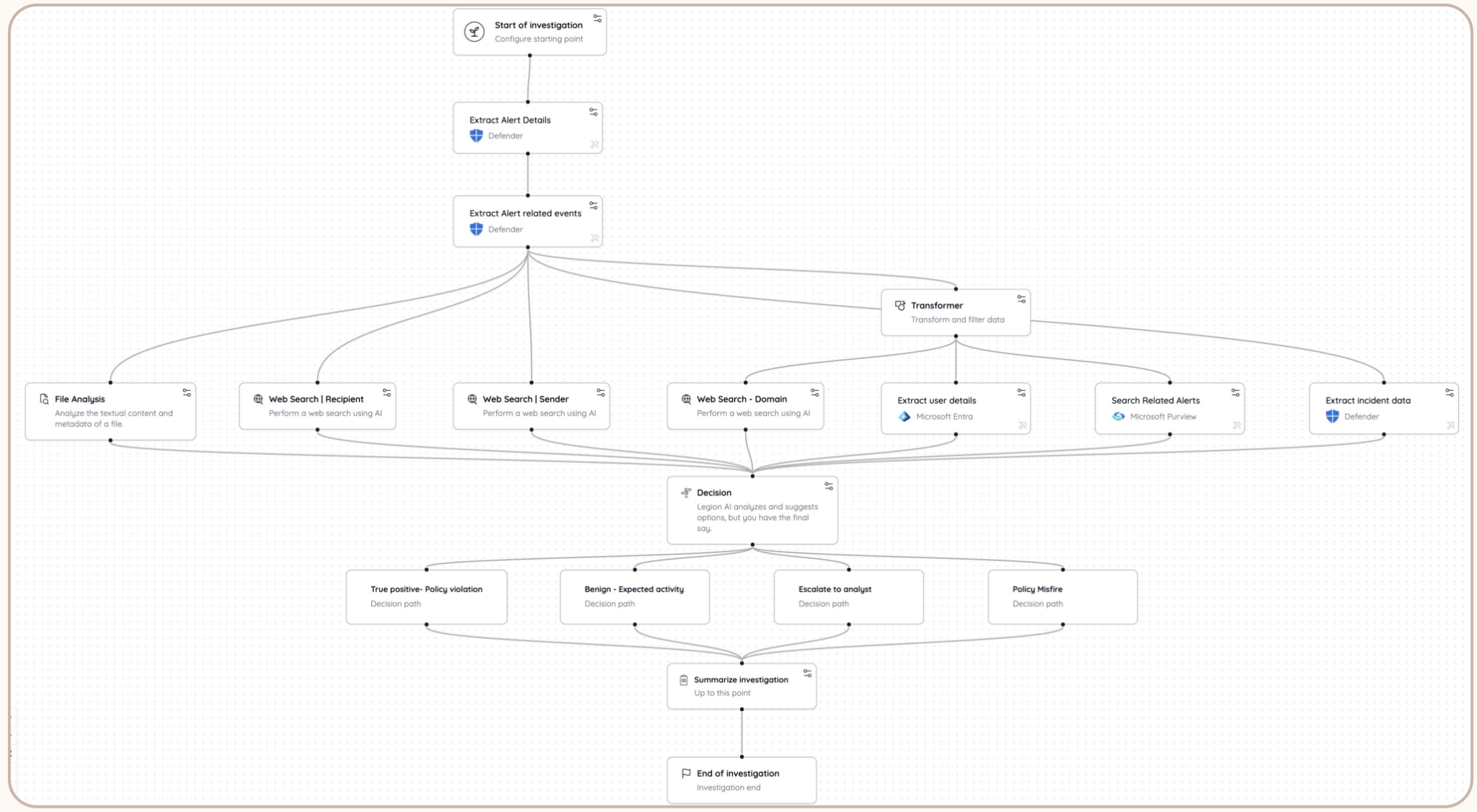
This is also what changes the value of the DLP tool itself. On its own, a DLP platform is very good at seeing things like where and when sensitive data is moving, and telling you which rule it matched, but it has no way to judge whether that matters. When Legion operates the DLP tool, opening the alert, reviewing the matched content, and taking actions inside the console such as revoking a sharing link or applying a label, that DLP tool (or tools) effectively gains an advanced-level brain. Every detection now arrives with the identity, endpoint, HR and business context needed to make a decision, and every decision can be acted on right where the data lives. The policies your team has spent years building finally get the judgment they were always missing, so the DLP investment starts producing answers instead of just alerts. For situations where a rule keeps generating the same false positive, that pattern is visible, so tuning the policy becomes a decision rather than a guess.
Because Legion learns, understands, and optimizes your team's logic rather than implementing a generic playbook, its conclusions look like the ones your *perfect* analyst would reach.
Your expertise, at the scale of your alert queue
DLP alerts aren't going to slow down, and we shouldn't expect them to. In fact, we should all expect them to pick up. The real problem has always been that a thorough investigation depends on context spread across a half-dozen tools and on judgment that lives with a few experienced people on your team.
Legion doesn't ask you (or need you) to replace that judgment with someone else's. It learns how your organization investigates DLP, connects to the identity, endpoint, HR and business context that the DLP tool can't see, and applies the optimal approach to every alert in the queue. Your analysts get their time back for the cases that genuinely need a human, and every DLP alert gets the investigation the perfect analyst would give it.

Your DLP policies catch sensitive data on the move, but Legion brings the context and judgment to investigate every alert and deliver answers.

Legion’s agentic security platform is built on a simple idea: your team knows how to investigate, but it is knowledge that is one of the most valuable and unique things your SOC has. Legion captures how your analysts work, all the way from an alert, to the steps they take to the evidence they gather and the reasoning behind each verdict, and turns it into agentic investigations that run the same way every time.
But that context should not stay locked inside a single console for knowing analysts. Security teams increasingly do their thinking in AI assistants like Claude and ChatGPT, whether they're drafting an incident summary, preparing for a leadership update or trying to remember whether they've seen an indicator before. That's why we offer our customers the Legion MCP server, which connects those assistants directly to your Legion data through the Model Context Protocol. With this, security teams can ask questions about their investigations in plain language, from the tools they already use every day, and get answers grounded in what Legion actually did.
What your team can ask
Once Legion is connected, an analyst or security leader can pull up the full story of an investigation without leaving their conversation. They can find sessions by title, summary or entity, filter them by status, decision, workflow, analyst or date, and walk through each step along with the verdict it reached. They can also see which workflows and use cases are running, check how much of their monthly action allowance has gone to guided versus autonomous runs, and get answers about Legion itself from our documentation, with links back to the source pages.
In practice, that means questions like these:
- "Summarize our Legion sessions from the last 24 hours: what failed, what's still active, and which were decided true positive."
- "Open our most recent phishing investigation and walk me through each step, the entities it found, and why it reached its verdict."
- "Have we investigated 203.0.113.42 before? List every session that mentions it, with dates and outcomes."
- "Which workflows ran most last month, and what use case does each belong to?"
- "How close are we to our action limit this month? Split it by guided and autonomous runs."
- "How do I set up a Jira poller so new tickets trigger a workflow? Cite the docs."
Because the answers come from your own investigations, the assistant isn't guessing at how your SOC handles an alert. It's reporting what your team's process actually found, which makes it far more useful for shift handoffs, executive briefings and the everyday question of "have we seen this before?"
Built with security teams in mind
We know that connecting security data to an AI assistant raises fair questions, which is why our MCP server starts by being conservative, gaining your trust as it goes. It's read-only, which means it can't create, change or delete anything in Legion, and it can't run workflows, skills or agents. Each person connects from their own assistant and signs in with their own Legion account, so every request runs as that user and is checked against their Legion role. Nobody sees more through Claude or ChatGPT than they could already see in Legion.
Admins stay in as much control as they want, throughout deployments. MCP access is turned off until an admin enables it for the organization, and it can be switched off again at any time. Individual users can disconnect Legion from their assistant whenever they like, and admins can revoke a specific user's sessions, which ends that person's MCP access within about a minute.
Getting started
Setup takes just a few minutes. Legion has always been about capturing the way your team investigates so that expertise can scale. With MCP, that expertise travels with your team, into the assistants where more and more of their work already happens. If you’d like help in configuring this or to learn more, please reach out to [email protected].

Connect Claude and ChatGPT to Legion via MCP and ask about your investigations in plain language, with read-only access scoped to each user’s role

TL;DR: In an agentic SOC, AI agents investigate alerts, decide what to check next, and can take action. Unlike SOAR playbooks or AI assistants, agents run the investigation themselves. They’re already handling phishing, triage and DLP alerts for teams like Virgin Money. The risks are real, but most come down to how much you let the agent do without checking, and that’s something you can control.
If you work in or manage a SOC, the appeal of AI agents helping your team is clear. They’re already being put to work too with 58% of cybersecurity leaders reporting that AI agents are taking actions within organizational workflows.
Broader SOC automation challenges haven’t disappeared, though and 52.6% of organizations cite skills gaps and a lack of expertise as barriers to SOC automation.
Below, we help you clear away some of those barriers and explain what an agentic SOC is and how agents work in the modern SOC, as well as limitations of their use.
What An “Agentic SOC” Is
Before we define what an agentic SOC is, there are three points that we think are worth clarifying:
- “Agentic” isn't a universally precise technical category.
- Not every product marketed as an “AI agent” has the same degree of autonomy.
- Agentic behavior exists on a spectrum.
However, it's reasonable to fundamentally say that an agentic SOC is a security operations environment in which AI agents can autonomously perform security tasks.
The tasks done by an agentic SOC (which in practice involves the deployment of an agentic layer like Legion) can include investigating alerts, gathering context, forming hypotheses, querying security systems, coordinating workflows, and executing approved response actions within defined human and technical controls.
We share practical examples of an agentic SOC in action further on in this article.
An agentic SOC solution or workflow involves an agent connected or logged into SOC tools and workflows gathering security data, autonomously investigating threats, reasoning through evidence, and taking action, all the while using organizational context and feedback to guide its decisions.
“Automation” vs “AI-assisted SOC” vs “agentic AI” tools
The three approaches below are often confused, but they differ in how independently they can work within the SOC.
Automation tools like SOAR follow predefined rules and workflows, whether that’s enriching an alert, opening a ticket or blocking an IP. If a case doesn’t fit the playbook, it can’t work out what to do.
AI-assisted SOC are mostly legacy security products with AI bolted on. You get alert summaries or a chat assistant inside one tool. The AI does some of the analysis, but you still run the investigation.
Agentic AI SOC is when AI agents independently plan and execute multi-step investigations, gathering evidence, developing and testing hypotheses, selecting tools, and adapting their approach as new information emerges. They work across multiple security tools, coordinating how those tools are used throughout an investigation.
Levels of AI SOC Agent Autonomy
The last of the approaches above (agentic AI SOC) effectively describes a human-like worker in your SOC. However, AI in the SOC operates at different levels of autonomy, from assisting analysts to independently managing security workflows.
We’ve adapted the levels below from Google Cloud’s Well-Architected Framework, which sets out four levels of security autonomy. Though Google wrote them with cloud security in mind, we think they work well for showing how a SOC moves from manual work to mostly running on its own.
Level 1: Manual (No AI autonomy)
People run every investigation. There may be a few scripts or SOAR playbooks for repetitive jobs, but a human analyst decides what happens next.
Level 2: Assisted (Low autonomy)
AI summarizes alerts and suggests what to look at. It might write queries for you too, but you’re still the one running the investigation.
Level 3: Semi-autonomous (Medium autonomy)
Here the agent does most of the investigating itself. If it gets stuck, isn’t sure, or wants to take a risky action, it asks an analyst.
Level 4: Autonomous (High autonomy)
Agents work through whole cases on their own, from investigation through response. Your team sets the rules and permissions up front and only gets involved in the big decisions.
Agentic SOC Example Use Cases
To show you what agentic AI SOC can look like in practice in 2026, here are four examples, with anonymized customer results where available.
1. Phishing investigation
When a suspicious email is reported, an AI SOC agent can examine the sender, inspect URLs and attachments, check reputation data, identify other recipients, and search for evidence that users interacted with the message.
The agent can then assess whether the email is malicious, document its findings, and recommend or execute approved containment actions.
Legion learns this workflow from how your analysts already investigate phishing, and once your team trusts it, Legion can run the workflow without an analyst directing each step.
A customer of ours uses this approach to handle phishing investigations overnight, reducing the volume of cases waiting for analysts.
2. Threat hunting and complex investigations
An analyst can give an AI SOC agent an objective, such as investigating whether a compromised account is part of a wider attack. The agent can then formulate queries, examine results, investigate related identities and endpoints, and change direction as new evidence emerges.
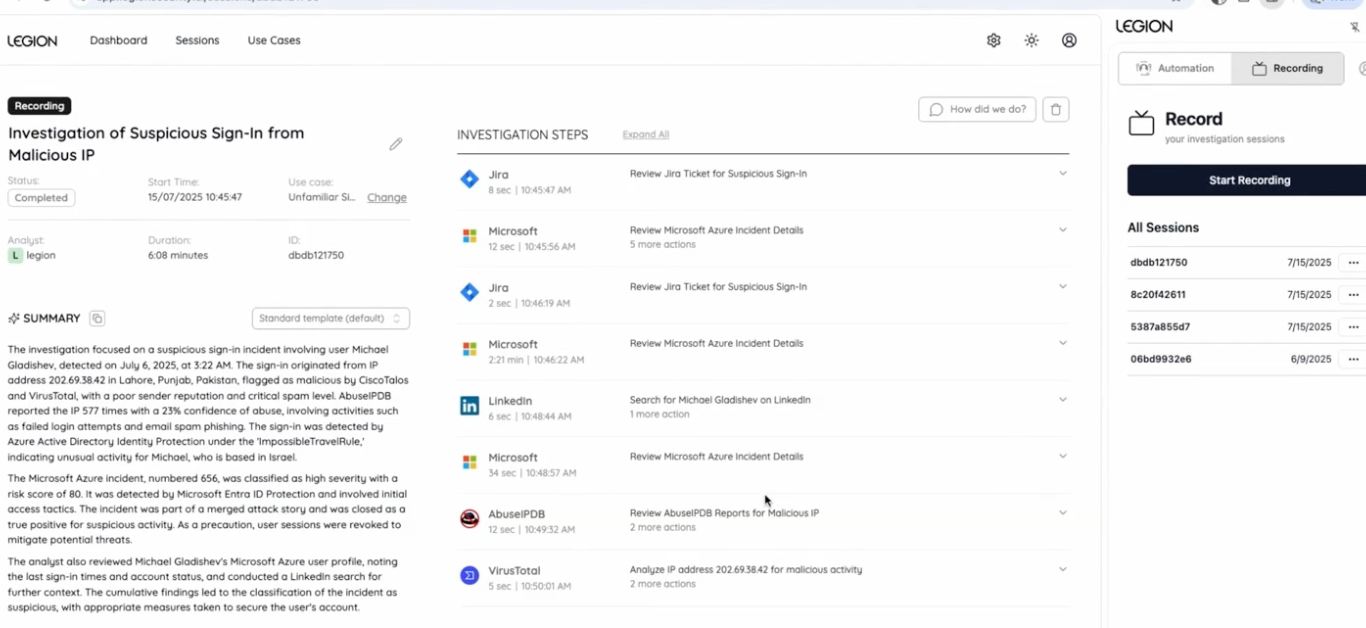
The agent can assemble its findings into a report for the analyst.
Legion AI Investigator supports these goal-driven investigations where analysts define the objective and permissions, then the agent selects tools and investigates iteratively.
3. High-volume alert triage
An AI SOC agent can collect evidence, check organizational context, determine whether an alert requires escalation, and document the outcome. This means agents can execute established workflows across thousands of alerts.
In our Virgin Money case study, the major bank used Legion to learn and automate its existing investigative processes. Legion processed 30,000 backlogged alerts in under two months, reducing the bank's alert backlog by more than 60%.
Another Legion customer, WELL Health Technologies, reported an 81% reduction in investigation and response time for its most common use case. Similarly, the University of Tulsa used Legion to cut average investigation time in half.
4. Data Loss Prevention (DLP) investigations
DLP alerts are often spurious and can be a big driver of SOC alert fatigue. For example, a file upload might trigger an alert, but investigating it requires checking who uploaded the file, where it went, who has access, and whether the activity was authorized.
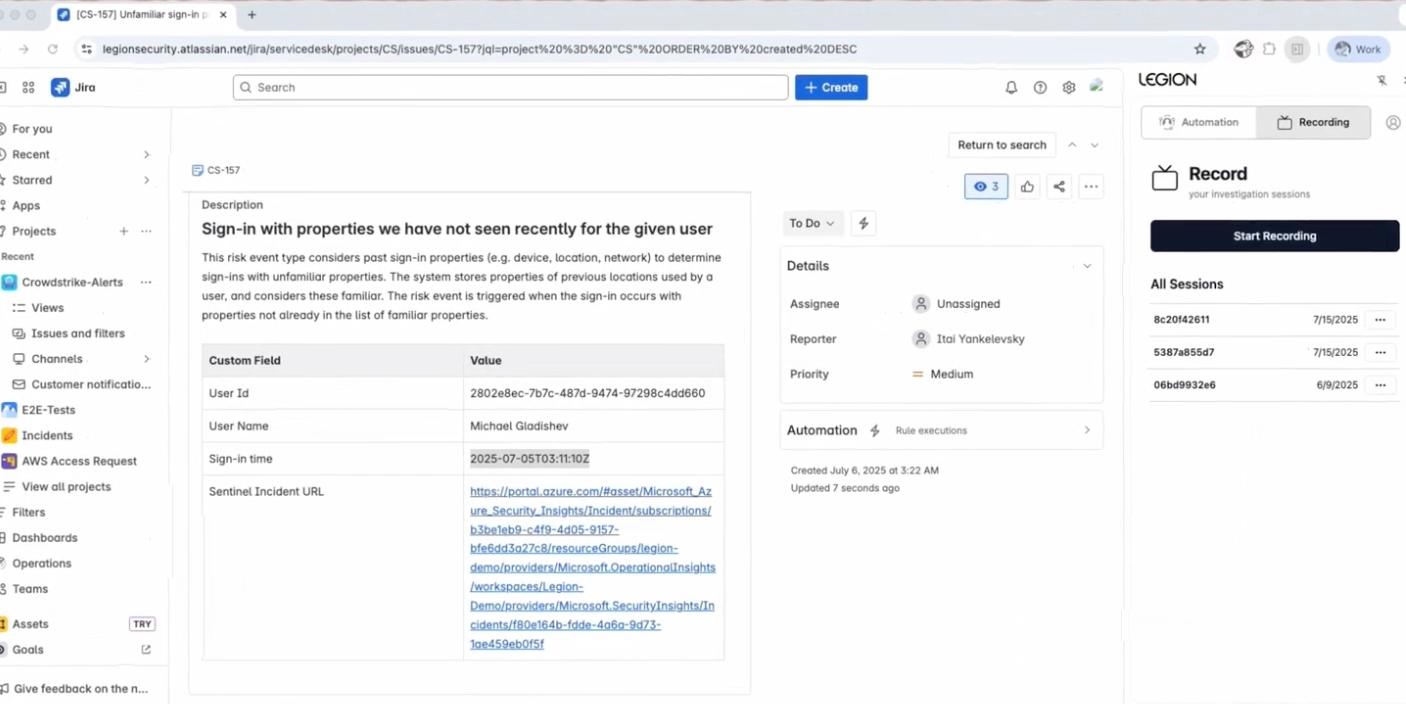
An agent can gather this information across identity, cloud, and DLP tools, compare it with past investigations, and identify cases that require human review.
AI SOC agents can check whether the activity is legitimate by verifying the uploader, destination, and access permissions automatically. Legion customer IQ-EQ has reported faster investigations and reduced manual work using the platform, with particular praise for its accuracy in handling DLP alerts.
Agentic SOC Risks and Mitigations
AI agents can independently interpret evidence, make decisions, and execute actions across security tools. These responsibilities carry risks, whether they’re handled by a human analyst or an AI agent.
Fortunately, agentic SOC risks are predictable, and you can reduce most of them with the right controls.
Below, we explain five core risks we think organizations should know about before green-lighting any agentic AI deployment in the SOC, along with how Legion approaches them.
1. Incorrect decisions and hallucinations
A confident explanation does not necessarily mean an investigation is correct. AI agents can misinterpret evidence, miss genuine threats, or classify legitimate activity as malicious.
Mitigation
Require verifiable evidence for investigative conclusions. At Legion, we believe agents should meet the same documentation standards as human analysts. Our platform captures screenshots of the systems agents interact with, allowing analysts to review the evidence behind each conclusion.
2. Missing or outdated organizational context
An AI agent may reach the wrong conclusion if it lacks information about the organization. For example, it might classify a legitimate financial document upload as data theft, or dismiss a suspicious transfer based on a previously approved workflow that is no longer safe.
Mitigation
Give agents access to organizational knowledge, previous investigations, asset information, and current access permissions. This knowledge must be regularly validated, i.e., you must be able to distinguish between how strongly evidence supports a conclusion and how recently that evidence was verified. Legion tracks these separately, as confidence and freshness, so teams can see when knowledge needs re-verifying before an agent relies on it.
3. Unauthorized or disruptive actions
Agents with broad permissions could mistakenly isolate production systems, disable legitimate accounts, or modify security configurations.
Mitigation
Apply least-privilege permissions, restrict access to approved tools, and require approval for high-impact actions. Legion’s AI Investigator allows organizations to define which tools and actions an agent can use and when it must request human approval.
4. Lack of visibility and accountability
One of the biggest risks in agentic SOCs is that security teams may struggle to understand why an agent made a decision or what actions it performed. Lack of visibility makes errors harder to investigate and can create problems for auditing and compliance.
Mitigation
Maintain an auditable record of investigations, including evidence, tool interactions, decisions, approvals, and response actions. Legion takes a white-box approach. Each automated investigation appears as a workflow analysts can inspect and edit, and corrections apply to future investigations.
5. Unreliable automation at scale
An agent that performs well in a demonstration can struggle with real-world workflows due to missing data, unfamiliar tools, and unusual cases. Automating unreliable decisions at scale can create more work for analysts or allow threats to go undetected.
Mitigation
Benchmark agents against actual SOC workflows before expanding their responsibilities. Measure false positives, false negatives, investigation accuracy, workflow completion, and the frequency of human intervention.
We highly recommend involving analysts in testing and starting with well-understood, repeatable use cases before expanding agentic AI SOC workflows. This also has the positive side effect of improving analysts’ performance and keeping your team sharp and engaged.
Safely Make Your SOC Agentic with Legion
Ready to bring agentic capabilities into your SOC? Get a demo of Legion today.

An agentic SOC uses AI agents to investigate alerts and take action. See how it compares to SOAR, real customer results, and the risks to plan for.